
Shopify speed optimisation means cutting the work your storefront makes a shopper’s browser do, without breaking the product or the buying journey. I measure your real templates, images, apps and interactions, change the biggest causes first, and retest each change in production.
Discuss your projectSee selected work
This service suits stores that have grown through new apps, media and theme edits and now feel slow. I am an independent designer-developer based in Manchester, working across the UK, and you work with me directly. I do not promise a score or a ranking. I promise evidence: what was slow, what I changed, and what I measured afterwards.
What “speed” means for a Shopify store
Google’s Core Web Vitals give three measures of real-user experience. A page is judged “good” when it meets all three at the 75th percentile of visits.
- Largest Contentful Paint (LCP). How long the biggest visible element takes to appear. Good is 2.5 seconds or less. On a product page this is usually the main image.
- Interaction to Next Paint (INP). How quickly the page responds when someone taps, clicks or types. Good is 200 milliseconds or less. It replaced First Input Delay in 2024.
- Cumulative Layout Shift (CLS). How much the layout jumps while loading. Good is 0.1 or less.
My Core Web Vitals guide goes deeper on each one. For a shop, the practical point is simple: LCP is about the first image, INP is about options, filters and the cart, and CLS is about things that move.
Field data and lab data
These are two different kinds of evidence, and mixing them up causes most arguments about speed.
- Field data comes from real visitors over a period. Google’s Chrome UX Report (CrUX) is the public source, and PageSpeed Insights shows it at the top of its report when your store has enough traffic. It is what Google uses for the Core Web Vitals assessment.
- Lab data is a single simulated load, such as a Lighthouse run. It is repeatable and good for diagnosis, but it is one device, one connection and one moment.
Field data lags. After I deploy a fix, it takes a while to show in the reports, because the window covers recent visits. I explain the difference in more detail in Lighthouse vs Core Web Vitals.
Shopify also reports a speed score in the admin, and shows performance data in its analytics. Treat these as useful signals, not the full picture. Shopify’s own performance testing guidance explains how to test, and the score will not match your own tests exactly. Small stores may have no field data at all, so I rely on repeated lab runs and say so.
Build a repeatable sample
I never test one page. I choose a homepage, an important collection and a representative product page. The product should use the options or media customers actually use. For each test I record the theme version, the active apps, the device, the connection and the consent state.
Then I run the same conditions before and after each change. I repeat lab runs and keep the range, not just one number. A single good run proves nothing.
What I check and fix on Shopify
The LCP image
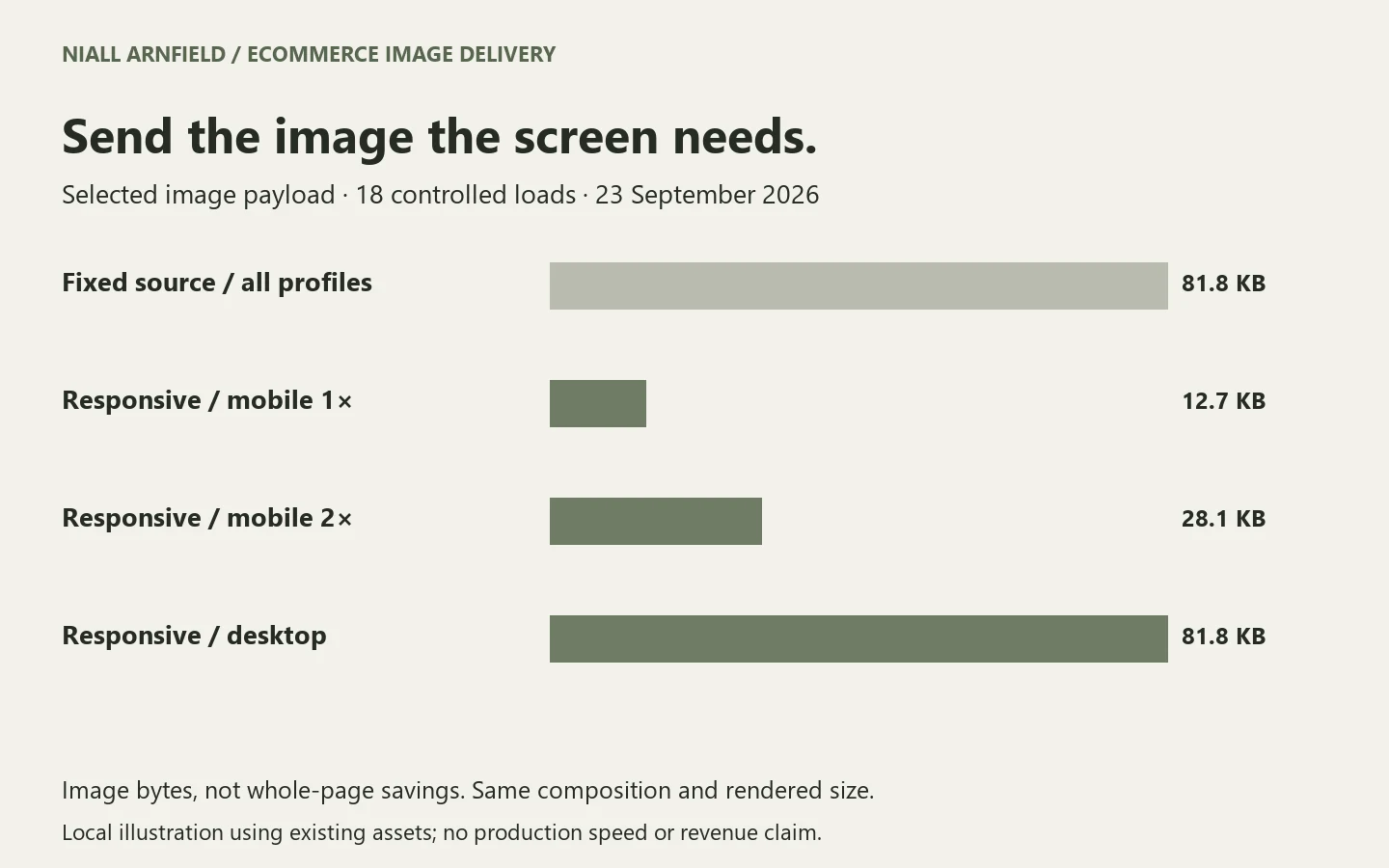
- Delivered size. Is the browser downloading a far larger file than the space needs? In Liquid, the
image_urlfilter sets a width, and theimage_tagfilter can output asrcsetwith several widths and asizesvalue. Together they let the browser pick the right file for each screen. - Format. Shopify’s CDN can serve modern formats to browsers that support them. I check what actually arrives, not what the theme assumes.
- Priority. The main image above the fold should load early. I add
fetchpriority="high"to the one LCP image, and I make sure it is not lazy-loaded. Lazy loading is right for images further down the page. On the hero it delays the thing the visitor is waiting for. - Only one. Marking many images as high priority cancels the benefit. I pick one per template.
Check how your theme’s image tag handles the loading attribute on the first image. Many themes set this differently on the first section than on later ones, and older themes may not.
Apps, app embeds and leftover code
Apps are the most common reason a Shopify store slows down over time. I look at three things.
- What each app loads. Reviews, popups, chat, upsells, loyalty and tracking tools each add scripts and styles. I list them, find where they load, and ask whether they are needed on every template.
- How they are installed. Newer apps use theme app extensions: app embeds, which you switch on or off in the theme editor, and app blocks, which sit in a section you place yourself. These are easier to control and remove cleanly than scripts injected another way. Where an app offers a choice, I prefer app blocks so the code only loads where the block appears.
- Leftovers. An uninstalled app can leave code behind, such as snippets,
includeorrenderlines in the theme, and script tags. Some apps clean up after themselves. Some do not, and older ones are more likely to leave something. I search the theme for references to apps you no longer use.
I do not delete a script on a hunch. Removing the wrong file can break reviews, consent behaviour or cart functions. Every candidate gets a regression check before it goes live.
Third-party tags and consent
Analytics, advertising pixels and tag managers all cost loading time. I check what fires, when it fires, and whether it waits for consent. A tag that should not run before consent is both a privacy matter and a speed cost. I keep the tags your marketing team needs, and I move or defer the ones that do not need to run immediately. I do not give legal advice on consent. I make sure the setup you choose works and is tested.
Fonts
- Fewer families and weights means fewer downloads.
- Fonts should be served in a way that avoids invisible text while loading.
- A fallback font with similar metrics reduces the jump when the real font arrives, which helps CLS.
Video and 3D
Large media is often the heaviest thing on a page. I check whether a video or 3D viewer loads before the visitor needs it. A poster image with a clear play control often does the job, and the full player loads on request. The poster must still explain the product, and the controls must stay accessible by keyboard.
If you sell configurable products, the same thinking applies to a viewer. I led development of the Praxis Digital 3D configurator platform, used by 20+ UK businesses from 2021 to 2025, and I cover the trade-offs in my 3D product configurator and Shopify configurator integration pages.
Interactions and INP
Loading is only half of speed. I test what customers repeat: choosing an option, opening a filter, changing a quantity and adding to the cart. I profile the actual action and look for long tasks on the main thread, often caused by theme or app scripts. Keyboard use, mobile taps, the selected state and error recovery stay in the acceptance criteria.
Layout shift
I find the element that moves and the state that triggers it. Common causes are images without dimensions, announcement bars that appear late, app widgets that inject content, and font swaps. The fix is usually to reserve space, then check it at several screen sizes.
Theme and sections
Online Store 2.0 themes use sections on every page, which makes it easy to add heavy blocks everywhere. I review which sections load on each template, remove unused ones, and check that the theme is on a current version. A theme update can bring performance improvements, but it can also overwrite your edits, so I compare changes before applying one. A slow theme sometimes cannot be fixed by tuning, and I will say so. In rare cases a rebuild or a headless approach is worth discussing, but I only suggest it where the evidence supports it.
Common Shopify speed problems
This is an original project worksheet. I fill it in for your store with real evidence. The rows below are illustrative examples of how it looks. For two frequent causes, see Shopify image optimisation with image_url and image_tag and finding and removing leftover app code.
| Change candidate | Evidence to collect | Regression check |
|---|---|---|
| Product hero image | Delivered dimensions, format and loading behaviour. | Image remains sharp and appears in the intended layout. |
| App script | Where it loads and what work it performs. | Its required function still works on the intended templates. |
| Leftover app code | References in the theme to apps no longer installed. | No console errors, and no missing feature on any template. |
| Third-party tag | When it fires and whether it waits for consent. | Tracking and consent behaviour still work as agreed. |
| Large media section | Download and rendering cost in the visible journey. | Poster, play controls and product meaning are preserved. |
| Theme interaction | Profile of an actual option, filter or cart action. | Keyboard, mobile and selected state still work. |
| Layout shift | The element that moves and the triggering state. | Reserved space behaves across responsive sizes. |
Shopify’s theme performance guidance is the reference I work from for theme-level choices.
What the service includes
- A dated baseline across a representative page sample.
- Findings tied to specific resources, apps or interactions, not generic advice.
- An agreed implementation scope and the change register.
- Theme and Liquid changes made by me, or a clear brief for your developer.
- Before-and-after lab evidence under matching conditions.
- A production regression check and a plan for reviewing field data.
If search visibility is the wider concern, I can pair this with a Shopify SEO audit or a broader technical SEO audit. Larger stores may need the extra planning in my Shopify Plus SEO work. If you also run WordPress, see WordPress speed optimisation.
How a project runs
- Brief. You send the URL, theme, app list and the journey that feels slow.
- Baseline. I build the sample and record the starting evidence.
- Findings. I rank causes by likely impact and effort, and agree the scope with you.
- Changes. I work on a duplicate theme where possible, so the live store is not disturbed.
- Retest. I repeat the tests, then check the features on mobile and desktop.
- Publish and review. I publish, recheck in production and set a date to review field data.
Speed is one input to conversion rate, not a guaranteed driver of it. I will not claim a revenue or ranking result from speed work alone.
Questions people ask
How do I speed up my Shopify store?
Start with the page type that matters most, usually the product page. Measure it, then deal with the largest causes: the main image, apps and their scripts, third-party tags, heavy media and layout shifts. Test after each change.
Do too many apps slow down Shopify?
They can, because each one may add scripts and styles. The number matters less than what each app loads and where. Remove the ones you do not use, and check the theme for code they left behind.
What is a good Shopify speed score?
The scores are lab estimates and move between runs. The measures that count for Google are the Core Web Vitals in field data: LCP at 2.5 seconds or less, INP at 200 milliseconds or less and CLS at 0.1 or less, at the 75th percentile. I use scores for diagnosis, not as the goal.
Do I need a new theme to make my store faster?
Often not. Many fixes are image, app and script changes. A new theme helps only when the current one is the cause and cannot be tuned. I will tell you which case you are in.
Does site speed help SEO?
Core Web Vitals are part of Google’s page experience signals, but relevance and content still matter far more. Speed also affects how the store feels to use. I cannot guarantee any ranking change.
Next step
Send me the URL, theme, app list and the slow journey you are worried about. Discuss Shopify speed optimisation. If you need wider build work first, see Shopify developer UK.
References: Shopify theme performance guidance, Shopify performance testing and Web Vitals documentation. The change register is an original project template; no unmeasured speed improvement is claimed.