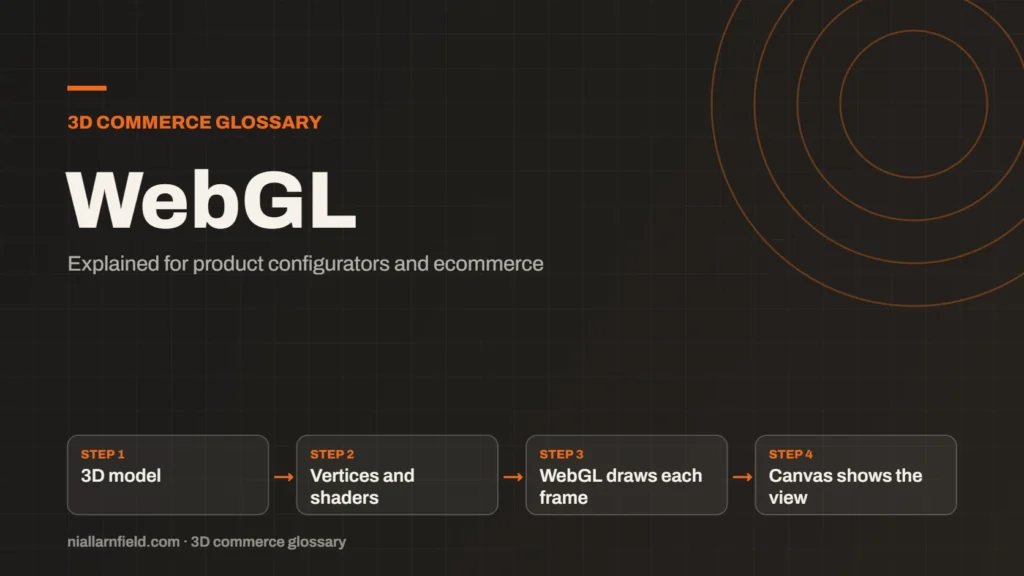
WebGL is a web standard that lets a browser draw 3D graphics on a canvas, using the device’s graphics chip. It needs no plugin, so 3D runs inside an ordinary web page.
Discuss your product rangeTry the demos
What WebGL is, in plain terms
WebGL stands for Web Graphics Library. It is a low-level 3D graphics API. An API is a set of rules that lets one program control another. In this case, that other program is the graphics card. WebGL is exposed to JavaScript through the HTML canvas element, so a web page can draw 3D on screen.
The Khronos Group maintains WebGL as an open standard. It is royalty-free, so nobody pays a licence fee to use it. WebGL 1.0 follows the OpenGL ES 2.0 feature set, and WebGL 2.0 follows OpenGL ES 3.0. OpenGL ES is a version of OpenGL made for phones and other small devices.
It helps to know where WebGL sits in the stack. Your JavaScript calls WebGL, WebGL calls the graphics driver, and the driver talks to the graphics chip. Each layer adds a little overhead, and each layer can fail in its own way. When a viewer breaks on one device only, this stack is the first place to look.
- 3D model
- Vertices and shaders
- WebGL draws each frame
- Canvas shows the view
How WebGL draws a 3D scene
A 3D model is stored as vertices, which are points in space. Groups of three vertices form triangles, and triangles form the surface you see. WebGL sends these points to the graphics card. Small programs called shaders then decide where each point goes and what colour each pixel should be.
Most people do not write WebGL calls by hand. The code is long and easy to get wrong. Instead, they use a library such as Three.js or Babylon.js. The library takes care of the low-level work. The developer then works with cameras, lights and materials instead.
Each frame repeats the same steps. The program clears the canvas, sends the geometry, sets the camera and light values, and then draws. At sixty frames a second, that cycle has about 16 milliseconds to finish. Anything slower, and the viewer will look jerky to the shopper.
Why WebGL matters for product configurators
A configurator lets a shopper change a product and see each change in 3D. WebGL is what draws every frame of that view. Because it runs in the browser, the shopper needs no app, plugin or download to use it.
When I build a configurator, WebGL is the engine behind the viewer on the product page. The same model then works on a desktop and on a phone. For a shop, that reach matters more than any single effect. Shoppers leave quickly when a page is slow or refuses to load. For the wider picture, see my product configurator service page.
Configurators also need to stay responsive while the shopper changes options. A change may swap a material, move a part or reload a texture. WebGL draws the result in the next frame, so the work between frames must stay small. Show a clear loading state while a heavier model updates.
Practical advice from building configurators
Speed decides whether the viewer feels good. Start with a light model and test it on a mid-range Android phone. Also test it on a laptop with integrated graphics. A viewer that runs well on a fast desktop can still stutter on a shopper’s phone. For file preparation, my guide to the GLB file covers the format.
- Reduce the triangle count before you add surface detail.
- Resize textures to the size they appear on screen.
- Group parts that share a material to cut the number of draw calls.
- Pack the model into one
.glbfile so it loads in a single request.
Common mistakes and limits
WebGL is a drawing layer, not a complete toolkit. It does not give you a scene format, a material system or a model loader. Those come from a library or from your own code. Heavy scenes can also drop frames on weaker devices, so set a performance budget early.
A frequent mistake is treating WebGL as the whole job. A reliable configurator also needs loading states, clear error messages and a sensible fallback when 3D cannot start. Plan for those from the first sprint, not the last. Check which WebGL version your chosen library needs before you commit to it.
If you are choosing between engines, my comparison of Three.js, Babylon.js and PlayCanvas explains how each one sits on top of WebGL. Most of the choice comes down to how much of the scene you want the library to manage, and how much your team wants to write itself.
Related terms
- WebGPU: WebGPU is the newer web standard for using a device's graphics processor from a browser.
- Three.js: Three.js is a JavaScript library that makes 3D graphics on the web easier to build.
- Babylon.js: Babylon.js is a JavaScript engine for building 3D experiences in the browser.
- PlayCanvas: PlayCanvas is an open-source 3D engine written in JavaScript, with its own visual editor.
- SKU explosion: SKU explosion happens when every combination of options becomes its own stock item.
- Line-item properties: Line-item properties are custom key and value pairs attached to one item in a Shopify cart or order.
- Product variants: Product variants are versions of one product, such as a size or a colour.
- Parametric models: A parametric model is a 3D model defined by dimensions and rules rather than fixed geometry.
- 3D asset pipeline: A 3D asset pipeline is the set of steps that turns source files into models a web viewer can load.
- Digital twin: In a product configurator, a digital twin usually means a 3D model that matches a real product's shape, materials and options.
Browse all the definitions in the 3D commerce glossary.
Common questions
Is WebGL the same as Three.js?
No. WebGL is the browser standard that draws 3D graphics. Three.js is a JavaScript library that makes WebGL much simpler to use. Most configurators use a library rather than raw WebGL, because it saves a lot of low-level code.
Do visitors need to install anything to see WebGL?
No. WebGL runs inside the browser, so visitors need no plugin or download. The page loads the model and draws it on screen. Test on the devices your customers actually use, because performance varies from one device to another.
Is WebGL being replaced?
Not yet. WebGPU is the newer browser standard, and it gives more direct access to the graphics chip. WebGL remains in use, and libraries such as Babylon.js still support it alongside WebGPU. Many projects will keep a WebGL route for a long time.