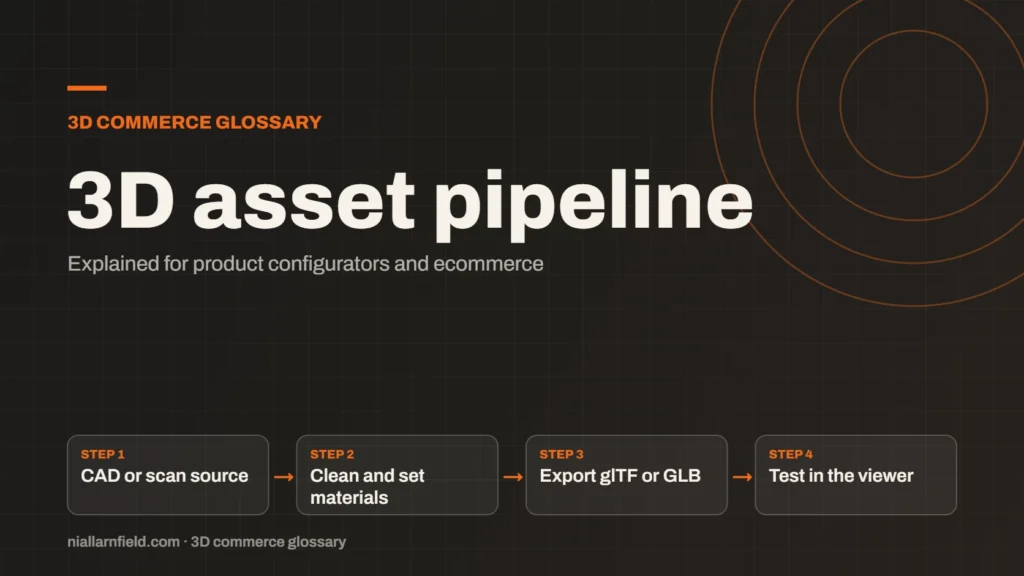
A 3D asset pipeline is the set of steps that turns source files into models a web viewer can load. It covers cleaning, texturing, export, compression and testing. A good pipeline makes each new product faster to add and keeps quality consistent.
Discuss your product rangeTry the demos
The steps from source file to viewer
A pipeline starts with a source file. That might come from CAD software, from a 3D modelling tool such as Blender, or from a product scan. The team cleans the geometry, sets up the materials and exports the result to glTF or GLB. Each step has a clear output, so a file can be checked before it moves on to the next step.
The pipeline ends where the shopper sees the model. The final file must load quickly on a phone, look right under the viewer’s lighting and open without errors. The glTF 2.0 specification defines the format at the end of that chain, so checking against it is worthwhile.
Thinking of the work as a pipeline, rather than a set of one-off files, is the key shift. It turns a craft task into a process that a team can repeat, measure and improve. Each stage should also produce a file or a note that the next stage can use. Without that discipline, work gets repeated and errors creep in. A pipeline that writes its outputs down is far easier to audit later. Naming the stages clearly helps too, because the whole team can then talk about the same step.
- CAD or scan source
- Clean and set materials
- Export glTF or GLB
- Test in the viewer
Why configurators need a repeatable pipeline
A configurator often has dozens of parts and many finishes. Building each one by hand leads to uneven results. One part may have a different scale, and another may use a different material set. A repeatable pipeline fixes naming, units and material rules once, so every part follows them.
Speed matters too. When a new product arrives, the team should know how long its models will take. For example, a pipeline that needs two days per product will struggle to cover a catalogue of several hundred items. Working through those numbers early shows where the bottleneck sits.
Consistency also protects the brand. A sofa in one fabric should look the same as the same fabric on a chair. A shared pipeline makes that match far more likely. Pipelines also make quality measurable. Once the checklist is fixed, a team can count how many files pass on the first attempt. That number shows whether the process is improving, or whether the source files need better briefs. A product configurator depends on this work, so plan the pipeline with the front end in mind.
How I set up a pipeline
I start a pipeline with one product and record every step as I go. Then I refine the process before I scale it up to the rest of the range. The aim is a checklist that anyone on the team can follow, without needing my help each time.
- Agree naming, units and origin points before the first model is made.
- Keep a checklist for scale, polygon count, texture size and materials.
- Export a GLB, then open it in the free GLB viewer before handing it over.
- Keep the source files, so you can re-export when specifications change.
Good pipelines also link to the 3D models guidance, which covers the model side in more detail than this entry can.
I also recommend a single person to own the checklist. Shared ownership often means nobody updates it. A named owner keeps the standards current as materials, tools and viewers change over time.
Common mistakes and limits
Teams often skip the test step. A model can look fine in a 3D tool and still fail in a browser because of large textures or missing normals. The viewer is the only place where the real result shows, so test there every time.
Another common error is a unit mismatch. glTF uses metres as its unit of length, so a model exported in millimetres can appear far too large or far too small. Check the scale in the viewer before any other review.
Compression and texture size matter as well. Use the lightest format and texture size that keeps the look you need. Page speed shapes how a viewer feels to shoppers, which is why the Core Web Vitals guide is worth reading alongside your asset work. Watch the source files too. A scan with noisy geometry, or a CAD model with hidden internal parts, can add cost at every later step. Fixing the input early is usually cheaper than fixing each output by hand. Treat every new source file as untrusted until it passes the checklist.
Related terms
- Parametric models: A parametric model is a 3D model defined by dimensions and rules rather than fixed geometry.
- Digital twin: In a product configurator, a digital twin usually means a 3D model that matches a real product's shape, materials and options.
- Configurator embed: A configurator embed is how a 3D configurator appears inside another website.
- Ambient occlusion: Ambient occlusion is a shading effect that darkens creases, corners and contact points where light struggles to reach.
- UV mapping: UV mapping is the process of unwrapping a 3D model's surface onto a flat 2D plane.
- Texture atlas: A texture atlas is one image that holds several smaller textures.
- Level of detail (LOD): Level of detail, or LOD, means keeping several versions of the same model at different polygon counts.
- Draw calls: A draw call is a request from the CPU to the GPU to draw one mesh with one material.
- Instancing: GPU instancing draws many copies of one mesh in a single draw call.
- Baked lighting: Baked lighting calculates light ahead of time and stores the result in a texture, called a lightmap.
Browse all the definitions in the 3D commerce glossary.
Common questions
What is the difference between a 3D asset pipeline and a 3D model?
A model is one file. A pipeline is the repeatable process that makes many models consistently. It defines the steps, the checks and the expected output for each one, so the whole range stays uniform.
Which file format should the pipeline output?
For the web, glTF and GLB are the usual target. They are an open standard maintained by Khronos, and most web viewers load them. Keep the source files in a format that suits your modelling tools.
How long does a pipeline take to set up?
That depends on the product range and the number of parts. Start with one product, record each step and fix the slow points. Then extend the same process to the rest of the range once it works.