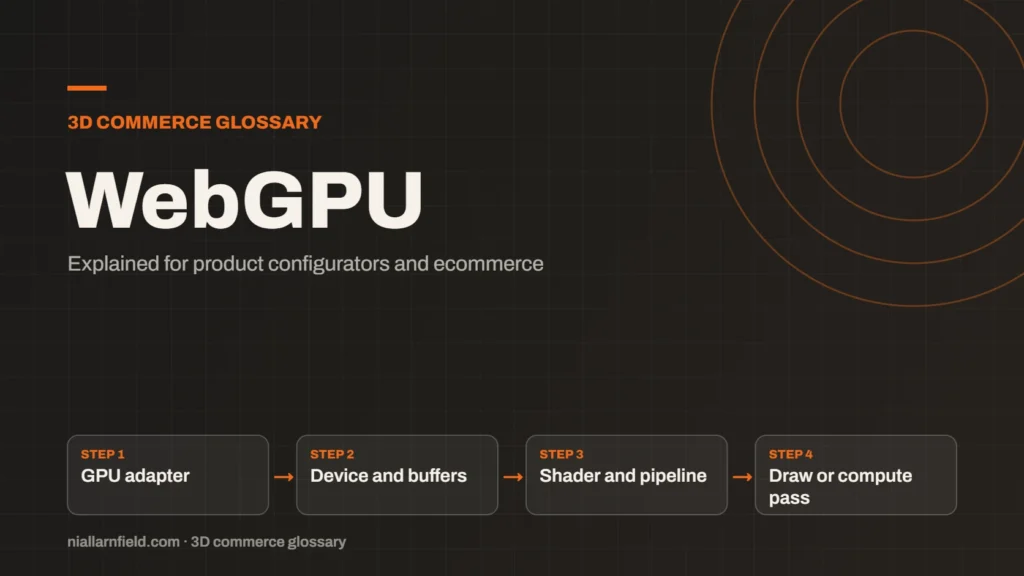
WebGPU is the newer web standard for using a device’s graphics processor from a browser. It gives more direct control than WebGL and can also run general compute tasks.
Discuss your product rangeTry the demos
What WebGPU is and where it came from
WebGPU is an API that exposes the capabilities of GPU hardware to web pages. A GPU, or graphics processing unit, is the chip built for parallel work such as drawing 3D. The W3C publishes WebGPU as a specification. At the time of writing, it is still a draft standard.
WebGPU is not simply a newer version of WebGL. It is a separate design. The design follows modern native GPU interfaces. That gives developers a cleaner model for buffers, textures and command submission. The details differ from WebGL, so existing WebGL code does not move across without changes. That difference matters most when you move existing code from one route to the other, because the rewrite is not a small change.
The specification is developed in the open by a W3C working group. Because it is still a draft, details can change before it becomes final. Check the current text before you build anything that depends on one specific feature.
- GPU adapter
- Device and buffers
- Shader and pipeline
- Draw or compute pass
How WebGPU works
WebGPU starts with an adapter, which represents a GPU the browser has found. From the adapter you create a device. The device owns buffers and textures, which live in GPU memory. Shader modules hold your GPU code. Pipelines tie those parts together, either for drawing or for computing.
The biggest new idea is compute. A compute pipeline runs general work on the GPU, not only drawing. Examples include physics, image processing or sorting large lists. Core WebGL 2.0 has no compute pipeline, so this is a real change for developers. Compute work also needs a clear plan for how results return to the page, which adds design work before any code is written.
Resource handling is more explicit than in WebGL. You create each buffer or texture, bind it to the right stage, and release it when you finish. That gives more control, but it also gives more places to make a mistake. Clear names for each pipeline make failures much easier to trace.
Why WebGPU matters for product configurators
Configurators with many parts, large textures or heavy lighting can strain WebGL. WebGPU aims to reduce that overhead. It can also run compute work, which WebGL cannot do in its core standard. For detailed product viewers, this can make a visible difference. A shop with a few simple products may gain little, so measure before you change anything.
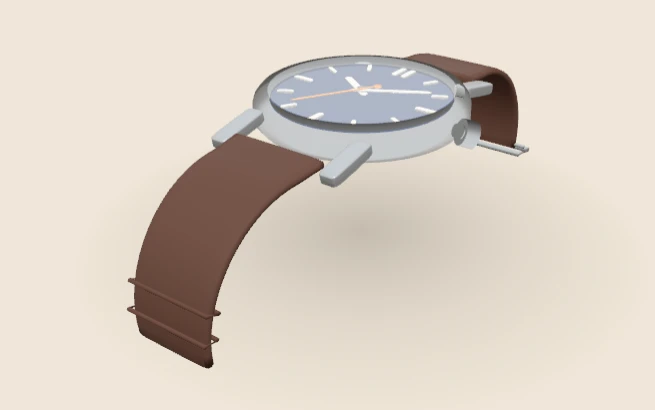
On this site, the WebGPU watch demo lets you change the case metal, strap and case size. Where the browser cannot use WebGPU, the demo falls back to WebGL, so the shopper still sees the watch. That fallback matters. Support varies between devices, and a shop cannot assume every visitor has WebGPU.
For how a viewer fits into a wider shop build, see my product configurator page.
Practical advice for WebGPU builds
Treat WebGPU as an upgrade path, not the only path. Keep the two routes close together in the code, so that a change to one is easy to spot in the other. Build the viewer so it works on WebGL first. Then add the WebGPU route as an option, and test both routes on the same device. The shopper should see the same product either way.
- Test the fallback as carefully as the main route.
- Compare frame rates on one device with each renderer.
- Keep shader code small and readable, so a second route is easier to maintain.
- Read your library’s notes on which features each route supports.
Plan how you will measure results before you start. Pick a fixed set of product views and a fixed set of devices. Then record load time, frame rate and visual differences for each route. Without those numbers, a decision about WebGPU is only an opinion. Keep the results in one simple table, so your team can read and repeat the comparison later.
Common mistakes and limits
A common mistake is moving everything to WebGPU because it sounds newer. For a simple viewer, WebGL may already be fast enough, and it has wider use. Check your target browsers and devices before you commit to a route. Shoppers judge a product page in seconds, so a slow viewer matters more than a missing effect.
WebGPU also adds complexity. You manage more explicit state, and bugs can be harder to trace. If a library handles the renderer for you, use its WebGPU option and keep its documentation close at hand.
For a comparison of the main engines and how each handles WebGPU, read my Three.js, Babylon.js and PlayCanvas guide. Watch your analytics as well. If most visitors fall back to WebGL, the WebGPU work may not pay off yet.
Related terms
- WebGL: WebGL is a web standard that lets a browser draw 3D graphics on a canvas, using the device's graphics chip.
- Three.js: Three.js is a JavaScript library that makes 3D graphics on the web easier to build.
- Babylon.js: Babylon.js is a JavaScript engine for building 3D experiences in the browser.
- PlayCanvas: PlayCanvas is an open-source 3D engine written in JavaScript, with its own visual editor.
- Configurator embed: A configurator embed is how a 3D configurator appears inside another website.
- Material swatch: A material swatch is a sample of a finish, such as fabric, leather or metal, shown as a choice in a configurator.
- HDRI lighting: HDRI lighting uses a high dynamic range image of an environment to light a 3D scene.
- Normal map: A normal map is an image that fakes fine surface detail, such as grooves and small bumps, by changing how light hits a surface.
- Roughness map: A roughness map is a texture that sets how blurry or sharp a surface's reflections look.
- Metalness: Metalness is a physically based rendering (PBR) value that says how much a surface behaves like metal.
Browse all the definitions in the 3D commerce glossary.
Common questions
Is WebGPU faster than WebGL?
It can be, for some workloads, because it reduces driver overhead and adds compute. Speed depends on the scene, the device and the code. Measure both routes on the devices your shoppers use before you decide.
Does WebGPU replace WebGL?
Not in the near term. WebGPU is a separate API, and it is still a draft standard. Libraries such as Babylon.js support WebGL and WebGPU side by side. Most projects will keep a WebGL route for a long time.
What happens if a browser has no WebGPU?
Your code should switch to WebGL. Three.js WebGPURenderer falls back to a WebGL 2 backend on its own. Babylon.js picks its engine at start-up, so build the choice into your code. Always test the fallback, because a missed one can leave shoppers with a blank viewer.