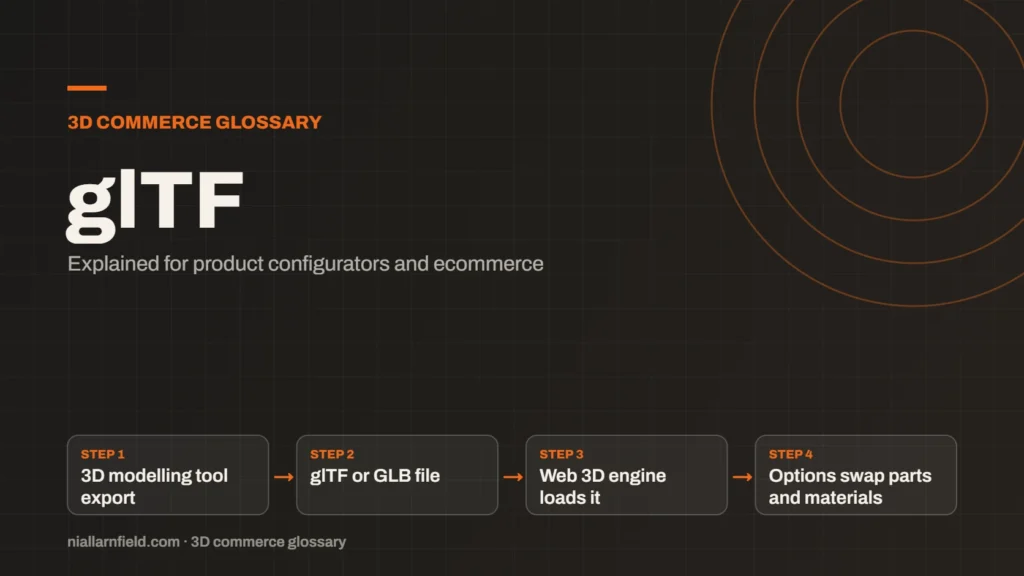
glTF is an open standard for 3D models, maintained by the Khronos Group. It stores geometry, materials, textures and animations in a format built for fast display on the web and in apps.
Discuss your product rangeTry the demos
What a glTF file stores
A glTF file describes a complete 3D scene. It holds the shapes, which are called meshes, and the way those shapes are arranged in space. It also holds the materials that define how each surface reacts to light, along with the textures those materials use.
glTF can also store skeletons and animations. A product can rotate, open or unfold when the model includes that motion. The format is documented in full in the official glTF repository on GitHub, which Khronos maintains as the reference for developers.
Each mesh is built from primitives. A primitive links its vertices to one material. This structure lets a single file hold many parts, each with its own finish. That is why one glTF file can represent a whole product, not just one object.
- 3D modelling tool export
- glTF or GLB file
- Web 3D engine loads it
- Options swap parts and materials
Text form or binary form
glTF comes in two forms. The .gltf form is readable JSON text, with separate files for buffers and images. The .glb form packs everything into one binary file. That single file is easier to upload, host and send to a client.
Both forms hold the same kinds of data, so the choice is about your pipeline. For the binary form, read the GLB guide. You can also open a GLB file, or a self-contained glTF file, in the free GLB viewer on this site. It works locally in your browser.
How configurators use glTF
A product configurator loads one glTF model and changes it in the browser. A fabric choice swaps a material or a texture. A handle choice can show or hide a mesh that sits inside the same file. The shopper sees the change at once.
Many web 3D engines can read glTF. The three.js GLTFLoader is one example. The model downloads once, and the viewer then keeps the parts it needs in memory. Each option change feels quick because nothing has to be fetched again. For a wider view of the tools, see the 3D product configurator overview.
Configurator logic usually sits outside the model. The file supplies the parts and materials, while the page decides which combinations are allowed and what the shopper sees next.
Why glTF matters for speed and cost
Speed depends on file size and on how the file is built. glTF supports compression extensions for geometry and textures. Draco, meshopt and KTX2 textures can all shrink a file. Each one trades a little processing at load time for a smaller download.
In practice, a well built glTF file brings three benefits to a configurator:
- Smaller files start faster on mobile connections.
- Well built files use less memory on the device.
- One format serves the web and Android AR, while iPhone AR uses USDZ.
A model with dense geometry may gain most from mesh compression. A product with many large textures may gain most from texture compression. Measure both before you decide, because each method adds some work when the page loads.
Practical advice from my own work
When I prepare a model for a configurator, I start with the source file from the 3D artist. I check the scene tree first. Unused nodes, hidden helper objects and duplicate materials add weight without adding any visible value. Removing them early saves time later in the project.
I also check the scale and origin of each part. A handle that is out of scale will break every layout it sits in. I set the units once, then test every option in the viewer before handoff. The wider preparation steps are covered in 3D models for product configurators.
I also keep a short written note with each file. It lists the units, the naming scheme and the options that the viewer should expose. A developer can then build the interface without guessing what the artist meant.
Common mistakes and limits
glTF is an open format, but files are not always clean. Exports from modelling tools often carry extra data, such as unused animation tracks or helper nodes. Some exporters also write material settings that viewers read in different ways. Check each file in at least two viewers before you publish it.
glTF also has limits. It stores the result of a design, not the rules behind it. A configurator still needs logic that decides which options are valid together. That logic lives in your code or your platform, not in the model file, so plan for both from the start.
Licensing deserves a check as well. Ask which tool exported the file and whether any third-party assets are included. Embedded textures from a stock library may carry usage limits that the brand has not agreed to.
Related terms
- KTX2 textures: KTX2 is a container format for textures, the images that give 3D surfaces their colour and detail.
- Draco compression: Draco is an open-source compression library from Google for 3D mesh data.
- Meshopt compression: Meshopt compression shrinks glTF geometry, morph targets and animation data.
- HDRI lighting: HDRI lighting uses a high dynamic range image of an environment to light a 3D scene.
- Scene Viewer: Scene Viewer is Google's viewer for 3D and augmented reality (AR) models on Android.
- WebXR: WebXR is a web standard for augmented reality (AR) and virtual reality (VR) in the browser, published by the W3C.
- WebGL: WebGL is a web standard that lets a browser draw 3D graphics on a canvas, using the device's graphics chip.
- WebGPU: WebGPU is the newer web standard for using a device's graphics processor from a browser.
- Three.js: Three.js is a JavaScript library that makes 3D graphics on the web easier to build.
- Babylon.js: Babylon.js is a JavaScript engine for building 3D experiences in the browser.
Browse all the definitions in the 3D commerce glossary.
Common questions
Is glTF the same as GLB?
Not quite. glTF is the format itself. GLB is a binary form of the same format, packed into one file. Both hold the same kinds of data. Use GLB when you want one file to upload and host, which makes it simpler to manage.
Does glTF work on phones?
Yes. Modern phones and browsers can display glTF models. On Android, Google’s Scene Viewer can open a glTF or GLB model in augmented reality. Keep files lean, because phones have less memory and often slower networks.
Who maintains glTF?
The Khronos Group maintains glTF. Khronos is an industry standards body that also maintains OpenGL, Vulkan and the KTX texture format. Anyone can read the specification and build tools that support it, which helps the format last.
Discuss your product rangeTry the demos
For a step-by-step method, see how to optimise glTF for the web.