Useful Three.js ecommerce examples do a defined job: help someone inspect an asset, compare a material or understand a product choice. The rendering library is one layer of that experience. Product policy, accessibility and commercial validation still need their own implementation.
Discuss your product rangeTry the demos
The examples below are working tools and demonstrations on this site. This is an original task-based review, not a performance ranking or a claim that every example is a production merchant integration.
What Three.js does on an ecommerce site
Three.js is a JavaScript library for drawing 3D scenes in a web browser. It typically draws through WebGL, a browser feature that lets a page use the graphics hardware. On a shop page, a Three.js product viewer can show an item that the shopper turns, zooms or changes.
Three.js is not a shop. It does not hold the basket, take payment or track stock. Your store platform and back-end systems still handle those jobs. The library draws what your code gives it. Your code decides which choices the shopper can make.
That split matters when you plan a build. The 3D view is one part of the product page. The product data, the rules and the checkout each need their own design and testing. For the wider idea, read my guide to the 3D product configurator.
Where Three.js fits and where it may not
Three.js can suit product views that need custom interaction, such as a configurator, a turntable viewer or a finish comparison. You control the scene, the camera and the controls around it.
It may not suit every product page. A plain photo gallery may do the job with less code to maintain. Some teams choose a game engine or a hosted viewer instead. For a side-by-side look at Three.js, Babylon.js and PlayCanvas, read my comparison of the engines.
Before you start a 3D ecommerce website build with Three.js, ask these questions. Does the shopper need to inspect or change the product? Does the 3D view show something a photo cannot? Can your team support the code after launch? If the answers are unclear, test a simpler page first.
1. Inspect a delivery asset
The free GLB viewer includes an original procedural chair and a local file input. Orbit the product, switch to wireframe and review the reported geometry counts. The tool explains its support limits, including external resources and compressed extensions.
For a controlled check, an original six-vertex octahedron contains eight triangles and one material. That fixture helps distinguish a known result from a complex product export. Geometry counts are diagnostic data, not a complete rendering benchmark or commercial asset acceptance.
2. Explore surface behaviour
The PBR material lab shows a sphere in a generated studio environment. Its roughness and metalness controls expose two important surface properties, with painted and copper presets. It gives teams a shared language for an asset review.
It does not certify the colour or reflectance of a real product finish. A merchant’s catalogue still needs approved references, consistent lighting and a review of the actual exported surfaces.
3. Connect choices to a product summary
The Three.js desk lamp demo groups arm, shade and accessory choices beside an interactive preview. In a recorded walkthrough, changing Medium/Linen/None to Long/Linen/USB charging port changed the fictional demonstration amount from £185.00 to £233.00 and updated the readable summary.
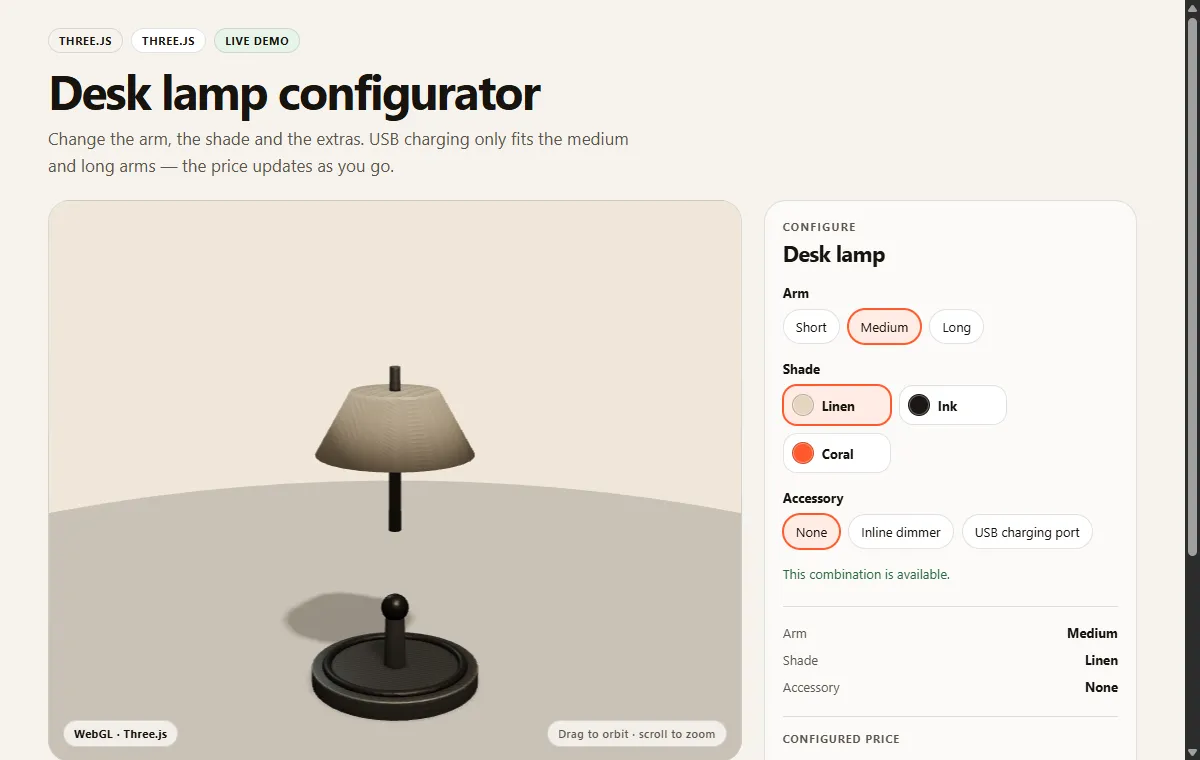
Those observed amounts are demo values. They illustrate state changes rather than supplier pricing or proven sales improvement. A real shop needs a validated mapping from the accepted choices into its catalogue or quote process.
4. Explore a React scene workflow
The modular sofa demo uses React Three Fiber, a React renderer for Three.js. Its rule rejects a chaise with two seats and accepts one after selecting at least three modules. It is useful for discussing accepted state and dependency feedback.
A React component tree does not replace a product policy. Define how visual components, option controls and the commercial summary read the same accepted configuration.
Choose an example around a question
| Question | Example | What it does not prove |
|---|---|---|
| Can I inspect the export? | GLB viewer and controlled fixture | All extensions or real product accuracy |
| Why does this surface look different? | PBR material lab | Physical finish certification |
| How do choices stay readable? | Desk lamp option journey | A production checkout connection |
| How should a dependency behave? | Modular sofa rule | The policy of a real sofa manufacturer |
Turn the observation into a test
Write the required initial state, action and expected result before adapting an example. Include loading and unsupported-rendering behaviour, keyboard use and narrow screens. If the application submits a cart or quote, compare the accepted summary with the recorded commercial data.
Measure a defined task on the intended device list before making performance claims. A small sphere, a procedural chair and a detailed catalogue model exercise different workloads. Their appearance alone cannot establish which architecture is fastest.
Use the project brief or discuss implementation through configurator development. References: Three.js and the React Three Fiber introduction. The task matrix and recorded walkthrough are original examples, reviewed 13 October 2026.
Practical concerns for product pages
A working demo is not yet a product page. Real shoppers arrive on slow connections, old phones and screen readers. Plan for these concerns before launch.
Model weight and compression
A 3D model is a file the browser must download before it can draw anything. Large files delay the first view. Teams often reduce the geometry and shrink the textures, and some compress the file. Check what your viewer supports before you rely on a compressed format. The GLB viewer explains its own support limits, including compressed extensions. For background on the file format, see what a GLB file is.
Loading states
Show the shopper what is happening while the model loads. A spinner or a short progress message is enough for many pages. Do not leave an empty box on the screen. Decide what happens if the download fails, and say so in plain words.
A still-image fallback
Keep a good product photo that works without 3D. Use it while the model loads, when a browser cannot run the 3D view, or when a shopper chooses not to open the 3D view. The photo should show the product clearly on its own.
Mobile and touch
Test on real phones, not only a desktop browser window. Touch gestures can clash with page scrolling. Check that the viewer does not trap the page. Make the controls large enough to tap. Watch how the device behaves in a long session.
Accessibility
A 3D view must not be the only way to find information. Give each choice a text label that a screen reader can read. Make every control usable from the keyboard. Put the product facts, price and options in ordinary page text too. Describe the state in words, not only by colour or motion.
Frequently asked questions
Is Three.js a shop platform?
No. Three.js draws 3D scenes in the browser. A shop still needs a store platform for products, checkout and orders. The rendering library is one layer of the experience.
Do the examples prove that a product will look right?
No. The PBR lab does not certify a real finish. The GLB geometry counts are diagnostic data, not commercial asset acceptance. Each example has a “does not prove” note in the table above for this reason.
What should I check before I build a 3D product page?
Check the file size and format, the loading and failure states, and a still-image fallback. Then test touch use, keyboard use and screen reader access. Run the tests described above on the devices your shoppers use.
Related reading: 3D product visualisation.
Next step
For a different engine on a similar task, try the PlayCanvas salon backwash demo.
I am an independent designer-developer based in Manchester, working across the UK. I led development of the Praxis Digital 3D configurator platform, used by 20+ UK businesses from 2021 to 2025. If you are planning a 3D product page, get in touch and tell me about the product, the choices and the store platform. For more examples, see product configurator examples. If your store runs on Shopify, see the Shopify product configurator integration guide.