Add seats, change fabric, add a chaise. Explore the product options, see how a configuration affects the demonstration price, and share the result.
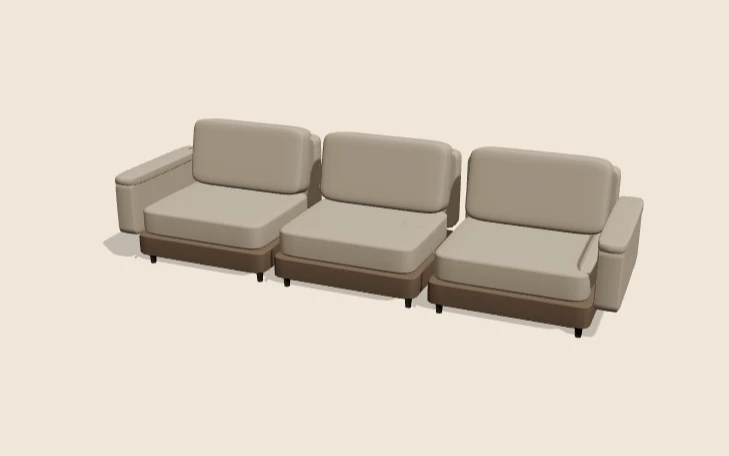
The interactive viewer loads when you choose Explore in 3D.
This is a demonstration product, not a client catalogue or an offer for sale. Explore product configurator development for your own range.
- Modules2, 3 or 4 seats
- FabricOatmeal wool, Ink bouclé or Moss linen
- ChaiseNone, left or right
- EngineReact Three Fiber on WebGL
How this demo works
This React Three Fiber modular sofa demonstration combines module count, fabric and chaise position. It demonstrates an important state-management decision: a chaise requires at least three modules, and an attempted two-seat chaise does not become the accepted selection.
The product and prices are fictional demonstration data. The rule is an application example, not a real sofa manufacturing policy.
The option groups
Choose Explore in 3D above. The interface identifies React Three Fiber with WebGL and displays a modular sofa preview. The initial state is 3 seats, Oatmeal wool and No chaise.
The module choices are 2, 3 and 4 seats. Fabrics are Oatmeal wool, Ink bouclé and Moss linen. The chaise choices are No chaise, Left chaise and Right chaise. A readable summary repeats all three groups beside the demonstration amount.
Reproduce the rejected and accepted paths
| Action checked | Accepted summary | Feedback and demonstration price |
|---|---|---|
| Open the default | 3 seats / Oatmeal wool / No chaise | Available; £1,640.00 |
| Select 2 seats | 2 seats / Oatmeal wool / No chaise | Available; £1,360.00 |
| Attempt Left chaise with 2 seats | No chaise remains selected | A chaise needs at least three modules; £1,360.00 remains displayed |
| Select 3 seats, then Left chaise | 3 seats / Oatmeal wool / Left chaise | Available; £2,060.00 |
These are recorded interface checks from 13 October 2026. They do not establish real catalogue pricing, conversion results or a production order integration.
Keep attempted choices separate from accepted state
The rejected two-seat chaise gives the visitor an explanation while retaining the last valid chaise state. A real application should define that behaviour explicitly. The preview, summary and commercial hand-off should read from the accepted configuration rather than each retaining an independent version.
React Three Fiber expresses Three.js scenes through React components. It fits naturally with applications that already use React state, but choosing it does not automatically solve product policy, pricing or persistence. Those remain separate design and implementation responsibilities.
Review module assembly as well as materials
For a modular range, record the identities, dimensions and attachment conventions of each component. Test every allowed module count and chaise side. Look for gaps, overlapping parts and changes that shift the product out of the camera’s useful view.
Fabric choices need a deliberate texture scale. If a scene grows by adding modules, the fabric pattern should not stretch across the entire assembly as though it were one enlarged cushion. Keep material identifiers stable across the component assets.
What to look for when you try it
Start with the size. Switch between two, three and four seats and watch the sofa grow or shrink. The view pulls back as seats are added, so the whole sofa stays in frame. Turn it round to check that the seats line up with no gaps.
Then add a chaise. With three or more seats, pick the left or the right side. The chaise joins the end seat, and the arm on that side goes away so the two pieces sit flush. Now switch to two seats and try to add a chaise. The rule stops it, explains why, and the summary keeps your last valid choice.
Last, change the fabric. All the parts should change together, including the chaise. If one cushion stays the old colour, that is a bug a buyer would spot straight away.
What loads, and when
Nothing 3D loads until you choose “Explore in 3D”. Then the app fetches its script (about 282 KB) and one sofa model, a 209 KB GLB file that holds every module, cushion, arm and leg.
While the model loads, the stage shows a “Loading 3D model…” message, which screen readers announce as a status. It fades out once the sofa appears. Before I added it, the stage sat blank for two to four seconds, which looked broken.
Because one file holds all the parts, changing seats or adding a chaise does not fetch anything new. The app shows or hides parts instead. For example, the inner arm next to a chaise is hidden, and the chaise brings its own legs.
An acceptance register for a real range
Start with the four states above, then add right-chaise selection, a fabric change after adding a chaise, an invalid restored configuration and a changed catalogue rule. Check both the customer summary and the intended quote or cart payload.
Also review keyboard interaction, narrow layouts and failed asset loading. The demo’s Request a quote and Copy share link controls are visible, but this walkthrough does not claim that a real customer order was created or a saved link was verified.
Try the chaise rule in the demo above, inspect an asset with the GLB viewer, or specify a real range using the project brief. Discuss implementation through configurator development.