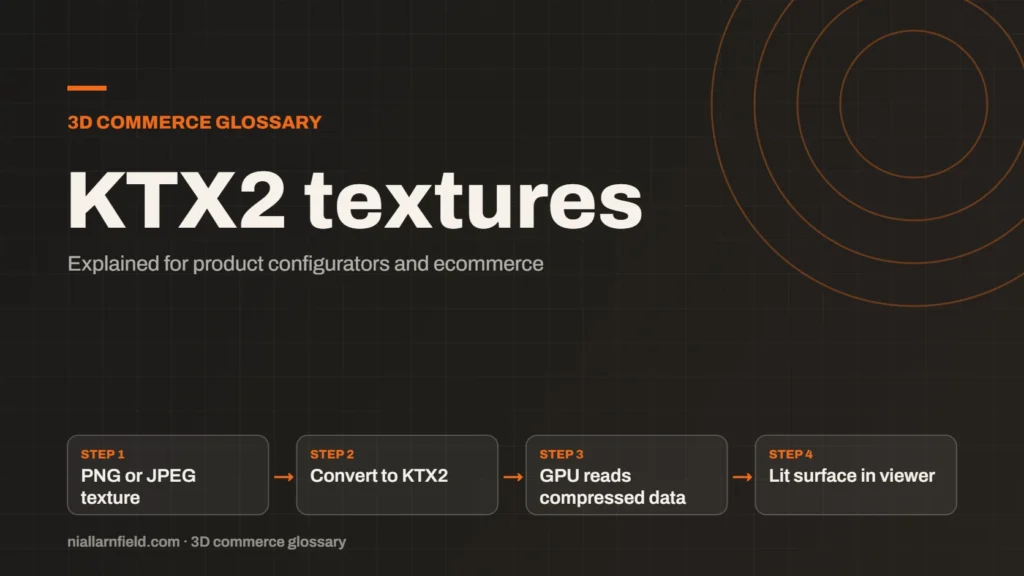
KTX2 is a container format for textures, the images that give 3D surfaces their colour and detail. It can store images in a form the graphics chip reads directly, which speeds up loading.
Discuss your product rangeTry the demos
What KTX2 means
KTX2 is the second version of a texture container format from the Khronos Group. A container holds image data plus the settings a graphics system needs to use that data. The official overview is on the Khronos KTX page, which describes it as a lightweight container for distributing GPU textures.
A PNG or JPEG image must be decoded into raw pixels before the graphics chip can use it. A KTX2 texture can stay compressed in GPU memory instead. The chip then reads less data, which saves memory and can make the first frame appear sooner.
- PNG or JPEG texture
- Convert to KTX2
- GPU reads compressed data
- Lit surface in viewer
Basis Universal and supercompression
KTX2 can carry Basis Universal data. Basis Universal is a compressed texture format that is transcoded at run time into the GPU format a device supports. One file can therefore work across many different graphics chips, which is the main reason it is useful for shoppers on mixed hardware.
Khronos describes two modes. ETC1S gives smaller files. UASTC gives higher quality. Each suits a different kind of texture. I choose the mode for each texture by looking at it closely, rather than applying one setting to every image in a model.
Developers should therefore test the loader in each target browser. Support can differ between devices, so do not assume it works everywhere.
Why KTX2 matters for configurators
A product configurator often needs many textures. Each fabric, finish or colour can add another image to the page. Large uncompressed images make the first load slow. They can also run out of memory on a phone, which can crash the page.
KTX2 helps in two ways. Files can be smaller than PNG or JPEG, though that is not guaranteed for every image. Textures also upload to the GPU faster, because the transcoded data is already in a GPU format. For example, a sofa offered in four fabrics needs four sets of textures, and each set adds to the load.
Plan the texture budget for the whole product, not for each file. Count the textures a shopper can change at once, then set limits for the full configuration. This keeps the load steady as options multiply.
How glTF uses KTX2
glTF files reference KTX2 images through the KHR_texture_basisu extension. This extension lets any material texture use KTX2 images with Basis Universal data. Geometry compression works in a separate way, and the GLB guide explains the overall file structure.
PBR materials use several maps, such as colour and normal maps. Each of those maps can be stored as a KTX2 texture. The PBR guide explains which maps a surface needs and why, so read it before you convert anything.
Developers should check the extension list in the file before release. A loader that ignores an extension may fail to show the texture. That looks like a broken product to a shopper, even though the model itself is fine.
Mipmaps and choosing a size
A mipmap is a set of smaller copies of the same texture. The viewer picks the right copy for the distance from the camera. Khronos notes that KTX2 gives access to individual mipmap levels, which is one reason the format suits real-time 3D viewers.
Mipmaps reduce the detail a viewer must load at once. They also keep distant surfaces looking clean. When I build the texture set, I check the mipmap chain as part of the review, not only the top image.
Common mistakes and limits
- Converting textures without checking the result on each model.
- Choosing one mode for every texture, whatever its content.
- Deleting the original high-resolution source. Always keep it safe.
- Going above Google’s recommended 2048 by 2048 pixel limit for Scene Viewer, whose guide lists PNG and JPG textures, so test KTX2 in AR separately.
KTX2 does not change the shape of a model. It only changes how the images are stored and read by the device. Treat it as one tool among several, and measure the gain on your own files.
Texture work is easy to overlook in a review. Ask who owns the texture pipeline, and whether the same person checks the output on a phone as well as on a desktop.
Test on a range of devices, not only the newest one. A texture that looks fine on a current laptop may behave differently on an older phone. Include an older device in every test round.
Related terms
- glTF: glTF is an open standard for 3D models, maintained by the Khronos Group.
- Draco compression: Draco is an open-source compression library from Google for 3D mesh data.
- Meshopt compression: Meshopt compression shrinks glTF geometry, morph targets and animation data.
- PlayCanvas: PlayCanvas is an open-source 3D engine written in JavaScript, with its own visual editor.
- React Three Fiber: React Three Fiber is a React renderer for Three.js.
- model-viewer: model-viewer is Google's open-source web component for showing 3D models on a web page.
- Normal map: A normal map is an image that fakes fine surface detail, such as grooves and small bumps, by changing how light hits a surface.
- Roughness map: A roughness map is a texture that sets how blurry or sharp a surface's reflections look.
- Metalness: Metalness is a physically based rendering (PBR) value that says how much a surface behaves like metal.
- Ambient occlusion: Ambient occlusion is a shading effect that darkens creases, corners and contact points where light struggles to reach.
Browse all the definitions in the 3D commerce glossary.
Common questions
Is KTX2 better than PNG?
They do different jobs. PNG is a general image format for editing and sharing pictures. KTX2 is a GPU texture format built for real-time 3D. Keep your PNG or JPEG originals, and convert copies for the viewer. Then check the file size and the look on each model.
Do all browsers support KTX2 textures?
Support depends on the viewer and the device. A glTF file that uses KTX2 needs a loader that understands the extension. Test the file in every browser and device you plan to support, before launch, so that no shopper meets a blank surface.
Does KTX2 replace Draco or meshopt?
No. KTX2 compresses images, while Draco and meshopt compress geometry and animation data. A single file can use several methods together. Check that your loader supports each extension you use, because a missing extension can stop the model from loading.
Discuss your product rangeTry the demos
For a step-by-step method, see how to compress textures with KTX2.