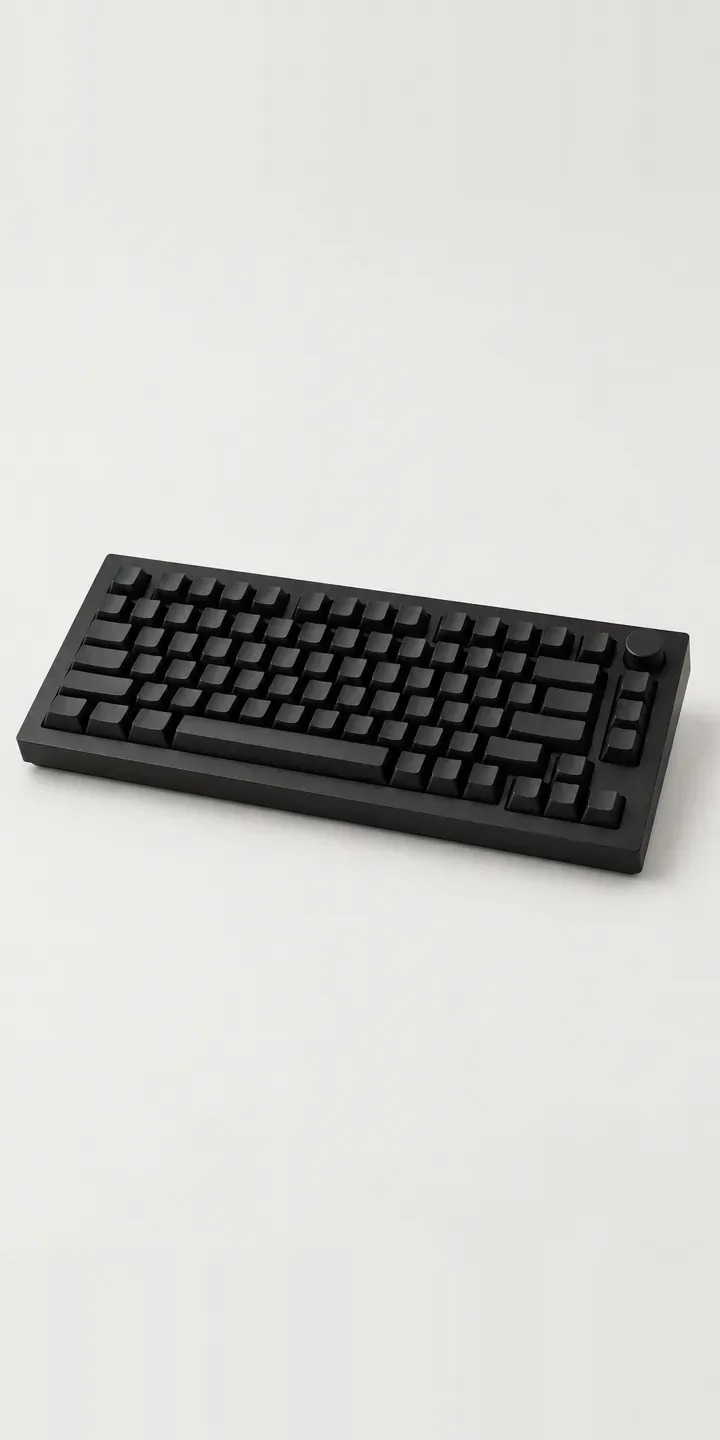
A solid anodised aluminium body with a crisp chamfer and a knurled rotary knob in the top right corner: this illustrative keyboard is built to stay on a desk for years. Case finish and switch type are yours to choose, and the specification goes out as a quote request.
People who buy an aluminium board have usually owned a mechanical keyboard before. They know roughly what they like, and the switch is the decision they care about most. Linear switches travel smoothly to the bottom, tactile ones have a bump you can feel, and clicky ones add an audible click. Each changes how typing feels and sounds, which matters to a writer in a quiet room as much as to a gamer.
PC and gaming hardware Configurator demo
Aluminium Keyboard
- Product
- Aluminium Keyboard
- Colour
- Matte Black
- Switch
- Linear
Illustrative product. The design and images are generated examples, not a real model for sale.
What you can configure
Matte black, silver, navy and slate are the four case finishes in the demo; sage and blush complete the six. Switch type is linear, tactile or clicky. The choice appears in the summary, not the image, which is accurate: the switches sit under the keycaps and look almost identical. What changes is feel and sound, so a production version would describe both clearly.
- Colour: Matte Black, Silver, Navy, Slate
- Switch: Linear, Tactile, Clicky
Why a configurator suits keyboards
Switch choice is a major cause of hesitation with mechanical keyboards. Reviews describe feel in terms that mean little until you have typed on the switch. A configurator can carry short, consistent descriptions of each type, plus a sound clip recorded on this exact board. That is as close as a buyer gets to a test without visiting a shop.
Eighteen builds come out of six finishes and three switch types. For a retailer, that is eighteen stock lines if switches are factory-fitted, or six cases and three switch sets if they ship separately. The configurator works either way, showing the buyer a clear finished product while the warehouse picks the right parts.
Anodised colour is also harder to sell than it looks. Navy and slate sit close together, and aluminium shifts with the angle of the light. Buyers investing in an aluminium board want to know exactly which shade they are getting. Consistent images of every finish, plus a close-up of the chamfer where colour reads most clearly, reduce returns from people who expected something bluer.
How a production version would be built
For a keyboard, images per finish do most of the work. Each case colour is rendered from above and from a low front angle that catches the chamfer and knob. Switches do not need their own product images; they need sound and words. I would add a short audio clip per switch type, recorded on one board, and a close-up of each switch with a keycap removed. On the data side, I need SKUs, finish names, switch details and whether switches ship fitted. Orders go to WooCommerce or Shopify as variants or bundles.
Build sheet for this range
- Colours in the full range: 6 (4 shown in this demo)
- Switch choices: 3
- Combinations to support: 6 × 3 = 18
- Images for one photograph per combination at 3 angles: 54
- Images if switches can be shown as separate layers, at 3 angles: 27
- Data each of the 18 combinations needs: a SKU or variant ID, price, stock or lead time, and any dimensions or specification that change
Questions about keyboard configurators
How can a configurator help buyers choose between linear, tactile and clicky switches?
With short descriptions and sound. Two plain sentences per switch, covering feel and noise, help more than a force curve. A typing clip for each type, recorded on the same board with the same microphone, lets buyers hear the difference. Some retailers also sell a switch tester, which the configurator can offer as an extra.
Should anodised finishes be photographed or rendered?
Rendering usually gives more consistent results, because anodising reflects light in a way that varies between shots. Whichever you choose, keep the light and camera fixed for every finish. A close-up of the chamfered edge is worth adding, since that is where colour and machining quality show most.
Can the configurator handle switches sold separately from the case?
Yes. If switches ship as a separate product, the configurator adds both to the basket and presents them as one keyboard. The summary names the case finish and switch type, so the order is clear to the warehouse and the buyer. Pricing can show the total or each part, depending on how you sell.
Can buyers also choose keycaps or a layout?
Yes, in a production build. Keycap sets work well as image layers over the case, and layout is a product data choice. Each extra option multiplies the combinations, so it is worth planning which choices change the image and which only change the SKU. My overview of how product configurators work explains the difference.
More PC and gaming hardware configurator demos
Curved Ultrawide
Dial Macro Console
Ergonomic Mouse
Featherweight Mouse
Flat Panel Display
Glass Display Case
All PC and gaming hardware configurator demos
A configurator for your keyboards
This demo uses an illustrative product. If you sell keyboards, I can build the same experience around your own range, photography and ordering process, connected to Shopify, WooCommerce or a quote workflow. I reply to enquiries within two UK working days.