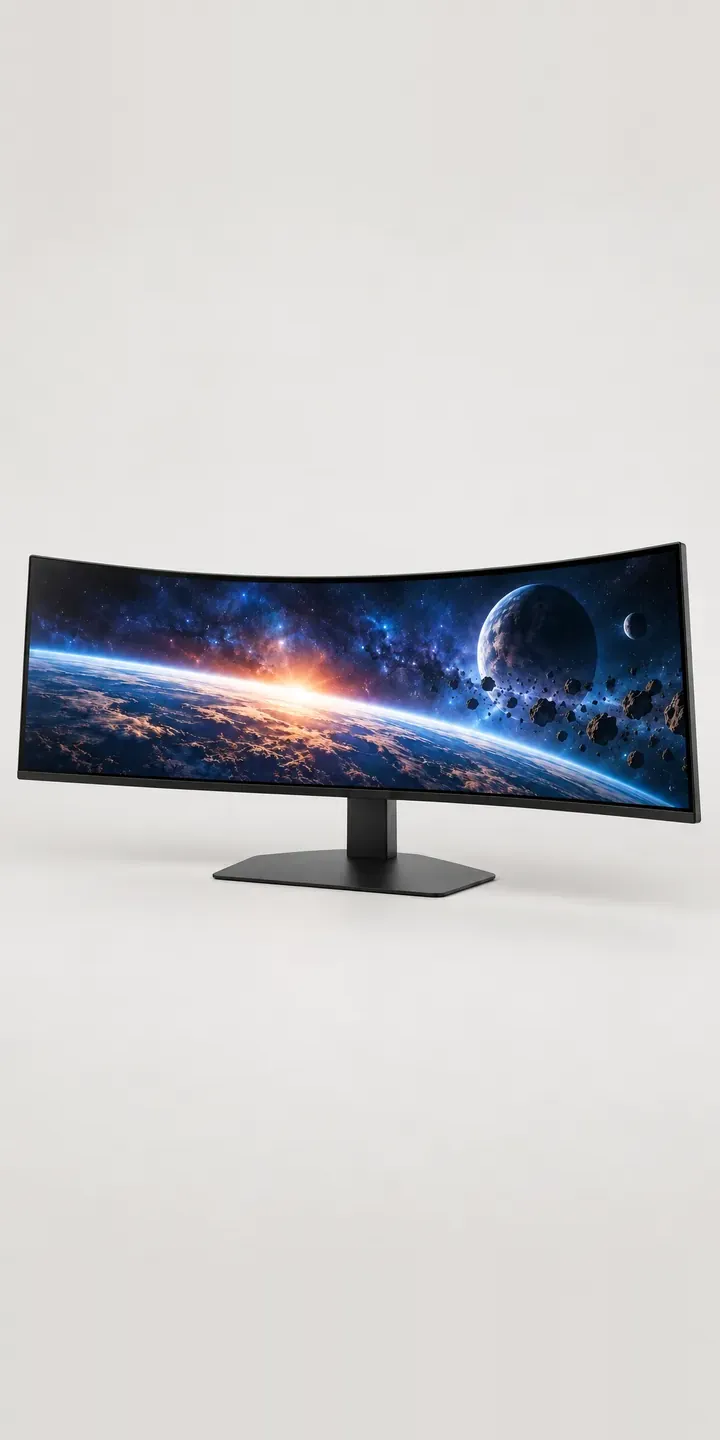
This illustrative ultrawide has a deep curve across a very wide panel and a small control joystick on the lower rear. In the configurator you choose the housing finish and how it is mounted: on its own stand, on an arm or on the wall. The finished set-up goes out as a quote request.
The mount is the decision people underestimate. A wide, curved panel is heavy and deep, and its stand takes up a lot of desk. An arm frees that space but must carry the weight and reach. A wall mount suits sim-racing rigs and fixed trading positions where the screen never moves. Each choice changes how the display sits in the room as much as the finish does.
PC and gaming hardware Configurator demo
Curved Ultrawide
- Product
- Curved Ultrawide
- Colour
- Dark Grey
- Mount
- Stand
Illustrative product. The design and images are generated examples, not a real model for sale.
What you can configure
Dark grey, black, white and silver are the four housings here; navy and sand are the others. The mount choice is stand, arm or wall, and it shows in the summary while the image stays the same. A production version would picture each mount, because buyers want to see the curve's depth from the side, and that depth is what changes between a desk stand and a wall bracket.
- Colour: Dark Grey, Black, White, Silver
- Mount: Stand, Arm, Wall
Why a configurator suits displays
Any housing can go on any of the three mounts. Few retailers photograph a monitor on anything but its own stand, so arm and wall options appear as separate accessory listings with no picture of the combination. Buyers then work out compatibility themselves, checking mounting patterns and weight limits across two product pages.
That is where returns come from. An arm that cannot hold a wide curved panel, or a wall bracket that does not suit the depth of the curve, sends both products back. A configurator that only offers mounts verified for the display removes that risk. It also lets the retailer bundle the mount at the point of choice, rather than hoping the buyer finds it.
Ultrawides also sell into business. Trading floors, control rooms and simulation centres order many identical positions, often with a mix of arms and wall mounts. A quote-based configurator lets the buyer specify each position, attach quantities and send one request. The retailer receives a fit-out list it can price and schedule, not a spreadsheet forwarded from facilities.
How a production version would be built
I would shoot or render each finish front-on and from a three-quarter side view, then composite each mount as a separate layer behind the panel. Three mounts and six finishes then need six panel images and a small set of mount layers rather than eighteen full photographs. The retailer supplies SKUs for display and mounts, the mounting pattern, panel weight and verified compatibility. Retail orders go to a Shopify or WooCommerce basket as a bundle. Business fit-outs go to a quote that can feed a CRM or ERP, which is standard in my configurator integration work.
Build sheet for this range
- Colours in the full range: 6 (4 shown in this demo)
- Mount choices: 3
- Combinations to support: 6 × 3 = 18
- Images for one photograph per combination at 3 angles: 54
- Images if mounts can be shown as separate layers, at 3 angles: 27
- Data each of the 18 combinations needs: a SKU or variant ID, price, stock or lead time, and any dimensions or specification that change
Questions about display configurators
Can a configurator stop customers choosing a monitor arm that cannot hold the display?
Yes. If each arm's weight limit and mounting pattern are in the product data, the configurator can offer only the arms rated for the chosen display. Unsuitable arms are hidden or marked as incompatible. A common compatibility mistake becomes a choice the buyer cannot get wrong.
How do you show a curved monitor's depth in a 2D configurator?
With a side or three-quarter view alongside the front view. The front view sells the width; the side view shows how far the curve projects, which decides whether it fits a shallow desk or sits close to a wall. Each mount can be layered into both views.
Can trading desks or simulation centres configure many positions at once?
That is one of its strengths. The configurator can build a list of positions, each with its own finish, mount and quantity, then send them as one quote request. That list can go straight into your CRM. It replaces the back-and-forth that usually comes with multi-seat fit-outs.
Is a 3D configurator better for curved displays?
It can be, because buyers like to rotate a curved panel and judge its depth. For most retailers, though, two well-chosen image views cover the decision at lower cost. I would start with images and move to 3D only if your range has many mount and accessory combinations.
More PC and gaming hardware configurator demos
Dial Macro Console
Ergonomic Mouse
Featherweight Mouse
Flat Panel Display
Glass Display Case
Glass Showcase Tower
All PC and gaming hardware configurator demos
A configurator for your displays
This demo uses an illustrative product. If you sell displays, I can build the same experience around your own range, photography and ordering process, connected to Shopify, WooCommerce or a quote workflow. I reply to enquiries within two UK working days.