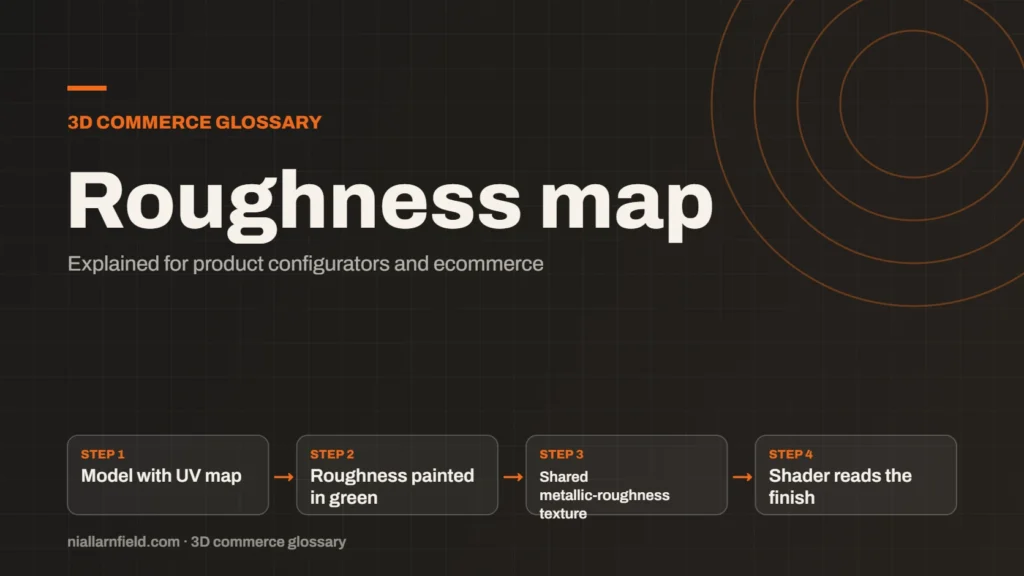
A roughness map is a texture that sets how blurry or sharp a surface’s reflections look. Each pixel controls one spot, so a single material can be glossy in places and matt in others.
Discuss your product rangeTry the demos
What roughness means in a material
Roughness describes how much a surface scatters light when it reflects it. A smooth surface reflects light in a tight, sharp pattern, which gives a clear, mirror-like highlight. A rough surface spreads the same light out, so its highlights look soft and wide.
Roughness is one of the core inputs in the PBR model, which I explain in my PBR guide. The three.js documentation sets its scale from 0.0 for a smooth mirror to 1.0 for fully diffuse. A diffuse surface scatters light equally in every direction, and that gives a matt look.
A roughness map multiplies that single number, pixel by pixel. The map and the number therefore work together, and the map can only scale the number down or keep it the same. If you want the map to decide the value alone, set the number to 1.
- Model with UV map
- Roughness painted in green
- Shared metallic-roughness texture
- Shader reads the finish
How the glTF file stores roughness
In a glTF 2.0 file, roughness is not stored on its own. It shares one texture with metalness, and that combined texture is called the metallic-roughness texture. The Khronos specification puts roughness in the green channel and metalness in the blue channel, so the two values sit side by side.
This layout matters when you export a model from another tool. If a tool writes roughness into a separate image, or swaps the channels, the surface will look wrong in the viewer. A matt sofa may turn glossy, and a steel handle may turn to plastic.
When I prepare a model, I check the channels on every export before it goes live. I do this in a viewer rather than trusting the export log. A quick test catches most channel errors. The wider export steps are part of my 3D model preparation work.
Why roughness matters for configurators
Roughness changes how a finish reads under light, and shoppers notice that difference quickly. A shopper comparing a matt black and a satin black option wants to see the difference before choosing. Roughness shows it without adding any extra geometry to the model.
This matters most for finishes that change the look without changing the shape. Options such as brushed, satin and gloss can share one model, and only the roughness value changes between them. That keeps the file small and makes each option switch fast on a phone.
- Glossy finishes need low roughness values, so their reflections stay sharp and clear.
- Fabric and wood usually need high roughness values, because they scatter light softly.
- Use a map for variation such as scratches or worn edges, and a single number for uniform finishes.
The product configurator service page explains how I set up options like these for a shop. The goal is a finish a shopper can judge from the screen alone, without a physical sample in hand.
Common mistakes with roughness maps
The most common error is inverting the map. Some tools store gloss, which is the opposite of roughness, so a glossy surface turns matt and a matt one turns glossy. Check the source file before you export, and read the label on each map carefully.
- Loading the map as colour data. Roughness is non-colour data, so the colour space should stay linear, and three.js expects that by default.
- Packing it wrongly. If another map overwrites the green channel, the finish changes without any warning in the file.
- Making the map too busy. Noise in a roughness map shows up as uneven gloss or sparkle across the whole surface.
Most of these errors show up in the first test render. I look at each finish under two different lights before I trust it. If the surface looks wrong under one light, I return to the map before changing anything else.
Limits of roughness maps
A roughness map cannot change what a surface reflects on its own. The reflected light still comes from the environment and the lights in the scene. Poor lighting can hide a good roughness setting, and good lighting can hide a poor one.
Roughness is also a simplification of something more complicated. Real surfaces have tiny detail that a single value only approximates. A satin finish can look different at close range than at a distance, and one map cannot capture both views fully.
I test each finish under the lighting the page will use. A finish that reads well in one viewer can look flat in another, so I check each target viewer. Test in the viewers your shoppers actually use, not only the ones your team prefers.
Related terms
- Normal map: A normal map is an image that fakes fine surface detail, such as grooves and small bumps, by changing how light hits a surface.
- Metalness: Metalness is a physically based rendering (PBR) value that says how much a surface behaves like metal.
- Ambient occlusion: Ambient occlusion is a shading effect that darkens creases, corners and contact points where light struggles to reach.
- UV mapping: UV mapping is the process of unwrapping a 3D model's surface onto a flat 2D plane.
- React Three Fiber: React Three Fiber is a React renderer for Three.js.
- model-viewer: model-viewer is Google's open-source web component for showing 3D models on a web page.
- Baked lighting: Baked lighting calculates light ahead of time and stores the result in a texture, called a lightmap.
- Tone mapping: Tone mapping converts the wide range of light values in a 3D scene into the narrower range a screen can show.
- Environment map: An environment map is an image of the surroundings that a 3D scene uses for lighting and reflections.
- Rules engine: A rules engine is the logic inside a product configurator that decides which option combinations are allowed.
Browse all the definitions in the 3D commerce glossary.
Common questions
What does a roughness map do?
It sets how sharp or blurred the reflections look in each area of a surface. Low values give mirror-like gloss, and high values give a soft, matt look. It lets one material vary across its surface, such as worn edges or fingerprints.
Is roughness the same as glossiness?
Not quite, although the two are opposites. Roughness is high for matt surfaces and low for glossy ones. Some tools store gloss instead, so check the file before you load it into a viewer, or the finish will be reversed.
Which glTF channel holds roughness?
In glTF 2.0, roughness sits in the green channel of the metallic-roughness texture. Metalness uses the blue channel of that same texture. Check the specification before you pack your own maps, because a wrong channel changes the finish.