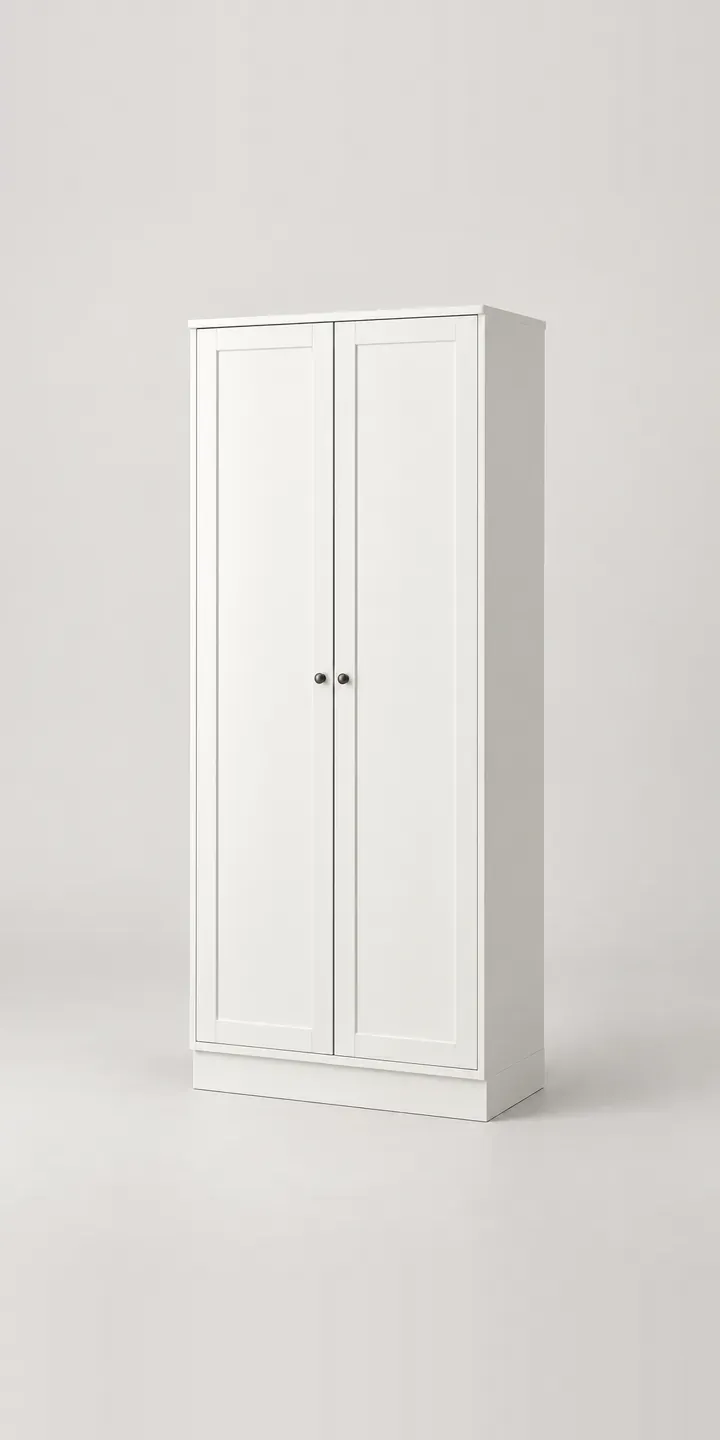
Flat doors, a slim minimal handle and a recessed plinth: the illustrative tall cabinet in this demo is deliberately plain. That puts the attention on colour and door type. Make both choices and the cabinet is ready to quote.
A tall cabinet does one of two jobs, and the door choice reveals which. Glass doors make it a display piece for glassware, books or ceramics, so the interior and its shelves become part of the look. Solid doors hide coats, cleaning kit and everything else a hallway collects. Colour sits on top of that decision. Painted finishes like sage and grey beige are often chosen to match or contrast with a wall that is already painted.
Furniture Configurator demo
Tall Cabinet
- Product
- Tall Cabinet
- Colour
- White
- Doors
- Solid
Illustrative product. The design and images are generated examples, not a real model for sale.
What you can configure
Clicking through white, dark grey, grey beige and sage shows the same cabinet in each painted finish. Black brown and an oak effect are the remaining two. Solid or glass doors are written into the summary, though the image keeps one door type. A production version would show both, because glass turns the cabinet from a block of colour into a frame around its contents.
- Colour: White, Dark Grey, Grey Beige, Sage
- Doors: Solid, Glass
Why a configurator suits cabinets
Tall cabinets are awkward to return. They are heavy, they need two people to move, and a colour that looked right on a phone can clash with a painted wall at home. Showing the cabinet in every colour at full size, rather than as a swatch dot, narrows that gap before the order is placed.
Door type doubles the range to twelve cabinets, and glass doors need their own photography because the interior shows through. Retailers often photograph the glass version in one colour only. That leaves buyers unsure how sage or dark grey looks with the shelves on show, so they either email to ask or default to solid doors.
There is also a safety conversation that belongs on the product page. Tall cabinets should be fixed to the wall, and buyers need to know what fixings are supplied and what their wall needs. A configurator can surface that information for the chosen build and repeat it in the order confirmation, where the person assembling the cabinet will see it.
How a production version would be built
For a cabinet with two door types, I would render each colour twice from a 3D model, once solid and once glass. Glass needs rendering or very careful photography, because reflections and the shelves behind must look the same in every colour. Twelve renders cover the full range, and a styled interior can be added to the glass versions. The retailer supplies colour names, paint or foil references, dimensions, shelf counts and wall-fixing details. On Shopify or WooCommerce the door type becomes a variant, so it reaches the basket like any other option. My storage configurator demo shows a similar build.
Build sheet for this range
- Colours in the full range: 6 (4 shown in this demo)
- Doors choices: 2
- Combinations to support: 6 × 2 = 12
- Images for one photograph per combination at 3 angles: 36
- Images if door types can be shown as separate layers, at 3 angles: 24
- Data each of the 12 combinations needs: a SKU or variant ID, price, stock or lead time, and any dimensions or specification that change
Questions about cabinet configurators
Can the configurator show glass doors with the shelves visible behind?
Yes. Glass doors are rendered with the interior shelves in place, and optionally a few styled objects to show scale. The key is consistency: the same interior styling in every colour, so buyers compare the cabinet rather than the props. A plain interior view is also useful for buyers who want to see the shelf positions.
How close will painted colours like sage look to the real finish?
Close, but not identical, because screens vary. I calibrate renders against a physical sample in daylight, and the configurator can offer a sample request beside the swatch. For painted furniture, naming a matching wall paint shade, if your supplier provides one, helps buyers coordinate with their rooms.
Can wall-fixing information appear for the chosen cabinet?
Yes. Fixing details are product data like anything else. The configurator can show the supplied fixings and suitable wall types for the chosen cabinet, and include them in the confirmation email. For tall furniture this belongs on the product page rather than only in the assembly instructions.
Can the same configurator cover the rest of a storage range?
Yes. If your sideboards, bookcases and low cabinets share colours and door types, one configurator can present them all with a shared swatch set. A buyer who chooses sage for the tall cabinet can see the low cabinet in sage too, and add both to the basket together.
More furniture configurator demos

All furniture configurator demos
A configurator for your cabinets
This demo uses an illustrative product. If you sell cabinets, I can build the same experience around your own range, photography and ordering process, connected to Shopify, WooCommerce or a quote workflow. I reply to enquiries within two UK working days.