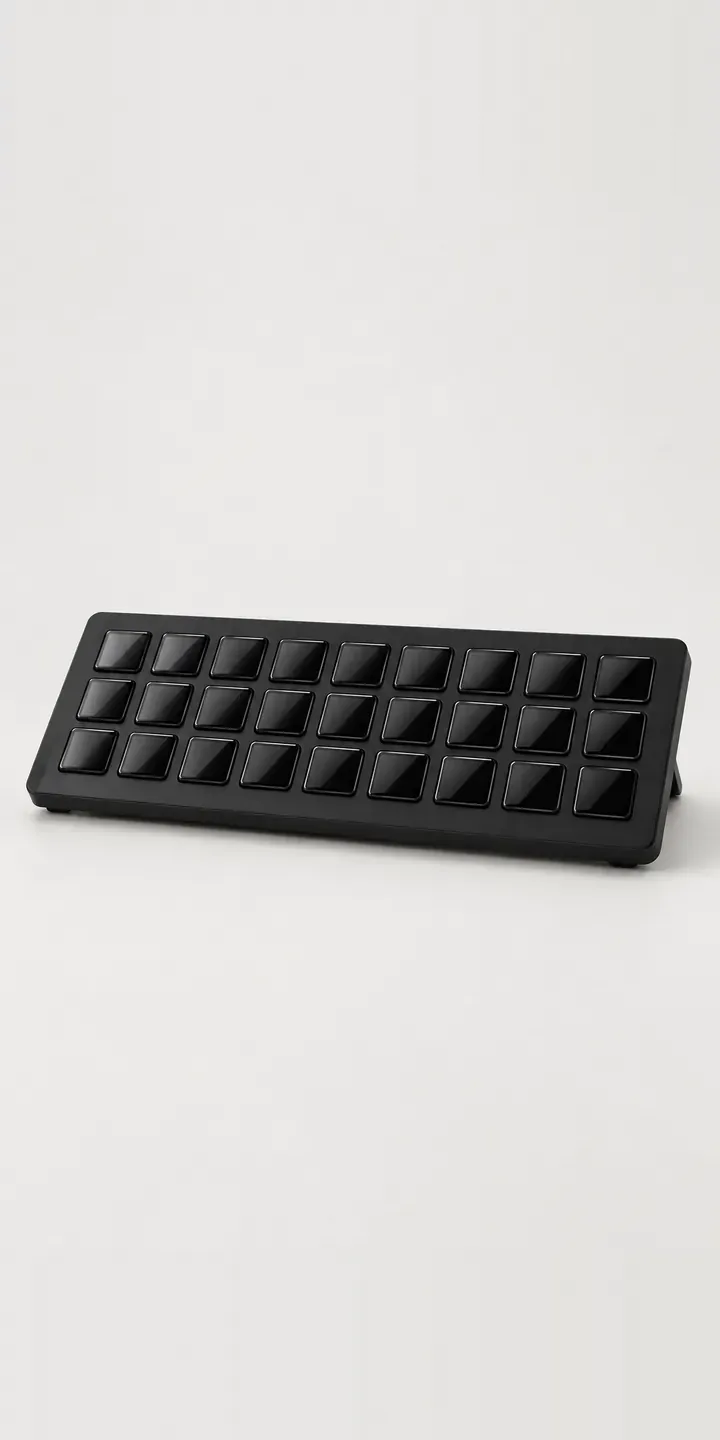
Thirty-two square glass display keys sit in a grid behind a thin bezel on this illustrative macro keypad. Each key can show its own icon, so the device becomes a control surface for scenes, cuts, sound effects or editing shortcuts. Below, you can pair a finish with a stand and send the build off as a quote.
Buyers of a keypad this size have outgrown a smaller one, or they know they need many controls at once. Broadcasters map scene switches and audio; video editors map tools and markers. The key count is fixed here, so the decision is about where the device sits. The stand angle decides whether the keys are readable at a glance from a seated position.
PC and gaming hardware Configurator demo
Wide Macro Keypad
- Product
- Wide Macro Keypad
- Colour
- Matte Black
- Stand
- Low
Illustrative product. The design and images are generated examples, not a real model for sale.
What you can configure
Matte black, white, cool grey and navy are the four finishes in the demo; clay and sage are the remaining two. The stand is low or upright, recorded in the summary but not shown in the image here. For a keypad with display keys the angle matters more than usual. Glass keys at a low angle can catch overhead light, while an upright stand faces the user directly.
- Colour: Matte Black, White, Cool Grey, Navy
- Stand: Low, Upright
Why a configurator suits macro keypads
Streaming and editing hardware is often bought on recommendation, after someone spots it in a creator's set-up. Buyers arrive knowing roughly what they want and look for confirmation. A configurator gives them a clean view of each finish and stand, with key count and connection details beside it, so they can commit without a long comparison.
Finishes like clay and sage show how much of this market is about the look of the desk. Creators coordinate their kit because it appears on camera, and a black keypad on a pale desk stands out in a way they may not want. Twelve finish and stand pairings, each shown under the same light, help buyers match what they already own.
There is a business market too. Broadcast studios, agencies and colleges teaching media production buy several units at once and want them set up identically. A quote route with quantities, plus a saved configuration they can reuse, suits that buyer. Spare stands or cables can be added at the quote stage rather than as separate orders.
How a production version would be built
An image-based build would render each finish from a fixed three-quarter view, with the stand as a separate layer beneath the keypad, so low and upright stands work with every colour. The keys should show a neutral, consistent icon set, since busy screen content distracts from the finish. SKUs, finish names, stand types, dimensions and connection details make up the product data. Retail orders map to Shopify or WooCommerce variants, while studio and education orders go to a quote. Rendering through a 3D product visualisation pipeline keeps the glass keys consistent across finishes.
Build sheet for this range
- Colours in the full range: 6 (4 shown in this demo)
- Stand choices: 2
- Combinations to support: 6 × 2 = 12
- Images for one photograph per combination at 3 angles: 36
- Images if stands can be shown as separate layers, at 3 angles: 24
- Data each of the 12 combinations needs: a SKU or variant ID, price, stock or lead time, and any dimensions or specification that change
Questions about macro keypad configurators
What should the display keys show in configurator images?
A simple, neutral set of icons, identical across every finish. Realistic icons make it clear that the keys are displays, which is the product's main feature. Busy or brightly coloured content distracts from the finish and makes swatches harder to compare. A separate detail view can show the keys in use with richer content.
Can the stand be shown as a separate layer?
Yes, and it keeps the asset list short. Each stand is rendered on its own from the keypad's camera position, then placed beneath any finish. Two stands and six finishes need six keypad images and a pair of stand layers, or one pair per finish if stands are colour-matched. A third stand later means one more layer.
Can studios and colleges order several identical units?
That suits a quote route. The configurator can end in a request with quantity, organisation and delivery details. A saved configuration with a reference means later orders match the first batch exactly. That suits broadcast teams and education buyers who need consistent kit across several rooms.
Will glass keys look right in product images?
With care. Glass picks up reflections, and at the wrong angle the icons vanish under glare. Rendering lets reflections be controlled so the keys still read as glass. I would check the images at small sizes as well, since a grid of 32 keys can turn into visual noise on a phone screen.
More PC and gaming hardware configurator demos
Aluminium Keyboard
Curved Ultrawide
Dial Macro Console
Ergonomic Mouse
Featherweight Mouse
Flat Panel Display
All PC and gaming hardware configurator demos
A configurator for your macro keypads
This demo uses an illustrative product. If you sell macro keypads, I can build the same experience around your own range, photography and ordering process, connected to Shopify, WooCommerce or a quote workflow. I reply to enquiries within two UK working days.