Tinted glass hides a build until it is lit. This illustrative chassis sets a tinted glass front into a steel frame, with a shroud running along the lower interior to cover the power supply. Its frame finish and fan count are set here, and the build ends in a quote request.
For the buyer, tint changes what the case is for. With lighting on, the components glow through; with lighting off, the front reads as a dark, plain slab. That suits people who want a gaming PC in the evening and something discreet during the working day. The decision is less about frame colour alone and more about how frame and tinted front look together, lit and unlit.
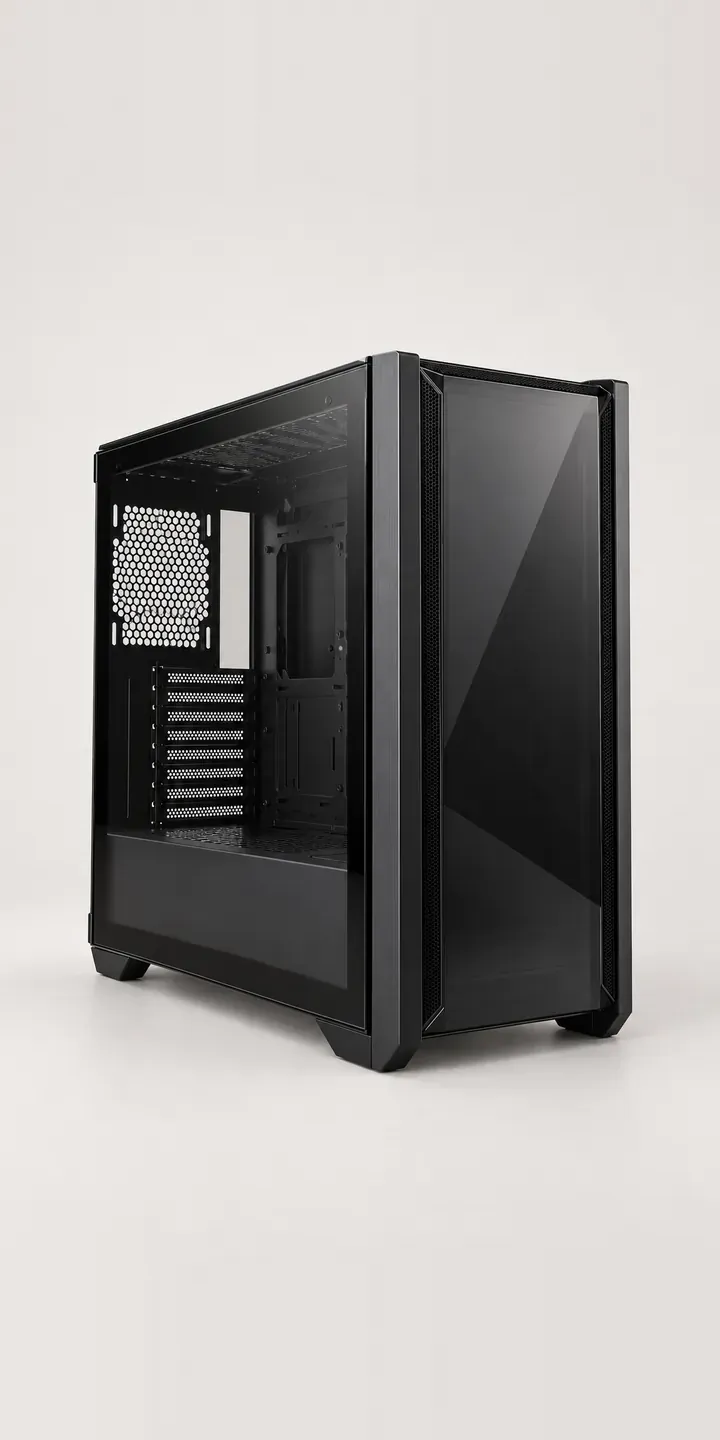
PC and gaming hardware Configurator demo
Tinted Glass Chassis
- Product
- Tinted Glass Chassis
- Colour
- Matte Black
- Fans
- 3 Fans
Illustrative product. The design and images are generated examples, not a real model for sale.
What you can configure
Choose from matte black, white, gunmetal and silver, the first four of six finishes; deep red and navy are the others. Fans come in packs of three or four, logged in the summary while the image stays the same. On a tinted front, fan count is partly visual. Each lit fan is a point of light behind the glass, so the fourth fan changes the look as well as the cooling.
- Colour: Matte Black, White, Gunmetal, Silver
- Fans: 3 Fans, 4 Fans
Why a configurator suits PC cases
Tinted cases are among the hardest products to sell from one image. Photographed unlit, they look like a black box. Photographed lit, they show a particular build and lighting scheme the customer will not receive. A configurator can show both states for every finish, so the buyer sees the case as it will arrive and as it could look once built.
Many tinted cases are sold inside complete systems rather than on their own. A system integrator offering prebuilt gaming PCs usually starts with the case, then moves through processor, graphics card, memory and storage. The case is the first and most visual step. If it looks clear and confident, the customer carries on through the technical choices; if it looks like a stock photo, they compare elsewhere.
For integrators, accuracy matters as much as appearance. Six finishes and two fan packs is twelve case options before any components, and each must map to the right chassis code on the build sheet. A configurator turns those choices into structured data the workshop can build from, which means fewer wrong colours leaving the bench.
How a production version would be built
An image-based build would use two renders per finish: one unlit, showing the tint and frame, and one lit with a neutral reference build behind the glass. Fan packs are composited as layers, so the lit view shows three or four glowing fans in the right mounts. Renders come from the same 3D product visualisation set-up, so every finish matches. The integrator supplies chassis codes, finish names, fan pack contents and any rules linking the case to other components. Orders can land in a Shopify or WooCommerce basket, or as a priced quote.
Build sheet for this range
- Colours in the full range: 6 (4 shown in this demo)
- Fans choices: 2
- Combinations to support: 6 × 2 = 12
- Images for one photograph per combination at 3 angles: 36
- Images if fan packs can be shown as separate layers, at 3 angles: 24
- Data each of the 12 combinations needs: a SKU or variant ID, price, stock or lead time, and any dimensions or specification that change
Questions about PC case configurators
Should the configurator show the case lit or unlit?
Both, as a toggle. The unlit view is what arrives in the box and what sits on the desk during the day. The lit view is why most people buy a tinted case. Showing only one sets the wrong expectation, and that gap between image and reality is a common cause of disappointed buyers.
Can a case configurator lead into a full PC builder?
Yes. The case can be step one of a longer configurator covering processor, graphics card, memory, storage and cooling. Each later step can be filtered by what fits the chosen case. The final summary doubles as a build sheet for the workshop and a clear order for the customer.
How do you make RGB lighting look believable in product images?
Keep it restrained and consistent. A neutral, single-colour glow behind the glass reads as realistic, while rainbow effects look like advertising. I would render the lit view with one lighting scheme across every finish, so buyers compare frame colours rather than light shows.
Will buyers see the difference between three and four fans through tinted glass?
In the lit view, yes. Each fan pack is a separate layer, so three or four lit fans appear in the correct positions. Unlit, the front barely changes between packs, and the option note should say so. Buyers then know the fourth fan mainly affects the look when lighting is on.
More PC and gaming hardware configurator demos
Triple-Fan Graphics

Vented Mouse
Wide Macro Keypad
Aluminium Keyboard
Curved Ultrawide
Dial Macro Console
All PC and gaming hardware configurator demos
A configurator for your PC cases
This demo uses an illustrative product. If you sell PC cases, I can build the same experience around your own range, photography and ordering process, connected to Shopify, WooCommerce or a quote workflow. I reply to enquiries within two UK working days.