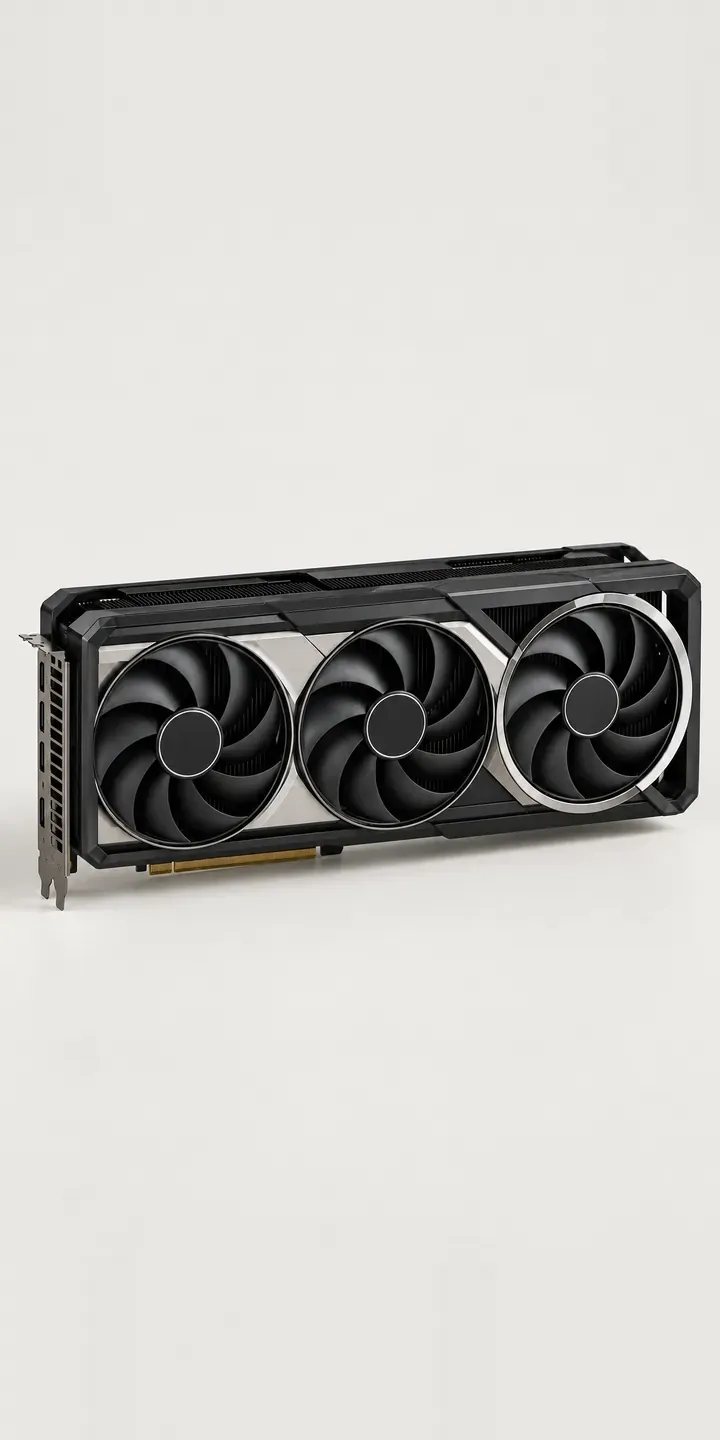
An illustrative triple-fan graphics card, set in a configurator where the shroud finish and memory size are chosen before a quote is sent. Three large fans run along the shroud, with heatsink fins visible through its open sections.
Card buyers start with performance, but the shortlist is often settled by fit and looks. Length and slot thickness decide whether the card goes in the case at all. After that, finish matters more than it once did, because many builds sit behind glass and the card is the largest part on show. A white or champagne shroud only makes sense if the rest of the build follows.
PC and gaming hardware Configurator demo
Triple-Fan Graphics
- Product
- Triple-Fan Graphics
- Colour
- Black & Silver
- Memory
- 16 GB
Illustrative product. The design and images are generated examples, not a real model for sale.
What you can configure
Black and silver, white, gunmetal and silver are the shroud finishes in this demo, with champagne and navy completing the set of six. Memory is offered at 16 or 32 GB. That choice sits in the summary rather than the image, which is true to the hardware: the two cards would look identical, so the configurator's job is to explain why the extra memory matters.
- Colour: Black & Silver, White, Gunmetal, Silver
- Memory: 16 GB, 32 GB
Why a configurator suits graphics cards
Six finishes and two memory sizes make twelve card variants, each with its own SKU and price. On a typical listing they appear as a long dropdown of near-identical names. Buyers pick the wrong one, or leave to check a forum. A configurator replaces that list with two clear choices and an image of the card they are actually buying.
Memory size is the decision that most needs explaining. Gamers at high resolutions, 3D artists and people running local AI models each have different reasons to want 32 GB. Short, plain guidance next to each option, written by the retailer, means the choice is made on use rather than on the bigger number.
The larger opportunity is for system integrators. In a prebuilt PC the card is never chosen alone: its finish and length constrain the case, the cooling and even the colour of the motherboard. A configurator that understands those links can warn when a card is too long for the chosen case, or suggest matching white components. That turns a parts list into a build the customer can see.
How a production version would be built
For a graphics card, image swaps work well because memory size changes nothing visible. One image per finish covers the range, plus a top view of the fans and a side view of the backplate. The retailer supplies SKUs, finish names, memory sizes, card length and slot width. Those dimensions, kept as clean configurator product data, are what make compatibility checks against cases possible. The basket connects to Shopify or WooCommerce, and integrator quotes can go straight to a CRM or ERP.
Build sheet for this range
- Colours in the full range: 6 (4 shown in this demo)
- Memory choices: 2
- Combinations to support: 6 × 2 = 12
- Images for one photograph per combination at 3 angles: 36
- Images if memory sizes can be shown as separate layers, at 3 angles: 24
- Data each of the 12 combinations needs: a SKU or variant ID, price, stock or lead time, and any dimensions or specification that change
Questions about graphics card configurators
Can a configurator check whether a graphics card fits a customer's case?
Yes, if both products have reliable dimensions. The card needs length, height and slot width; the case needs maximum GPU length, ideally with and without a front radiator fitted. The configurator compares them and warns before the order is placed. The check is only as good as that data, so it is worth auditing first.
How should memory options be presented when the cards look the same?
With a short explanation rather than a picture. Two lines per option, written for real uses such as high-resolution gaming, rendering or AI work, help more than a spec table. The summary records the exact SKU, so the buyer and the warehouse both see which card was chosen.
Can it show the card installed inside a build?
Yes, as a second view. A render of the card mounted in a reference case, in each finish, helps buyers judge how it will look behind glass. A full 3D build could place the card inside the customer's chosen case, which suits integrators selling complete systems.
Will metallic and white shrouds photograph consistently?
They can, with care. Brushed silver, gunmetal and champagne all change with light direction, and gloss white picks up studio reflections. Shooting every finish under the same lighting rig, or rendering from CAD files, keeps them comparable. I would avoid mixing photographs and renders within one set of swatches.
More PC and gaming hardware configurator demos

All PC and gaming hardware configurator demos
A configurator for your graphics cards
This demo uses an illustrative product. If you sell graphics cards, I can build the same experience around your own range, photography and ordering process, connected to Shopify, WooCommerce or a quote workflow. I reply to enquiries within two UK working days.