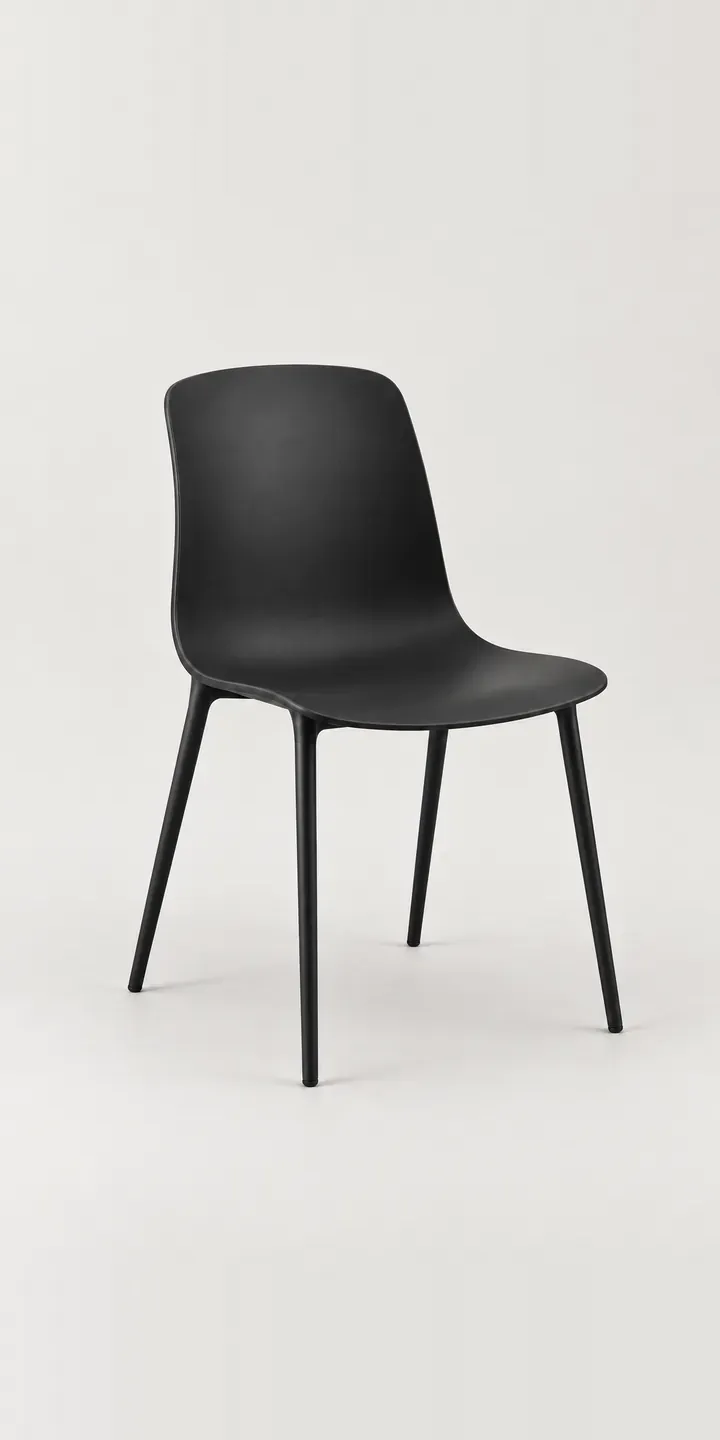
Slim legs and a gently curved back shell give this example bistro chair its café look. Choose a shell colour, pick steel or wood legs, and send the build as a quote.
Bistro chairs live in rows. On a pavement terrace or round a kitchen table, nobody sees one on its own, so a colour is judged as a repeated line. Brick red reads warm and Parisian, while grey and black stay neutral against busy interiors. Leg material shifts the style. Steel keeps the chair light and urban; wood pulls it towards a homely kitchen.
Furniture Configurator demo
Bistro Chair
- Product
- Bistro Chair
- Colour
- Black
- Legs
- Steel
Illustrative product. The design and images are generated examples, not a real model for sale.
What you can configure
The swatches run through black, white, grey and brick red, four of six shell colours. Steel or wood legs are chosen and listed in the summary, with the image keeping one leg type for now. A production version would swap the legs visually, since a wooden leg under a brick red shell looks very different from steel under the same colour.
- Colour: Black, White, Grey, Brick Red
- Legs: Steel, Wood
Why a configurator suits chairs
Bistro chairs are usually bought with a table, and the table has its own finishes. Six colours on two leg types make twelve chairs, a small enough range to photograph, but the buyer is really choosing a set. Retail photography rarely shows the exact set they want. A configurator can place the chosen chairs beside a matching table, which is how they will be seen.
For hospitality, the replacement order matters as much as the first. Chairs get damaged, and a café wants to reorder the same colour and leg finish without specifying everything again. A saved configuration with exact references makes that a quick job and keeps the terrace consistent. Mixed batches on one terrace look careless to customers.
Home buyers are matching a kitchen. Sand and dusty blue sit well with painted cabinetry, and black steel legs echo industrial lighting. Showing each pairing honestly, rather than one hero colour, is what persuades someone choosing four or six chairs at once. Brick red on oak legs makes a very different kitchen from brick red on black steel.
How a production version would be built
Layering suits this chair. The shell is shot or rendered once per colour, each leg set once per material, and the configurator composites them from a fixed camera angle. Twelve combinations come from eight images, and a new leg finish later costs one image set rather than six. The data set is short: colour and leg references, stock by leg type and any table pairings. Retail orders go to a basket through the Shopify integration; café orders go to a quote with quantities.
Build sheet for this range
- Colours in the full range: 6 (4 shown in this demo)
- Legs choices: 2
- Combinations to support: 6 × 2 = 12
- Images for one photograph per combination at 3 angles: 36
- Images if leg types can be shown as separate layers, at 3 angles: 24
- Data each of the 12 combinations needs: a SKU or variant ID, price, stock or lead time, and any dimensions or specification that change
Questions about chair configurators
Can the configurator show the chairs with a matching table?
Yes. A table can be configured alongside the chairs, with its own top and base finishes, and both go into one order. For bistro furniture this mirrors how people shop, because the chairs are rarely chosen in isolation from the table they will sit around.
How does a café reorder the same chair months later?
Through a saved build or their account history. Colour, leg material and references load exactly as before, and the order goes straight through. If a colour has left the range, the configurator flags it so the café can choose a close match or buy remaining stock.
Is it worth showing steel and wood legs as separate images?
It is. Leg material changes the chair's character more than buyers expect, especially on lighter shells. With layered images it costs one extra image set per leg type, not one per colour. The saving over full photography is large, and the buyer sees what will arrive.
Can hospitality enquiries go to our CRM instead of the shop?
They can. Retail buyers check out through the basket, while hospitality builds with quantities go to a quote form that posts into your CRM as a structured record. Your sales team receives colour, legs and quantity as fields rather than free text.
More furniture configurator demos
All furniture configurator demos
A configurator for your chairs
This demo uses an illustrative product. If you sell chairs, I can build the same experience around your own range, photography and ordering process, connected to Shopify, WooCommerce or a quote workflow. I reply to enquiries within two UK working days.