Flush crossing dividers and a thin back panel form the illustrative cube shelving unit in this configurator. Choose a finish and a grid, from a small 2 x 2 to a wall-scale 5 x 5, and request a quote.
Cube shelving is bought for what goes in it. Records, books, toy baskets and plants all suit square compartments, and the grid size is really a decision about how much of that a household owns. A 2 x 2 is a side table with storage, while a 5 x 5 is a wall or a room divider. Finish follows the room: white and light grey often for playrooms, black brown and oak effect where the shelving sits in a living space.
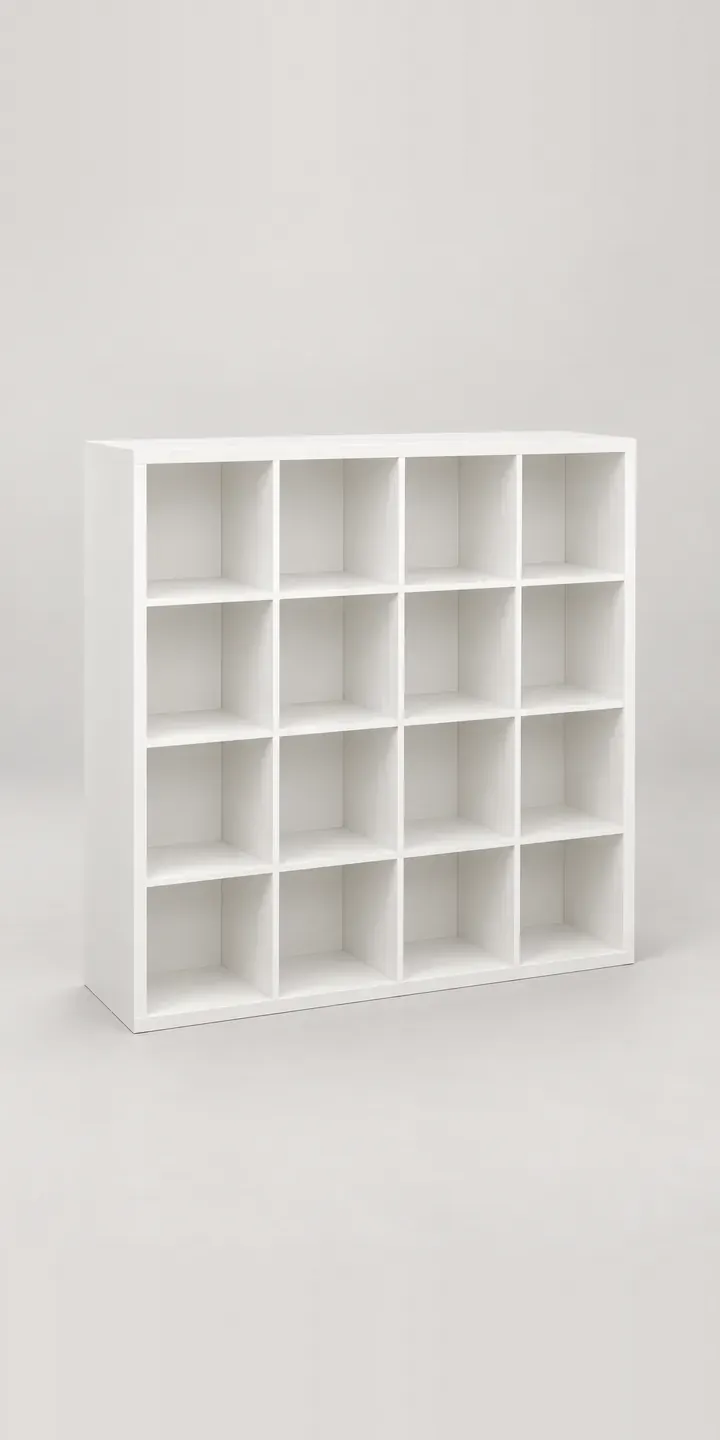
Furniture Configurator demo
Cube Shelving
- Product
- Cube Shelving
- Colour
- White
- Grid
- 2 x 2
Illustrative product. The design and images are generated examples, not a real model for sale.
What you can configure
Four finishes are clickable: white, black brown, oak effect and light grey. Pale pink and navy are the brighter options held for the full range. Grid size is logged as 2 x 2, 4 x 4 or 5 x 5, with the image fixed on one grid. Grid is the choice with consequences. It runs from four compartments to twenty-five, and turns the unit from a piece of furniture into part of the room.
- Colour: White, Black Brown, Oak Effect, Light Grey
- Grid: 2 x 2, 4 x 4, 5 x 5
Why a configurator suits cube shelfs
Cube shelving makes its money on inserts. Doors, drawers, baskets and backing panels fill some compartments and leave others open, and each insert comes in its own colours. A 5 x 5 grid has twenty-five slots to fill. Letting the buyer click an insert into a cube, and see the result, turns a single shelving sale into a full storage order.
The base range is already wide at eighteen units. Add a few insert types in several colours and the possible arrangements go far beyond what any photo shoot can cover. Compositing makes it manageable, because each insert is one layer reused in every compartment, and the shelving frame is drawn only once per finish and grid.
Room-divider use raises a detail worth showing. When the unit stands free, both sides are visible and the back panel becomes a face. Buyers splitting a studio flat want to see what the back looks like, and whether inserts can face both ways. A configurator can show a rear view alongside the front with one extra image per finish.
How a production version would be built
Cube shelving is the classic case for layered compositing. The frame is rendered once per finish and grid size, and each insert is a separate layer that snaps into any compartment. The buyer clicks inserts into place, and the parts list updates with each one. The retailer supplies grids, finishes, insert types and colours, compartment dimensions, and rules such as which inserts fit which grid. On Shopify or WooCommerce, the unit and its inserts go to the basket as separate lines, so stock is tracked per item.
Build sheet for this range
- Colours in the full range: 6 (4 shown in this demo)
- Grid choices: 3
- Combinations to support: 6 × 3 = 18
- Images for one photograph per combination at 3 angles: 54
- Images if grids can be shown as separate layers, at 3 angles: 27
- Data each of the 18 combinations needs: a SKU or variant ID, price, stock or lead time, and any dimensions or specification that change
Questions about cube shelf configurators
Can buyers place drawers and baskets in individual cubes?
Yes, and this is where a production build earns its keep. Each compartment becomes a slot, and each insert is a layer that can be dropped into it. The configurator checks fit, updates the price and adds the insert to the order. The demo records grid size and finish only, but inserts are usually the reason a cube shelving retailer wants a configurator.
Can it show the back of the unit for room divider use?
Yes. A rear view can be rendered for each finish and grid, with the back panel shown as it really is. For units sold as dividers, I would make the rear view a toggle beside the main image, and allow double-sided inserts where the range includes them.
How do you handle child safety and wall fixing for tall grids?
Through product data and clear messaging. Larger grids can show the supplied anti-tip fixings and a note on wall types, and the order confirmation can repeat it. For playroom use, the configurator can also suggest keeping heavier inserts in the lower rows, if that matches your own guidance.
Does a shelving configurator need 3D?
Usually not. Cube grids are geometric and the camera angle can stay fixed, so layered 2D images handle most ranges well and load quickly on phones. 3D becomes worthwhile if buyers need to rotate a free-standing divider or plan it in a room. My product configurator service page explains how I choose between them.
More furniture configurator demos
All furniture configurator demos
A configurator for your cube shelfs
This demo uses an illustrative product. If you sell cube shelfs, I can build the same experience around your own range, photography and ordering process, connected to Shopify, WooCommerce or a quote workflow. I reply to enquiries within two UK working days.