The stand mixer in this demo is an illustrative design with a tilt-back head and a weighing control panel in the base. Choose a finish and a bowl size, and the summary follows each change.
Bakers who want built-in weighing are usually serious about it. They make bread by weight, scale recipes up for the weekend and push the mixer with stiff doughs that cheaper machines struggle with. The bowl decision follows from that: how much dough per batch, and whether the head still tilts back under the wall cupboards. Finish is the easier choice, often matched to a range cooker or a set of steel pans.
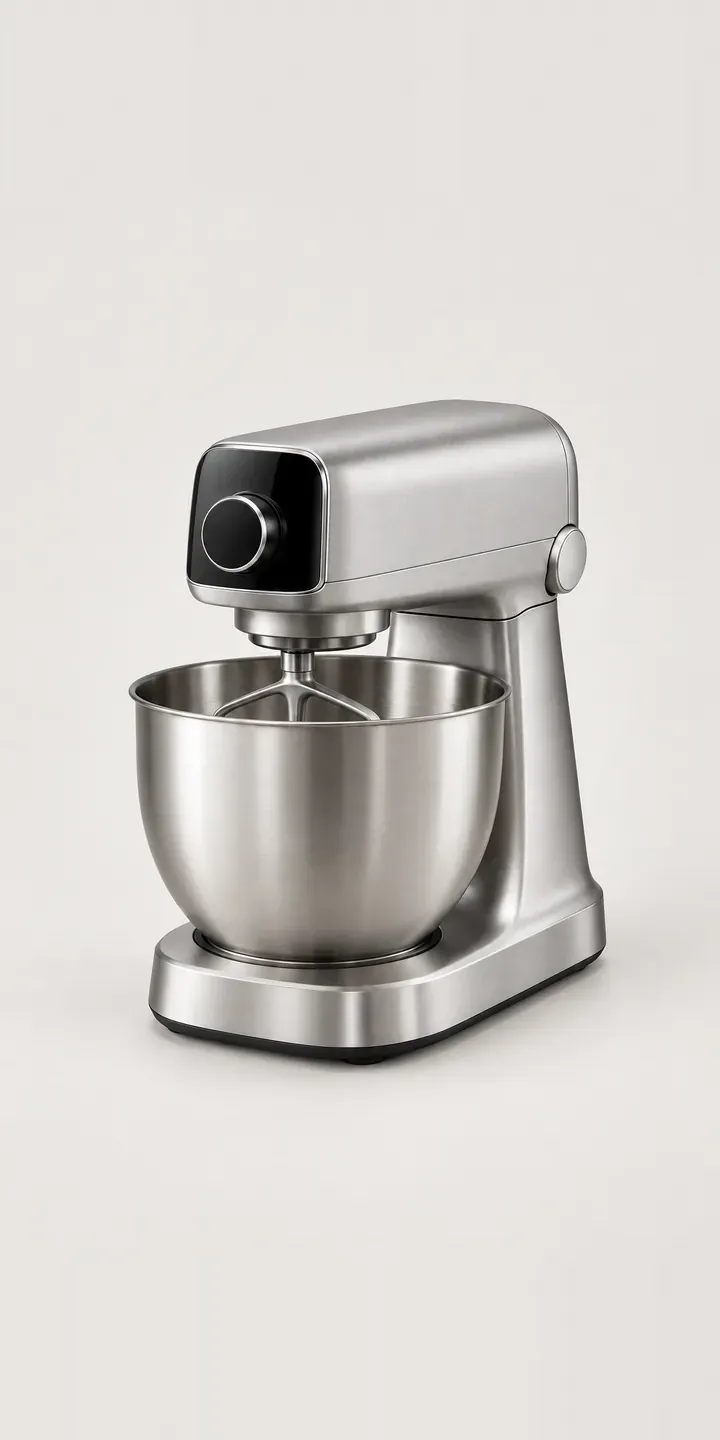
Kitchen Configurator demo
Weighing Stand Mixer
- Product
- Weighing Stand Mixer
- Colour
- Brushed Steel
- Bowl Size
- 5.7 L
Illustrative product. The design and images are generated examples, not a real model for sale.
What you can configure
Four finishes change the picture: brushed steel, matte black, white and charcoal, with sage and denim to follow in production. The bowl option, 5.7 L or 6.6 L, is noted in the summary rather than shown. For bread bakers the difference is real. The larger bowl takes bigger dough batches and double cake mixes, while the smaller one is easier to lift, wash and store.
- Colour: Brushed Steel, Matte Black, White, Charcoal
- Bowl Size: 5.7 L, 6.6 L
Why a configurator suits stand mixers
Stand mixers are long-term purchases, and buyers research them carefully. They compare motor behaviour under load, the attachment hub, bowl capacity and whether the head tilts or the bowl lifts. They rarely compare colours side by side, because most product pages do not let them. A configurator puts every finish at the same angle, so the choice becomes a fair comparison.
The base range is 12 combinations, and attachments multiply that quickly. Dough hooks, flat beaters and whisks usually come in the box, but pasta rollers, mincers and spiralisers are sold separately. A configurator can bundle the mixer with the attachments a baker actually wants, turning a single sale into a complete kit with every part on one order.
There is a trade side too. Micro-bakeries, cafés and cookery schools sometimes buy domestic-style stand mixers in small numbers for light production. They care about bowl size, spare bowls and warranty terms for business use. A quote route alongside the basket lets them ask those questions without abandoning the order halfway.
How a production version would be built
For a tilt-head mixer, I would render each finish with the head down for the hero image and tilted back in a second view, so buyers see the clearance needed. The two bowls can be separate layers, which keeps the image count low. The brand supplies variant codes, assembled and tilted heights, bowl capacities and the attachment list with compatibility notes. Accessories become optional extras in the summary. The finished build can go to a basket, a quote, or a saved configuration the buyer returns to once they have measured their cupboards.
Build sheet for this range
- Colours in the full range: 6 (4 shown in this demo)
- Bowl Size choices: 2
- Combinations to support: 6 × 2 = 12
- Images for one photograph per combination at 3 angles: 36
- Images if bowl sizes can be shown as separate layers, at 3 angles: 24
- Data each of the 12 combinations needs: a SKU or variant ID, price, stock or lead time, and any dimensions or specification that change
Questions about stand mixer configurators
Can the configurator show how much height the mixer needs with the head tilted?
Yes. A second image with the head raised, plus the tilted height in centimetres, tells buyers whether it will work under their wall cupboards. It is one of the most common pre-sale questions for tilt-head mixers, and answering it on the page saves a return when the head meets a cupboard on first use.
Can bakers build a kit with attachments in one go?
They can. Attachments become optional extras after the finish and bowl, each with an image, a code and a short line on what it does. The summary shows the full kit, and the basket receives each item as its own line. Kit pricing can be applied if you sell bundles differently.
Should the weighing display appear in the product images?
It should, because it is the feature that sets this mixer apart. A close detail of the control panel, ideally showing a reading, helps buyers understand that they can weigh straight into the bowl. That detail barely changes between finishes, so one or two images cover every colour.
Can trade buyers request a quote rather than checking out?
Yes. A trade option can sit beside the basket and collect quantities, business details and any questions about commercial use. It routes to your sales inbox or CRM as a structured enquiry. Consumers still check out as normal, so one product page serves both audiences without duplication.
More kitchen configurator demos
Arched Kitchen Tap
Classic Kitchen Mixer
Countertop Air Roaster
Deep Granite Sink
Deep Steel Sink
Dial Smoothie Maker
All kitchen product configurator demos
A configurator for your stand mixers
This demo uses an illustrative product. If you sell stand mixers, I can build the same experience around your own range, photography and ordering process, connected to Shopify, WooCommerce or a quote workflow. I reply to enquiries within two UK working days.