Try this configurator on an illustrative classic food mixer with a hinged upper arm, a front locking lever and a polished bowl. Colour and bowl size are the two settings, and each lands in the build summary.
A mixer like this is often bought once and kept for decades, and it lives on the worktop where everyone sees it. That makes colour a long-term commitment, closer to choosing a range cooker than a kettle. Many are bought as gifts or added to wedding lists, so the person choosing may not be the person baking. Both want to see the exact shade before they commit.
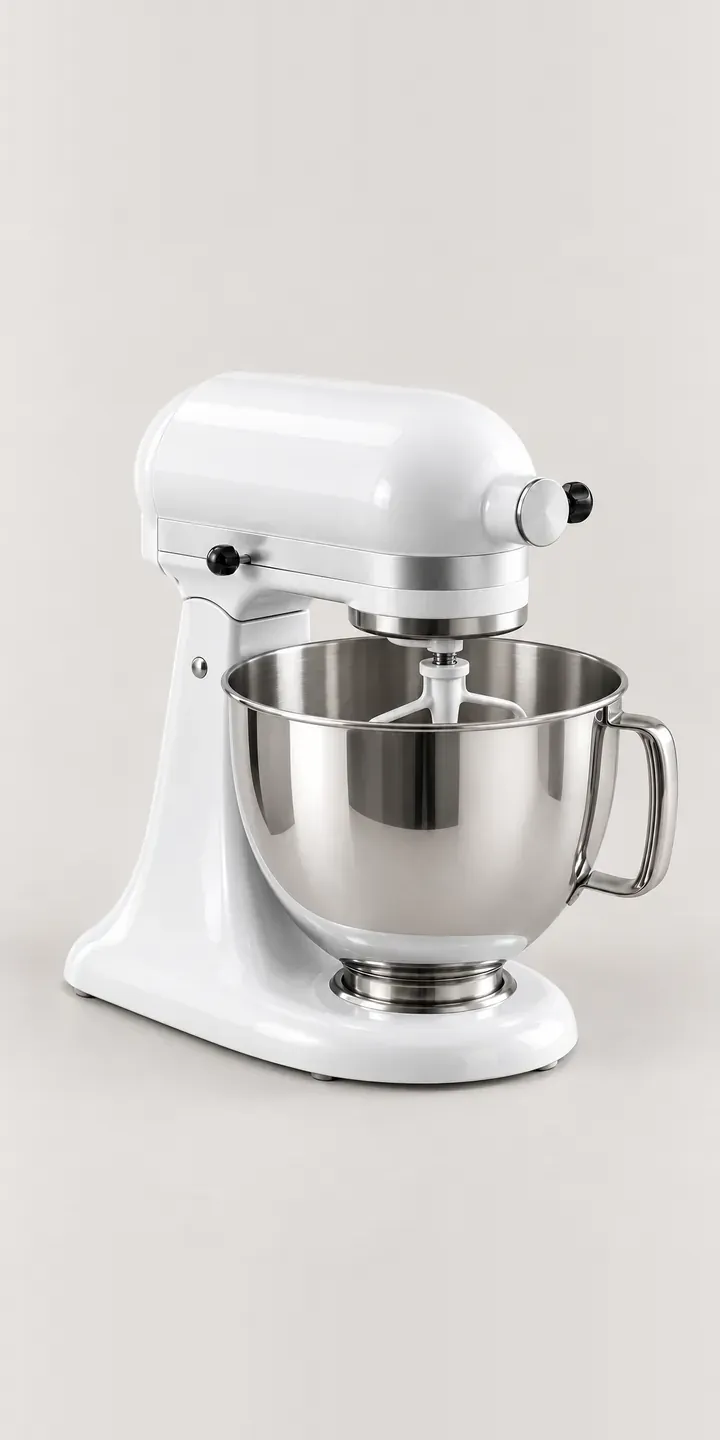
Kitchen Configurator demo
Classic Kitchen Mixer
- Product
- Classic Kitchen Mixer
- Colour
- Gloss White
- Bowl Size
- 4.8 L
Illustrative product. The design and images are generated examples, not a real model for sale.
What you can configure
The demo covers gloss white, deep red, black and sage, four of the six colours; navy and silver complete the palette. A 4.8 L or 6.6 L bowl can be selected and recorded, though the image shows one bowl. The smaller bowl suits everyday cakes, meringues and smaller households. The larger handles double batches and bread dough, which matters to anyone baking for a market stall or a big family.
- Colour: Gloss White, Deep Red, Black, Sage
- Bowl Size: 4.8 L, 6.6 L
Why a configurator suits food mixers
Gloss colours are where online appliance sales most often go wrong. A deep red that photographs well under one light can look orange or brown under another, and a gloss finish reflects whatever is in the studio. When a mixer is a gift, a colour that disappoints on arrival is especially awkward to return.
A configurator built from calibrated images shows each colour in the same light, at the same angle, against the same background. Two bowls across six colours gives 12 mixers before a single attachment is added. Keeping all of that on one page, with each kit adding to the basket as separate lines, is far easier to manage than a page per colour.
Gift lists and wedding registries are a natural fit. A couple can configure the mixer they want, save and share the link with family, and the gift arrives in the right colour with the right bowl. For retailers, saved configurations also show which colours are being considered, not only which ones sold.
How a production version would be built
For a gloss mixer, I would render each colour from a 3D model rather than photograph it. Rendering keeps reflections identical across colours, so the only thing that changes is the paint. The two bowls can be layered over the base. The brand supplies colour names and codes, bowl capacities, the attachment list and which colours each retailer stocks. Attachments sit after the main choices as optional extras. Orders go to the basket, a gift list or a quote, and on Shopify each colour and bowl pairing remains an ordinary variant for stock.
Build sheet for this range
- Colours in the full range: 6 (4 shown in this demo)
- Bowl Size choices: 2
- Combinations to support: 6 × 2 = 12
- Images for one photograph per combination at 3 angles: 36
- Images if bowl sizes can be shown as separate layers, at 3 angles: 24
- Data each of the 12 combinations needs: a SKU or variant ID, price, stock or lead time, and any dimensions or specification that change
Questions about food mixer configurators
Can someone configure a mixer and add it to a wedding list or gift registry?
Yes. The finished configuration can be saved as a link with the image, colour, bowl size and codes. That link can be shared with family or added to any registry that accepts external links. If the retailer runs its own gift list, the configured product can be added there directly as a normal variant.
How do we stop deep red looking orange on some screens?
Start with calibrated images and a neutral background, then check the result on several common phones and laptops. Reds are the colours most affected by screen settings, so perfect accuracy is not possible, but consistency is. A second image in soft daylight helps buyers who want to be certain.
Can attachments be sold as part of the configuration?
They can. After colour and bowl, the configurator can offer attachments such as a pasta roller or a mincer, each with an image and code. If some attachments are colour-matched to the mixer, the configurator can show the matching version automatically once a colour is chosen.
Is it better to show the mixer in a kitchen scene or on a plain background?
Both, for different jobs. A plain background is for comparing colours, so it should stay identical across every swatch. A kitchen scene helps buyers see the mixer's size and how the colour sits in a room. I would keep the plain image as the swatch view and add a scene as a second image.
More kitchen configurator demos
Countertop Air Roaster
Deep Granite Sink
Deep Steel Sink
Dial Smoothie Maker
Digital Multicooker
Fireclay Apron Sink
All kitchen product configurator demos
A configurator for your food mixers
This demo uses an illustrative product. If you sell food mixers, I can build the same experience around your own range, photography and ordering process, connected to Shopify, WooCommerce or a quote workflow. I reply to enquiries within two UK working days.