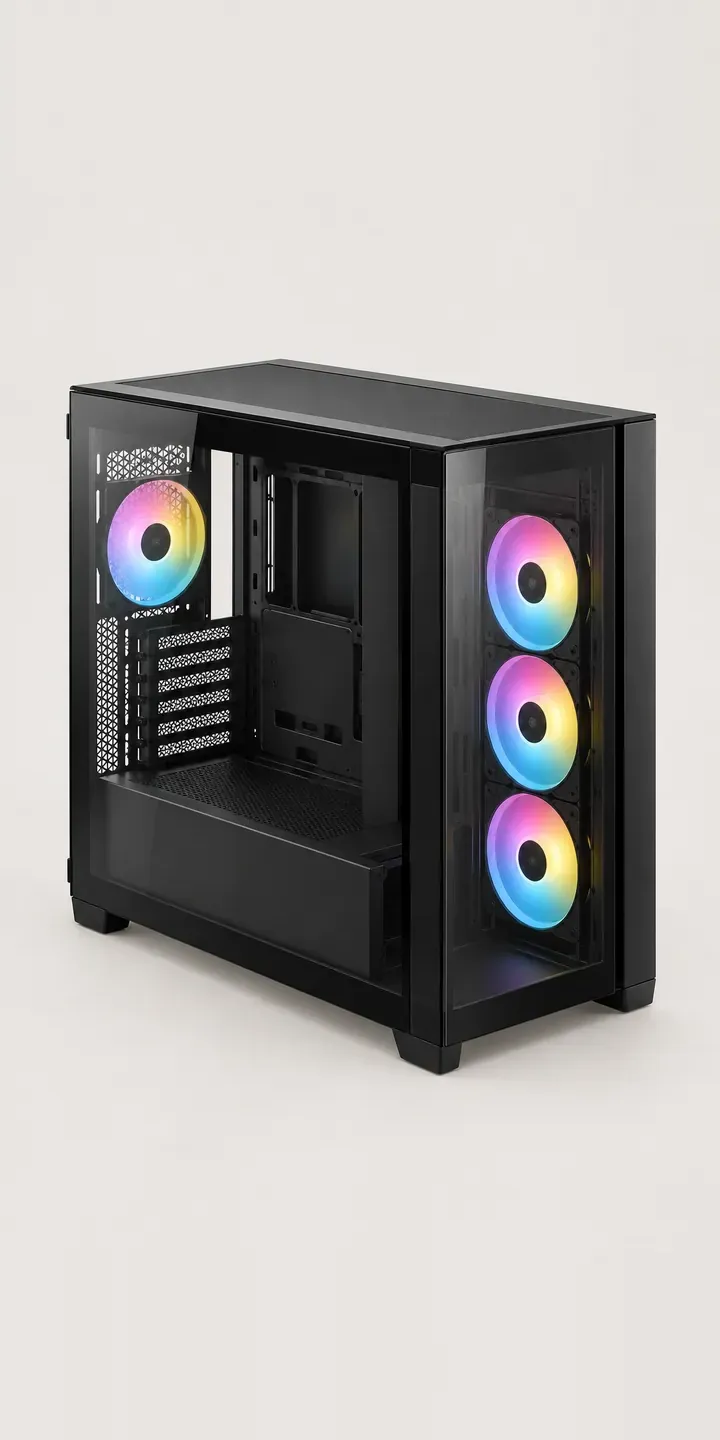
A central divider wall splits this illustrative chassis into two compartments, with a glass front set over a mesh section. Components go on one side; the power supply and cabling hide on the other. The demo offers a choice of finish and a three or six fan pack, then asks for a quote request.
Dual chamber cases are wider and shallower than a standard tower, and that changes how the buyer decides. The first test is physical: will it fit on the desk beside the monitor, with room left for the chair. The second is visual. With cables hidden behind the divider, the display side has to look finished, so frame colour and fan count carry more of the look than usual.
PC and gaming hardware Configurator demo
Split-Level Chassis
- Product
- Split-Level Chassis
- Colour
- Matte Black
- Fans
- 3 Fans
Illustrative product. The design and images are generated examples, not a real model for sale.
What you can configure
Matte black, white, gunmetal and frost are shown; navy and moss make up the full six. The fan pack is three or six, recorded in the summary without changing the image. On a split-level case the extra fans would populate more of the display chamber, so six fans gives a different-looking build, not just a cooler one.
- Colour: Matte Black, White, Gunmetal, Frost
- Fans: 3 Fans, 6 Fans
Why a configurator suits PC cases
Footprint is a common reason a dual chamber case goes back. Buyers used to towers underestimate the width, then find it crowds the desk or blocks a speaker. A configurator can set width, depth and height beside a desk-scale reference, and ask for the buyer's desk depth if the retailer wants to flag tight fits. That check costs nothing and avoids a bulky return.
These cases are popular with people whose PC appears on camera. Streamers and broadcasters often place the case beside the desk where it sits in shot, so the finish is a set-dressing decision as much as a hardware one. Frost and gunmetal read very differently under a ring light. Neutral, consistent images of each finish let the buyer judge it fairly before it goes on air.
On this case the fan layout changes the visual result more than on most. Retailers who photograph only the three fan version leave buyers guessing what six looks like. Showing the difference directly helps the higher-value pack sell on its own merits.
How a production version would be built
A production build would render each finish from the front-quarter angle that shows both the glass front and the divider. Fan packs would be separate layers placed in the display chamber, so three and six fans each read correctly. A plan view with dimensions helps buyers check the footprint. External dimensions and fan positions per pack are the critical data, alongside SKUs, finish names and fan pack contents. The configured case maps to a variant in Shopify or WooCommerce, and streamers or businesses ordering several can request a quote instead.
Build sheet for this range
- Colours in the full range: 6 (4 shown in this demo)
- Fans choices: 2
- Combinations to support: 6 × 2 = 12
- Images for one photograph per combination at 3 angles: 36
- Images if fan packs can be shown as separate layers, at 3 angles: 24
- Data each of the 12 combinations needs: a SKU or variant ID, price, stock or lead time, and any dimensions or specification that change
Questions about PC case configurators
How can buyers check that a wide case will fit their desk?
Give them dimensions in context. A plan view of the case on a standard desk outline, with width and depth labelled, works better than numbers alone. The configurator can also ask for desk depth and warn when the case and a monitor will be tight. Both rely on accurate external dimensions in your product data.
Why does the fan option matter more on a dual chamber case?
Because the fans are on display. In a split-level layout the main chamber is mostly glass, so fan count changes what the buyer looks at every day. Showing three and six fans as separate layers lets them judge the look, not only the cooling. That is the honest way to sell the larger pack.
Can the configurator show the cable side behind the divider?
Yes, as a second view. A rear-quarter image with the back panel removed shows where the power supply sits and how much room there is for cables. Builders use it to judge whether their existing supply will fit. The view does not vary by finish, so one image covers the range.
What do I need to provide to get started?
A product list with SKUs, finish names and fan pack contents, plus any images or CAD files you already hold. From that I can say whether your existing photography will work or renders are needed. I reply to enquiries within two UK working days, and cost depends on range size and integration.
More PC and gaming hardware configurator demos

Studio Grade Display

Tenkeyless Keyboard

Thumb-Rest Mouse
Tinted Glass Chassis
Triple-Fan Graphics

Vented Mouse
All PC and gaming hardware configurator demos
A configurator for your PC cases
This demo uses an illustrative product. If you sell PC cases, I can build the same experience around your own range, photography and ordering process, connected to Shopify, WooCommerce or a quote workflow. I reply to enquiries within two UK working days.