This configurator runs on an illustrative steel sideboard: coloured steel panels held in a chrome tube frame by spherical connectors, with drop-down doors and coin locks. Choose a panel colour and a width in bays to set up a quote request.
System furniture like this is bought as a set of components rather than a single object. The buyer is deciding how many bays the wall can take and what each will hold, whether records, files or glassware. Colour feels like the emotional decision, yet with steel it is practical too. Graphite and light grey sit quietly in an office. Steel blue, mustard and brick red make the sideboard the centrepiece of a living room.
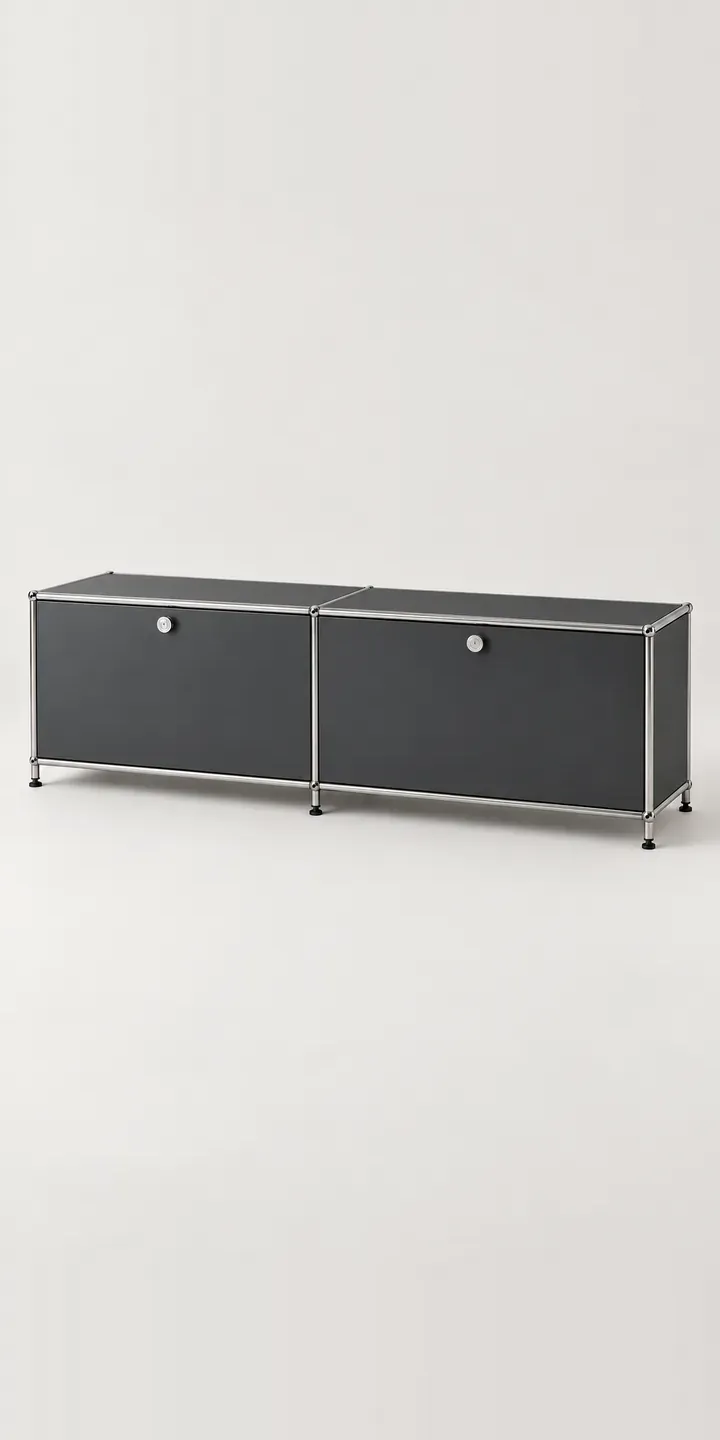
Furniture Configurator demo
Steel Sideboard
- Product
- Steel Sideboard
- Colour
- Graphite
- Width
- 2 bays
Illustrative product. The design and images are generated examples, not a real model for sale.
What you can configure
Panels change between graphite, white, light grey and steel blue, while the chrome frame and connectors stay constant. Mustard and brick red are the bolder two of the six. Bays are logged in the summary as 2, 3 or 4, and the picture stays at one width. Because bays are the unit this kind of furniture is sold in, a production version would redraw the sideboard as each bay is added.
- Colour: Graphite, White, Light Grey, Steel Blue
- Width: 2 bays, 3 bays, 4 bays
Why a configurator suits sideboards
Modular steel storage has a long tail of combinations. Panel colour and width alone give eighteen sideboards, and real systems go further, with different colours per panel, doors or drawers per bay, and stacked heights. Retailers typically show a few standard configurations and invite customers to call for anything else. That puts a phone call between the buyer and the order.
A configurator does the work of the showroom planner. It checks which components fit together, builds the parts list and prices it as the buyer goes. For the manufacturer, the order arrives as a bill of materials: tubes, connectors, panels and doors, each with a code. That is far less error-prone than reading a sketch from an email.
Dealers selling system furniture benefit in a similar way. Many sell the same system to offices and homes, and a shared configurator lets every dealer quote from the same rules. The manufacturer also sees which colours and widths are being configured across the network, which helps plan paint runs and panel stock.
How a production version would be built
Steel system furniture suits layered compositing well. The frame, each panel colour and each door type are rendered as separate layers from a fixed camera, and the configurator assembles the sideboard bay by bay. Adding a fourth bay or a new colour then needs a handful of new layers rather than a new photo shoot. The manufacturer supplies the component list, codes, which parts connect, and pricing per component. Configured builds can go to a basket on WooCommerce or export a parts list to the ERP for production.
Build sheet for this range
- Colours in the full range: 6 (4 shown in this demo)
- Width choices: 3
- Combinations to support: 6 × 3 = 18
- Images for one photograph per combination at 3 angles: 54
- Images if widths can be shown as separate layers, at 3 angles: 27
- Data each of the 18 combinations needs: a SKU or variant ID, price, stock or lead time, and any dimensions or specification that change
Questions about sideboard configurators
Can buyers choose a different colour for each panel?
Yes, once each panel is its own layer, as it would be in a production build. A buyer can then set a steel blue door among graphite panels and see it straight away. Rules decide what is allowed, for example limiting colour changes to doors only. The demo applies one colour to the whole sideboard for simplicity.
Can the configurator generate a parts list for the factory?
Yes. Each configured sideboard resolves into its components, such as tubes, connectors, panels, doors and locks, with quantities and codes. That list can travel with the order to your ERP or production system, so nobody has to translate a picture into a cutting list. For system furniture it is often the most valuable part of the project.
Will the chrome and steel finishes look right on screen?
They can, with rendering. Chrome reflects its surroundings, so the render needs a consistent studio environment, and each steel panel needs the right level of sheen for its colour. I check renders against physical panel samples, because a painted steel finish that looks right in daylight can read differently under studio light.
Can it show heights and stacked units as well as widths?
Yes. Height works the same way as width: each level is an extra row of components, and the configurator stacks them following the system's rules. The data simply needs to describe which elements can sit on top of others. This demo only shows widths, but adding heights is a common extension.
More furniture configurator demos
All furniture configurator demos
A configurator for your sideboards
This demo uses an illustrative product. If you sell sideboards, I can build the same experience around your own range, photography and ordering process, connected to Shopify, WooCommerce or a quote workflow. I reply to enquiries within two UK working days.