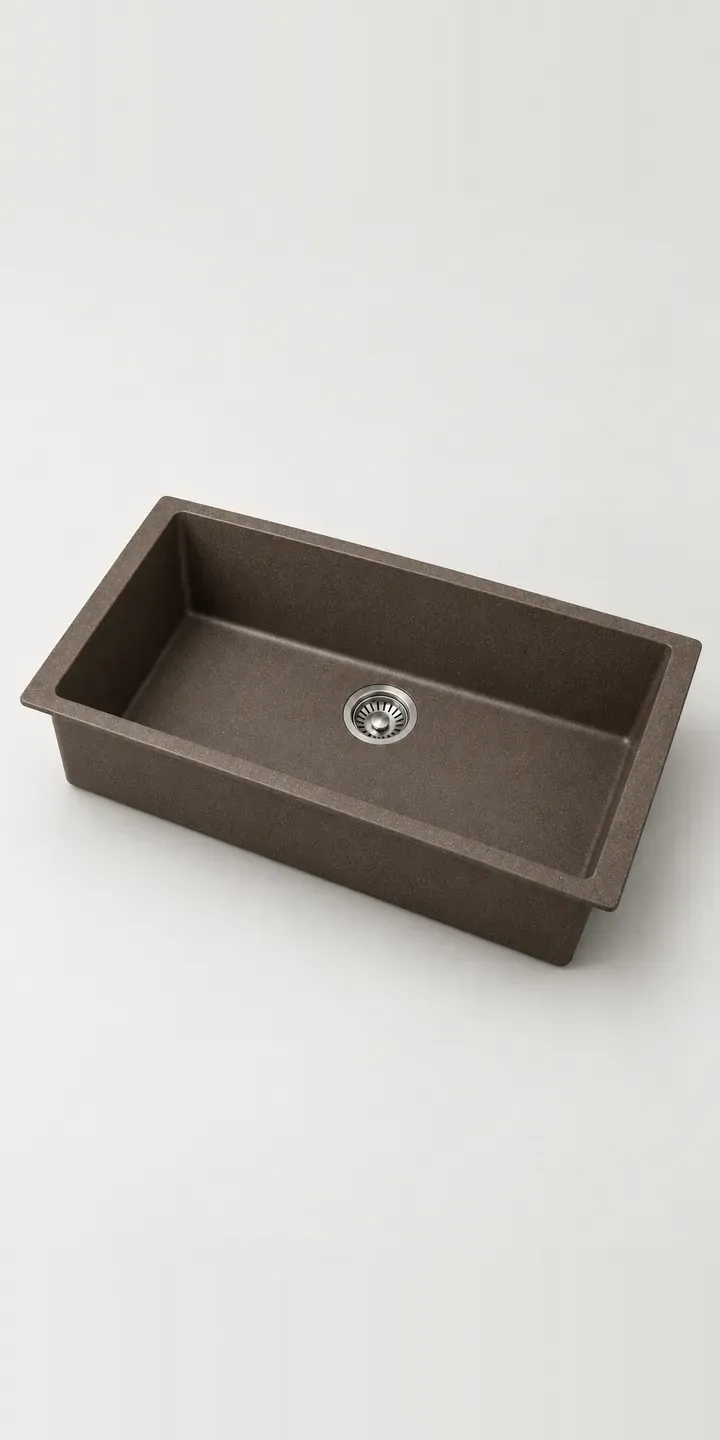
This example granite composite sink has a large, deep single basin with its drain set towards the back. Switching colour swaps the image, and the width you pick is noted for the quote.
Granite composite appeals to people who want a warmer, quieter material than steel. It is often chosen for rustic and traditional kitchens, set into an oak or walnut worktop. The buyer's main worry is colour: whether mocha will look rich or muddy against timber, and whether white will stain. The rear drain is a quieter benefit, keeping the plughole clear of pans and freeing space in the cabinet below.
Kitchen Configurator demo
Deep Granite Sink
- Product
- Deep Granite Sink
- Colour
- Mocha
- Width
- 710 mm
Illustrative product. The design and images are generated examples, not a real model for sale.
What you can configure
Mocha, black, stone grey and white are shown in the demo, with sand and anthracite in the full range. The 710 mm and 790 mm widths are selectable and recorded in the summary, though the image shows one width. On a deep single bowl, the extra width mostly buys room for large trays, oven racks and the biggest pans, which is why keen cooks tend to look at it first.
- Colour: Mocha, Black, Stone Grey, White
- Width: 710 mm, 790 mm
Why a configurator suits sinks
Colour is the hardest thing to sell online in this category. Granite composite has a speckled surface, and the speckle changes how the colour reads from a distance. A swatch the size of a stamp cannot show that. Full-size images of each colour, plus a close-up of the speckle at real scale, give buyers something close to standing over the sink.
Many retailers handle the remaining doubt with physical samples, and a configurator can make that easier. A sample request can sit beside each colour, carrying the configured width with it. When the sample arrives and the customer is happy, the order is one step away. Without that link, sample requests and eventual orders often arrive through different channels and never connect.
Context sells composite better than specifications do. Mocha against walnut, stone grey against oak, white against painted timber: a second image per colour, set into a wooden worktop, answers the question buyers are really asking. It also lets the retailer show that dark colours hide everyday marks, which is often why they are chosen.
How a production version would be built
I would render each colour from the manufacturer's CAD model with a low light across the surface so the speckle reads, plus a top-down view that shows the rear drain position. Twelve images cover the colour and width combinations, with a further set placing each colour in a timber worktop. The manufacturer supplies colour codes, dimensions, cut-out templates, cabinet requirements and sample availability. The build can go to a basket, a sample request or a quote. If you sell several sink ranges, the same product configurator setup can serve all of them from one product data source.
Build sheet for this range
- Colours in the full range: 6 (4 shown in this demo)
- Width choices: 2
- Combinations to support: 6 × 2 = 12
- Images for one photograph per combination at 3 angles: 36
- Images if widths can be shown as separate layers, at 3 angles: 24
- Data each of the 12 combinations needs: a SKU or variant ID, price, stock or lead time, and any dimensions or specification that change
Questions about sink configurators
Can customers order a colour sample from the configurator?
That is a good use of it. A sample button beside each colour can create a small order or a request to your sales team, carrying the configured width with it. When the customer is ready, the saved configuration lets them order the full sink without starting again. That keeps sample requests and sales connected in your data.
Does the rear drain need different plumbing, and how should we explain it?
It may need the trap and waste positioned differently from a centre drain, so say so beside the product. A plan view can show the drain position and the free space it leaves in the cabinet. Fitters appreciate seeing that before they arrive, and buyers see why it frees up room for bins.
Will light colours like white stain, and can the configurator say so?
It can say whatever your care guidance says. A short note beside white and stone grey, covering what marks them and how to clean it, answers a question buyers ask before ordering. Honest care notes build more trust than silence, and they reduce complaints from people who expected composite to behave like ceramic.
Can buyers see the sink set into a wooden worktop?
Yes, as a second image per colour, set into oak or walnut. These scenes are best rendered so the worktop and lighting stay identical between colours, which keeps the comparison fair. If you sell several worktop styles, the configurator can let the buyer pick the one closest to their own.
More kitchen configurator demos
Deep Steel Sink
Dial Smoothie Maker
Digital Multicooker
Fireclay Apron Sink
Heated Food Processor
High-Power Liquidiser
All kitchen product configurator demos
A configurator for your sinks
This demo uses an illustrative product. If you sell sinks, I can build the same experience around your own range, photography and ordering process, connected to Shopify, WooCommerce or a quote workflow. I reply to enquiries within two UK working days.