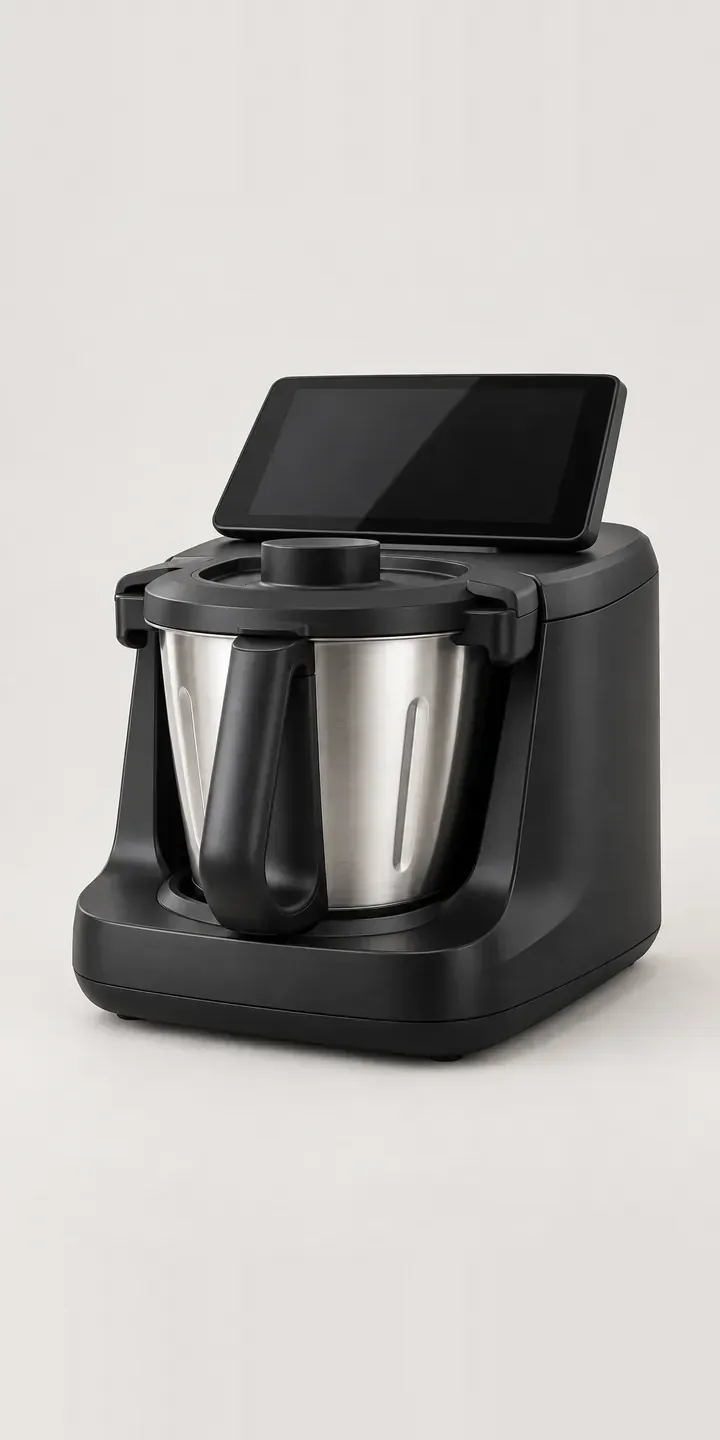
This is an illustrative heated food processor: a countertop machine that chops, stirs and cooks in one steel bowl, controlled from a touchscreen in the top. The configurator sets the finish and whether it comes with one bowl or two.
A machine like this is a large purchase, and buyers justify it by how often they will cook with it. Many first meet one at a cookery class or a friend's home demonstration. By the time they reach a product page, the concept has already sold itself. What remains is detail: which finish suits the room, and whether a second bowl will let them cook a sauce and a main back to back.
Kitchen Configurator demo
Heated Food Processor
- Product
- Heated Food Processor
- Colour
- Matte Black
- Bowls
- 1 Bowl
Illustrative product. The design and images are generated examples, not a real model for sale.
What you can configure
Matte black, white, graphite and sage are the four finishes shown; taupe and navy complete the range. One or two bowls can be selected and appear in the summary, though the picture shows the single-bowl machine. The second bowl is the practical upgrade. It lets someone keep cooking without washing up between stages, which matters most to people who batch cook or teach.
- Colour: Matte Black, White, Graphite, Sage
- Bowls: 1 Bowl, 2 Bowls
Why a configurator suits food processors
Premium kitchen machines are often sold through demonstrators, cookery schools and independent appliance shops rather than straight off a shelf. Each of those channels needs to show the full range on the spot. A configurator on a tablet does that during a demonstration, and the customer can save their build to buy later instead of leaving with a leaflet.
Twelve variants is a manageable image set, but the commercial value is in bundling. Buyers who choose a second bowl are good candidates for a recipe subscription, a blade cover or a spare spatula, and a configurator can present those at the moment of choice rather than in a follow-up email after checkout.
Trade buyers have their own needs. A cookery school fitting out several workstations wants one finish, the two-bowl version and a single quote with delivery to one address. Giving them a quantity field and a quote request, rather than forcing a consumer checkout, keeps those orders out of the general inbox.
How a production version would be built
The base unit looks the same whichever bowl option is chosen, so the second bowl is best shown as an extra image or inset rather than a new hero shot. That keeps the image set to one hero per finish plus a bowl view. Glossy touchscreens and polished steel reflect everything, so rendering from a 3D model often gives more consistent results than photography. The brand supplies codes for each finish and bundle, plus the accessory list. Orders can route to Shopify, a demonstrator's account or a quote form for schools.
Build sheet for this range
- Colours in the full range: 6 (4 shown in this demo)
- Bowls choices: 2
- Combinations to support: 6 × 2 = 12
- Images for one photograph per combination at 3 angles: 36
- Images if bowl sets can be shown as separate layers, at 3 angles: 24
- Data each of the 12 combinations needs: a SKU or variant ID, price, stock or lead time, and any dimensions or specification that change
Questions about food processor configurators
Can demonstrators use the configurator in a customer's kitchen?
Yes. The configurator runs in a browser, so it works on a tablet during a demonstration. The demonstrator can build the machine with the customer, save it to a link and send it on for the customer to buy later. If demonstrators earn commission, the saved link can carry their reference so the sale is credited correctly.
How should we present the second bowl so it does not feel like an upsell?
Show what it does rather than what it costs. A short line about cooking two stages without washing up, and an image of both bowls side by side, explains the value. I would present it as a choice between one and two bowls, not as an add-on hidden after the colour.
Can the touchscreen and steel bowl be shown without heavy reflections?
Yes, with controlled lighting or rendering. Shiny screens and polished steel pick up every light source, which can make finishes look inconsistent from one image to the next. Rendering lets me fix reflections across all colours, so the only thing that changes when someone clicks a swatch is the finish itself.
Could cookery schools request a quote for several machines at once?
They can. A trade route can add a quantity field, a delivery address and a note about the venue, then send it to your sales team or CRM as a quote. Consumers on the same page still see a normal checkout, and both routes share one product page, which keeps content in one place.
More kitchen configurator demos
All kitchen product configurator demos
A configurator for your food processors
This demo uses an illustrative product. If you sell food processors, I can build the same experience around your own range, photography and ordering process, connected to Shopify, WooCommerce or a quote workflow. I reply to enquiries within two UK working days.