On this page you can configure an illustrative high-power liquidiser with a touchscreen base. Pick one of four finishes and a jar size, and the build summary updates as you go.
People spending more on a blender have usually outgrown a cheap one. They want it to crush ice, make nut butter and survive a daily protein shake after the gym. Once those boxes are ticked, the decision turns domestic: whether it lives on the worktop permanently, whether the finish suits the kettle beside it, and whether the taller jar clears the wall cabinets.
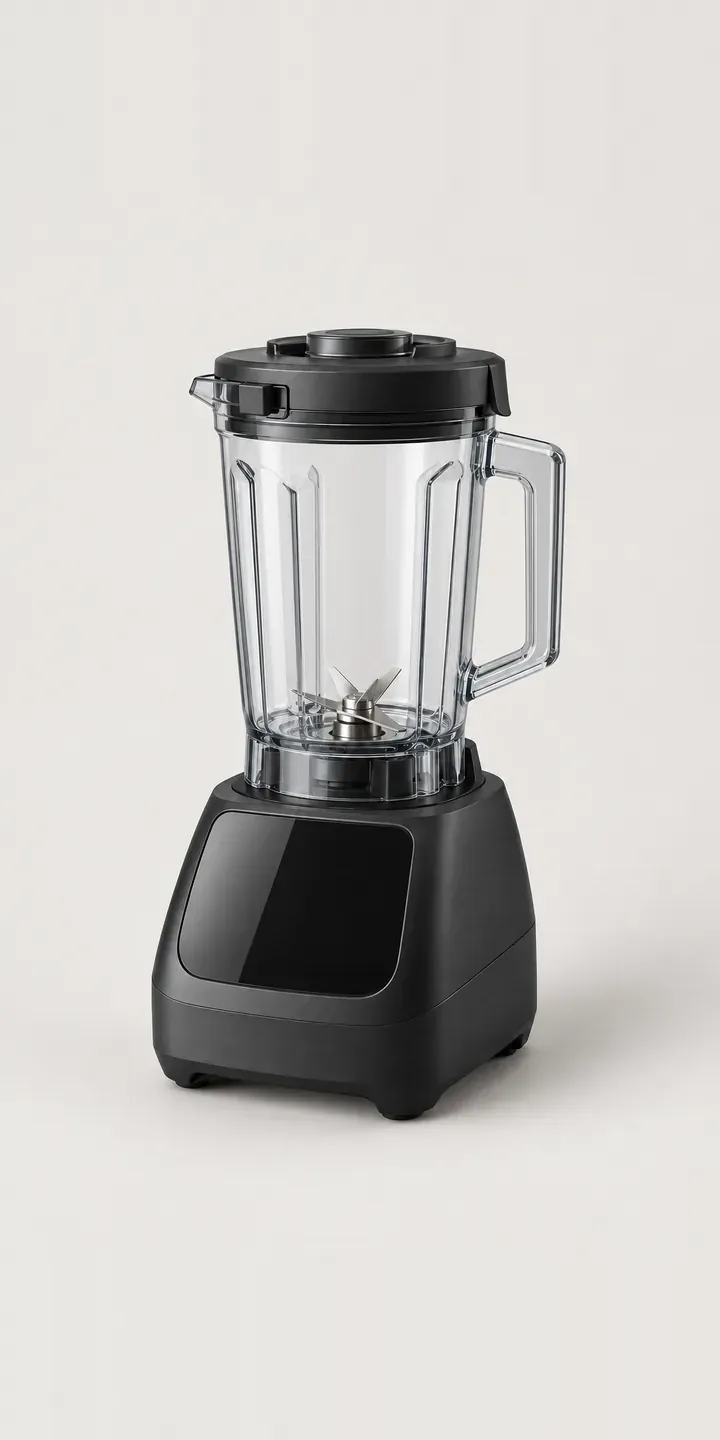
Kitchen Configurator demo
High-Power Liquidiser
- Product
- High-Power Liquidiser
- Colour
- Matte Black
- Jar
- 1.4 L
Illustrative product. The design and images are generated examples, not a real model for sale.
What you can configure
Jar size is the practical choice here. The 2 L jar suits soups and family batches, while the 1.4 L is easier to wash, store and fit under cupboards. Either goes into the summary, though the picture keeps a single jar. For finish, the swatches show matte black, brushed steel, white and slate, with blush and deep red reserved for a full build.
- Colour: Matte Black, Brushed Steel, White, Slate
- Jar: 1.4 L, 2 L
Why a configurator suits blenders
Small appliance ranges grow sideways. A blender that sells well in black gets a steel version, then a seasonal colour, then a second jar. Six finishes and two jars already make 12 product variants, each needing photography, a listing and a place in the retailer's feed.
Most stores handle that by listing each colour as a separate product or by hiding colours behind tiny swatches. Customers then compare the wrong things, or buy whichever colour was photographed first. A configurator keeps one product page with every finish at the same size and angle, so the choice is about the kitchen rather than about which photo looked best. It also leaves one set of reviews and one URL to rank, instead of six competing pages.
Jar capacity is also a quiet source of returns. Taller jars may not clear standard wall units, and buyers rarely measure before ordering. Putting the assembled height next to each jar option, and showing both jars at a consistent scale, answers that question before the box ships.
How a production version would be built
A countertop blender suits a layered image approach. The motor base is shot or rendered in each finish, and each jar is a separate transparent layer placed on top, so 12 combinations need eight images. Clear jars need careful lighting so reflections stay consistent across finishes. The brand or retailer supplies variant codes, assembled heights, jar capacities and any colours limited to certain stockists. On Shopify each combination maps to a variant, so stock, pricing and product data feeds stay correct.
Build sheet for this range
- Colours in the full range: 6 (4 shown in this demo)
- Jar choices: 2
- Combinations to support: 6 × 2 = 12
- Images for one photograph per combination at 3 angles: 36
- Images if jar sizes can be shown as separate layers, at 3 angles: 24
- Data each of the 12 combinations needs: a SKU or variant ID, price, stock or lead time, and any dimensions or specification that change
Questions about blender configurators
Can one product page replace separate listings for each blender colour?
Yes, and it usually should. The configurator handles colour and jar choice on a single page, while each combination keeps its own variant code underneath for stock and marketplace feeds. Search engines see one strong page instead of several thin ones, and customers stop landing on a sold-out colour with no way to switch.
How do we show the blender's height with each jar so buyers know it will fit?
Show the assembled height in centimetres beside each jar option, and render both jars from the same camera position. A dashed line marking typical wall cabinet clearance helps buyers judge it at a glance. That small detail answers one of the most common pre-sale questions about tall blenders.
Can we limit certain colours to particular retailers or promotions?
Easily. Availability rules can hide a colour on one storefront, show it as pre-order on another, or switch it on only during a campaign. Those rules live in the product data, so a marketing team can launch a seasonal finish such as blush without asking for a code change.
Can accessories like personal cups and tampers be added?
They can be offered as optional extras after the main choice. Each accessory needs an image, a code and compatibility rules, because not every cup fits every base. Selling them inside the configurator keeps the basket accurate and suits buyers who want a complete set from the first day.
More kitchen configurator demos
All kitchen product configurator demos
A configurator for your blenders
This demo uses an illustrative product. If you sell blenders, I can build the same experience around your own range, photography and ordering process, connected to Shopify, WooCommerce or a quote workflow. I reply to enquiries within two UK working days.