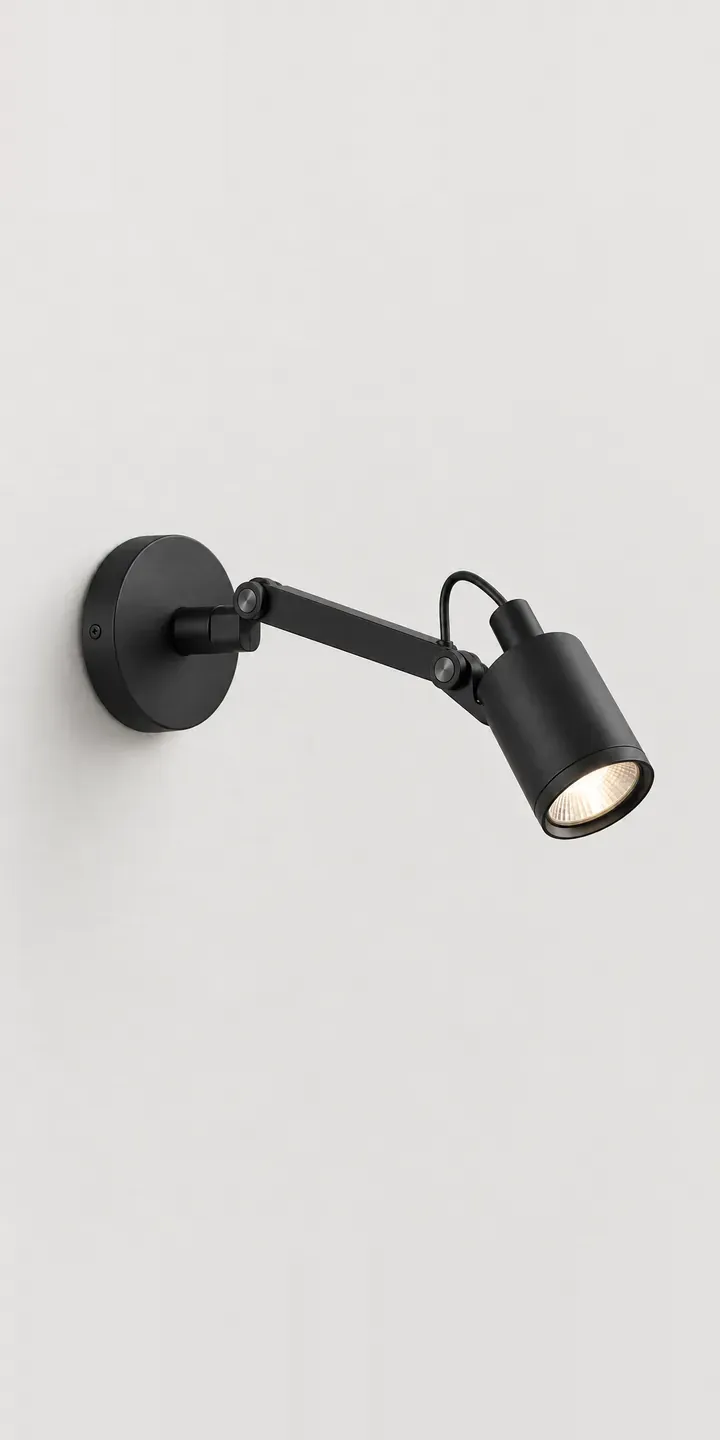
The example fitting on this page is a wall spotlight: a cylindrical head with an open aperture, pivoting on a short arm from a flat plate. Choose a finish and a beam.
Spotlights are bought for what they light rather than how they look. A buyer lighting a gallery wall is weighing the size of the artwork, the distance from the fitting and how dramatic the effect should be. The beam choice carries that decision. Finish matters too, but mostly so the fitting disappears against the wall or ceiling once the eye goes to the picture.
Lighting Configurator demo
Wall Spotlight
- Product
- Wall Spotlight
- Colour
- Black
- Beam
- Narrow
Illustrative product. The design and images are generated examples, not a real model for sale.
What you can configure
Black, white, aluminium and bronze are the finishes on show, from a range that also offers sage and terracotta. The head is aimed identically throughout, which keeps attention on the finish. Beam, narrow or wide, appears in the summary. It does not alter the product picture, and it would not in reality either: what changes is the light on the wall.
- Colour: Black, White, Aluminium, Bronze
- Beam: Narrow, Wide
Why a configurator suits spotlights
Beam angle is where spotlight buyers make mistakes. A narrow beam from a long distance throws a tight, bright circle that may only catch part of a large canvas. A wide beam from close up spills across the wall. A configurator can ask for the artwork size and the distance from the fitting, then recommend narrow or wide with a simple diagram.
Gallery walls rarely use one spotlight. Buyers want a row, so quantity and spacing come into the order alongside the twelve finish and beam variants. Capturing that in the configurator, with a diagram of several spots over several frames, sells the set rather than the single fitting.
Galleries, shops and restaurants also buy spotlights for accent lighting, often with a lighting designer involved. They need beam data, the colour rendering figures you publish and dimming compatibility in one place. A configurator that shows that detail beside the finish choice serves the homeowner and the specifier from the same page.
How a production version would be built
The fitting itself needs only one image per finish, since the beam is internal. The more valuable images show the light: a wall with each beam lighting a framed print, rendered so the spread matches your photometric data. The supplier provides finishes, beam angles, photometric files, light source type, dimming options and any accessories it sells. Specifiers download the data sheet; homeowners add to the basket. The configurator cost guide explains why accurate lit renders are usually the biggest line in a build like this.
Build sheet for this range
- Colours in the full range: 6 (4 shown in this demo)
- Beam choices: 2
- Combinations to support: 6 × 2 = 12
- Images for one photograph per combination at 3 angles: 36
- Images if beams can be shown as separate layers, at 3 angles: 24
- Data each of the 12 combinations needs: a SKU or variant ID, price, stock or lead time, and any dimensions or specification that change
Questions about spotlight configurators
Can the configurator recommend narrow or wide beam for a specific painting?
Yes. It asks for the artwork's size and the distance from the spotlight, then compares the spread of each beam at that distance. The recommendation uses your photometric data, so it is a real calculation rather than a guess. A diagram shows the pool of light on the wall.
How do you show beam spread visually?
With a lit render for each beam, built from your photometric files so the spread is accurate. Two images of the same wall, one with a narrow pool on a print and one with a wide wash, explain the choice faster than angle figures. Buyers understand the picture immediately.
Can the configurator handle track, surface and wall-mounted versions?
Yes. Mounting can be an extra option that changes the code and the image. Each version can carry its own accessories and data sheet. For a range with several mounts and beams, the configurator keeps combinations valid by hiding any you do not make.
Can lighting designers download photometric files?
Yes. Each beam option can link to its photometric file and data sheet, and the configured code can be copied or saved. Designers working in lighting calculation software want the file, not a picture, so making it available at the point of choice is worth the small effort.
More lighting configurator demos
All lighting configurator demos
A configurator for your spotlights
This demo uses an illustrative product. If you sell spotlights, I can build the same experience around your own range, photography and ordering process, connected to Shopify, WooCommerce or a quote workflow. I reply to enquiries within two UK working days.