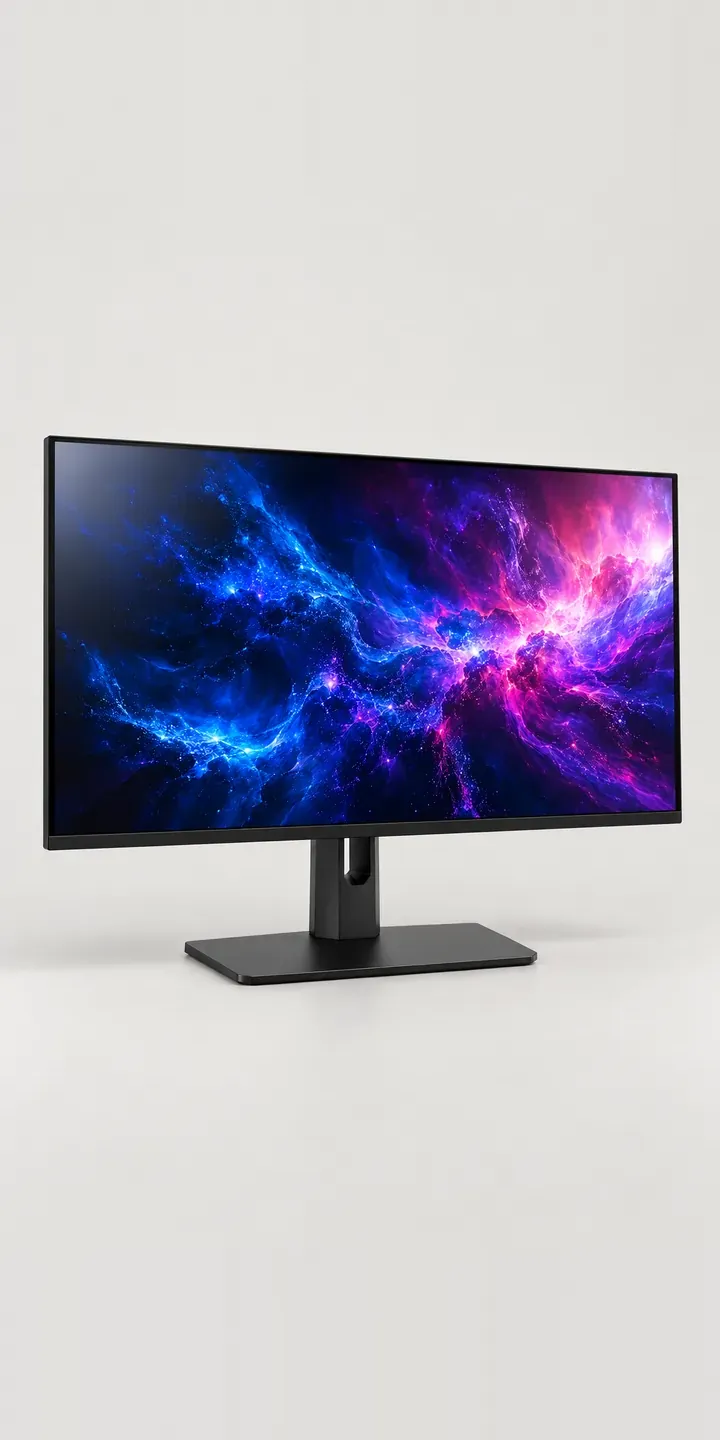
Here is a working configurator for an illustrative studio-grade display. Pick a housing finish, choose between the supplied stand and a monitor arm, and the summary keeps track of the setup.
People buying a display for photo or video work judge it on things a housing cannot show: panel uniformity, gamut coverage and how well it holds calibration. The housing and mount still matter, because the screen sits at eye level for hours. A white frame in a dim edit suite catches the eye, while a darker one recedes. Desk depth, and whether the screen needs to swing aside, decide between stand and arm.
PC and gaming hardware Configurator demo
Studio Grade Display
- Product
- Studio Grade Display
- Colour
- Matte Black
- Mount
- Stand
Illustrative product. The design and images are generated examples, not a real model for sale.
What you can configure
The demo shows matte black, white, silver and gunmetal, from a range of six, so the frame finish is the variable you compare. Mount is the second choice. A stand gives height adjustment on its central column without touching the desk. An arm frees the surface and lets the screen pull closer for retouching. In this demo the mount is recorded in the summary while the product image stays the same.
- Colour: Matte Black, White, Silver, Gunmetal
- Mount: Stand, Arm
Why a configurator suits displays
Display retailers sell to people who read specification sheets closely, then still hesitate over physical fit. A configurator answers the questions a spec sheet leaves open. How will a given housing finish sit in a pale studio? How much desk does the stand base take, and what changes when an arm replaces it?
Six finishes on two mounts makes twelve products. That is manageable to photograph, but it is not the whole sale. Many display buyers add a shading hood, a calibration device or a second unit. Those belong at the point of choice, where they make sense, not in a carousel further down the page.
Brands selling into studios and post-production houses often receive orders as quotes for several screens at once. A configured build gives the purchasing team a clear line per unit, with finish and mount stated, so the quote does not bounce back with questions. Over time the same records show which finishes professional buyers actually choose.
How a production version would be built
Twelve combinations are few enough to render one by one, which avoids compositing problems around the stand column and arm joint. I would render rather than shoot, because a matte housing next to a lit panel is hard to light consistently in a studio. The retailer provides SKUs, mount compatibility such as VESA pattern and arm load range, and which accessories fit which model. Single units can go to a WooCommerce basket, and multi-screen studio orders to a quote form linked to the sales team's CRM.
Build sheet for this range
- Colours in the full range: 6 (4 shown in this demo)
- Mount choices: 2
- Combinations to support: 6 × 2 = 12
- Images for one photograph per combination at 3 angles: 36
- Images if mounts can be shown as separate layers, at 3 angles: 24
- Data each of the 12 combinations needs: a SKU or variant ID, price, stock or lead time, and any dimensions or specification that change
Questions about display configurators
How do you show a display's finish fairly when the buyer's own screen isn't calibrated?
You cannot guarantee it, and display buyers know that better than most. What a configurator can do is keep the finishes consistent with each other, so the step from silver to gunmetal looks right. Panel performance should be covered by measured specifications on the page, not by the product image.
Can the configurator check whether a monitor arm will suit the buyer's desk?
It can ask the right questions. Desk thickness, clamp or grommet mounting, and the gap to the wall all decide whether an arm works. A short step after the mount choice can collect those details and flag a mismatch before the order is placed, which saves a support email and a return.
Could we bundle calibration devices and shading hoods into the build?
Yes. Accessories work well as optional steps after the main choices. Each needs a compatibility rule so a hood for one screen size is never offered on another. Shown as part of the setup, accessories read as useful kit rather than a late upsell at checkout.
Can the configurator handle dual-screen setups?
Yes. Quantity becomes a step, with a dual arm offered when two screens are chosen. Image-based builds can show a pair side by side from the front. For buyers who want to see one screen turned upright beside another, or the pair angled on a desk, a 3D product configurator is the better fit.
More PC and gaming hardware configurator demos
Tenkeyless Keyboard

Thumb-Rest Mouse
Tinted Glass Chassis
Triple-Fan Graphics

Vented Mouse
Wide Macro Keypad
All PC and gaming hardware configurator demos
A configurator for your displays
This demo uses an illustrative product. If you sell displays, I can build the same experience around your own range, photography and ordering process, connected to Shopify, WooCommerce or a quote workflow. I reply to enquiries within two UK working days.