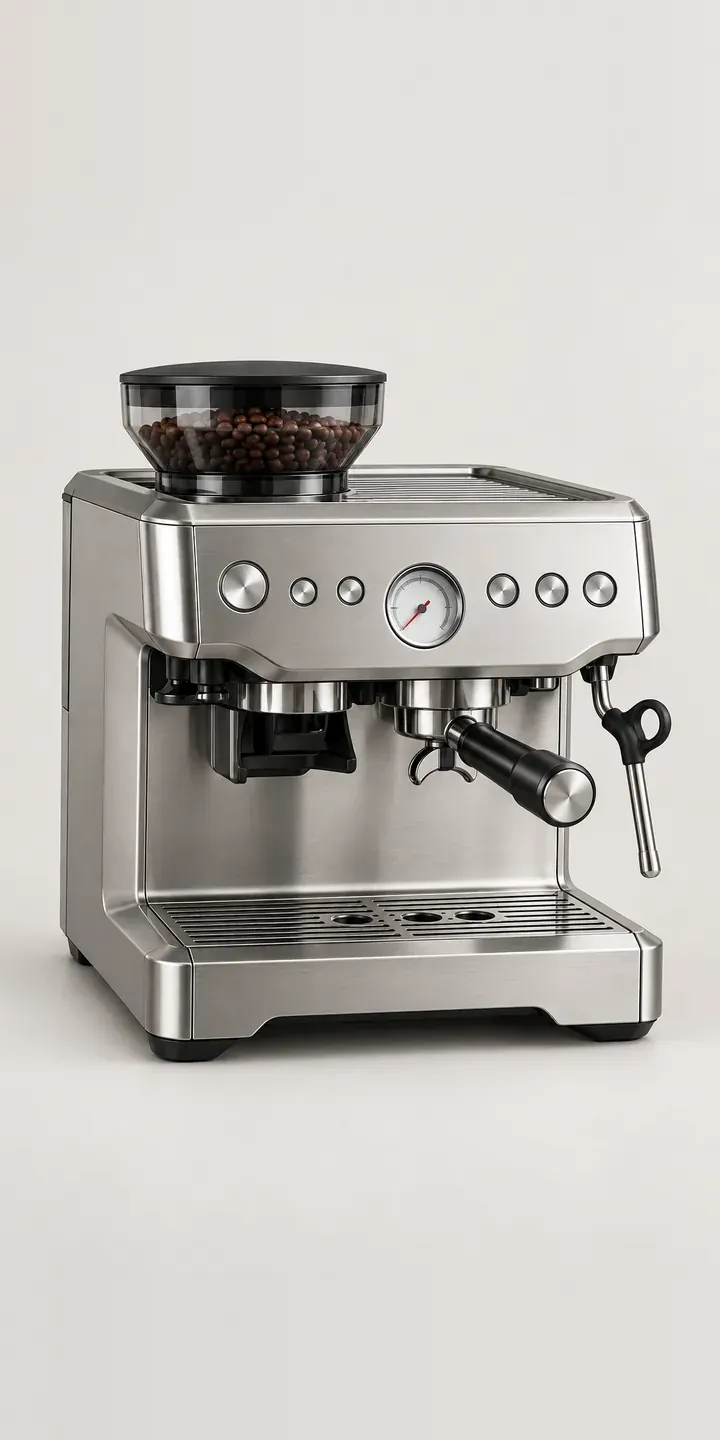
On this example espresso maker, the burr grinder is built in, the grind size dial sits on the front and the portafilter locks into the group. Four finishes and a basket choice are on offer.
Most buyers of this type of machine are moving from pods or a cafetière to proper espresso. They want the grinder built in, so there is one appliance to learn and one footprint on the worktop. What confuses them is the vocabulary: dose, basket size, grind setting. The single or double basket choice is a good example. It looks like a small option, but it decides how much coffee goes in and how the drink tastes.
Coffee Configurator demo
Burr Espresso Machine
- Product
- Burr Espresso Machine
- Colour
- Brushed Steel
- Basket
- Single
Illustrative product. The design and images are generated examples, not a real model for sale.
What you can configure
Brushed steel, black steel, ivory and brick are shown, with the grind dial and portafilter identical across all four. The basket option is single or double. A single basket makes one shot and is less forgiving to dial in; a double basket is what most recipes assume and suits a milk drink. The basket is listed in the summary but not drawn on the machine in this demo.
- Colour: Brushed Steel, Black Steel, Ivory, Brick
- Basket: Single, Double
Why a configurator suits espresso makers
First-time espresso buyers generate a lot of support questions, and returns in this category often involve a machine that works fine but was misunderstood. A configurator can explain basket size, grind setting and dose in a sentence each, at the point of choice. That costs nothing per sale and saves the retailer explaining it again by email.
Brick is the finish that sets this machine apart. It suits farmhouse kitchens, terracotta tiles and warm timber, but it is a risky choice online, because a red-brown can look orange or maroon depending on the image. Of the twelve builds, the two in brick need the most careful imagery and the most honest lifestyle shot.
Small cafés and bistros sometimes look at machines like this for light service or back-of-house coffee. They need a different conversation about volume, warranty for commercial use and whether the machine suits them at all. A configurator can ask whether the buyer is a business and route them to a quote, so the retailer can advise honestly instead of selling the wrong machine.
How a production version would be built
A whole-image swap per finish works here, with the basket shown as a small inset image when selected. That is eight images in total for twelve builds. A second view of the grind dial close up helps first-time buyers understand the controls. Alongside finish SKUs, the retailer writes plain notes on basket sizes and states any commercial-use restrictions. Home orders go straight to the basket on Shopify or WooCommerce; business enquiries go to a quote. It is the same image-based approach as the configurator from the MMU Knowledge Transfer Partnership I worked on, released in 2019.
Build sheet for this range
- Colours in the full range: 6 (4 shown in this demo)
- Basket choices: 2
- Combinations to support: 6 × 2 = 12
- Images for one photograph per combination at 3 angles: 36
- Images if baskets can be shown as separate layers, at 3 angles: 24
- Data each of the 12 combinations needs: a SKU or variant ID, price, stock or lead time, and any dimensions or specification that change
Questions about espresso maker configurators
How should we explain single and double baskets to a first-time buyer?
In one plain sentence each. The single basket makes one shot and needs more precise grinding; the double makes two shots, or one larger one, and suits milk drinks. Recommending the double as the default for beginners is sensible. A short dialling-in guide can sit below for anyone who wants more.
Will the brick finish look accurate online?
It can, with care. Warm red-brown tones shift towards orange or maroon under different lighting and on different screens. I match images to a physical sample, light every finish identically, and would add a lifestyle shot of brick among warm materials, so buyers can judge it in the kind of room it will live in.
Can the configurator ask whether the buyer is a café or other business?
Yes. A simple question near the start, or before checkout, can identify business buyers and route them to a quote request. That gives the retailer a chance to discuss volume and warranty terms before the sale. Home buyers continue to the basket as normal, with no extra steps.
Can buyers see a close-up of the grind dial?
Yes. A detail image of the grind dial and display can sit as a second thumbnail for every finish. For first-time espresso buyers it makes the controls less intimidating, and it is cheap to produce once the main images exist. The same close-up can feed a short setup guide after purchase.
More coffee equipment configurator demos
Compact Bean-to-Cup
Conical Burr Grinder
Espresso Grinder Combo
Filter Coffee Maker
Flat Burr Grinder
Home Espresso Station
All coffee machine configurator demos
A configurator for your espresso makers
This demo uses an illustrative product. If you sell espresso makers, I can build the same experience around your own range, photography and ordering process, connected to Shopify, WooCommerce or a quote workflow. I reply to enquiries within two UK working days.