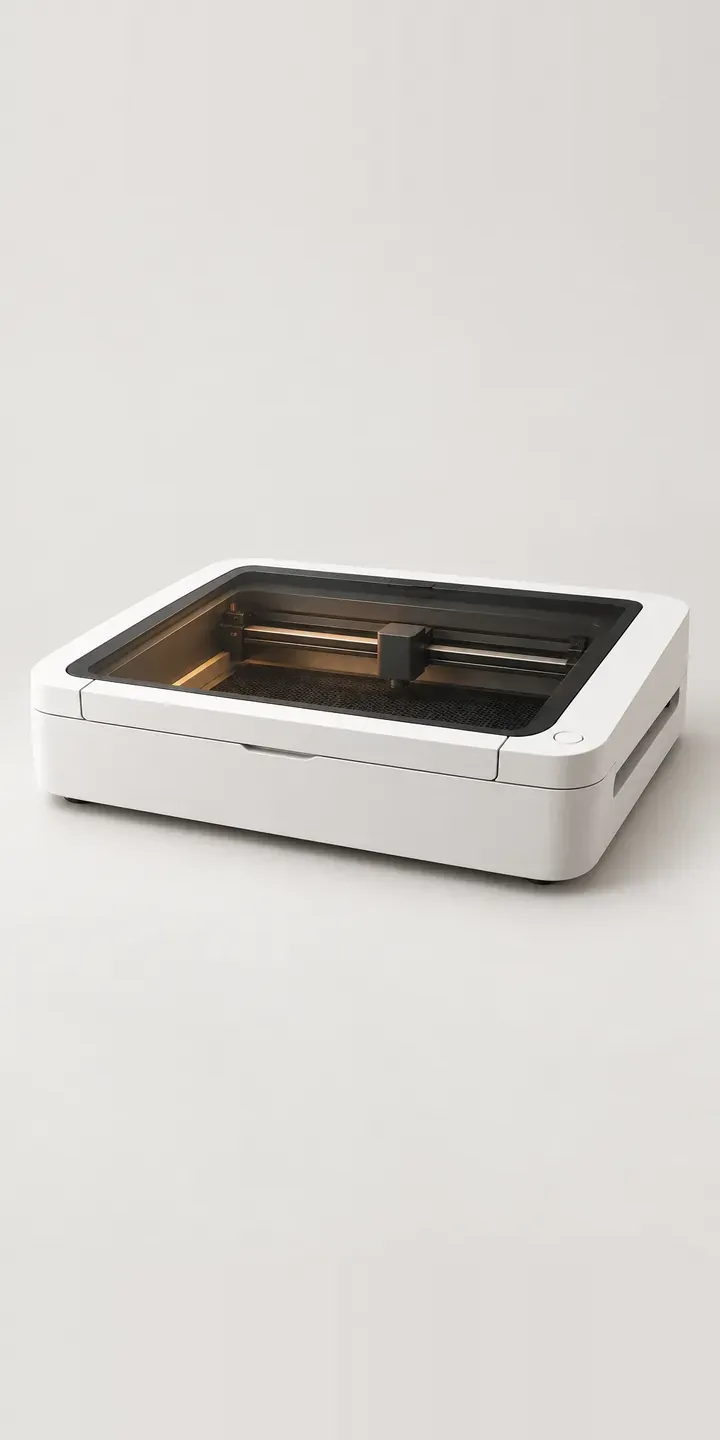
Desktop laser cutters have moved out of maker spaces and into spare rooms and small online shops. This illustrative model can be configured in four colours, with or without an air filter, and the result is sent as a quote request.
First-time buyers tend to focus on cutting area and power. The question that decides whether the machine actually gets used is ventilation. Venting through a window works in a garage but not in a flat or a shared studio, and that is where a filter earns its place. Colour matters more than it used to as well, because these machines now sit in rooms people live and sell from, next to shelves of finished stock.
Tools and workshop Configurator demo
Desktop Laser Cutter
- Product
- Desktop Laser Cutter
- Colour
- White
- Filter
- None
Illustrative product. The design and images are generated examples, not a real model for sale.
What you can configure
Swatches change the machine between white, black, stone grey and sage, shot from one angle so the lid camera and the pass-through slot stay in the same place. The filter choice appears in the summary. It does not change the image in this demo; in production the filter unit would be shown beside the cutter, since it takes up real space on or under the table.
- Colour: White, Black, Stone Grey, Sage
- Filter: None, Air Filter
Why a configurator suits laser cutters
Laser retailers spend a lot of time on pre-sale questions about fumes, materials and space. Putting the filter decision on the same page as the machine answers one of the most frequent at the point of purchase. A buyer who chooses no filter can be shown a short note about ducting, and a buyer who adds one sees the combined footprint before committing.
The filter is a separate box, so it behaves more like a bundle than a variant. Handling it inside a configurator keeps stock separate while presenting one decision. It also avoids the after-sale problem of a customer realising, a week in, that the room smells of burnt plywood and the filter they now need was never mentioned.
For brands selling to craft businesses, the colour range is part of the appeal. Sellers photograph their workspace for social media, and a sage or blush machine fits that. Showing each finish properly sells the point better than a row of small dots, and the chosen colour can carry through to accessories such as honeycomb beds or material packs.
How a production version would be built
The machine body is a clean image swap: one photograph or render per colour from a fixed angle, plus an optional detail shot of the lid camera and pass-through slot. The filter works better as a second product image placed beside the cutter, because it stands apart from the body rather than attaching to it. The retailer needs SKUs for each colour and the filter, materials guidance, and any accessory bundles. Orders reach a WooCommerce or Shopify basket as linked lines, so returns and stock levels stay accurate.
Build sheet for this range
- Colours in the full range: 6 (4 shown in this demo)
- Filter choices: 2
- Combinations to support: 6 × 2 = 12
- Images for one photograph per combination at 3 angles: 36
- Images if filters can be shown as separate layers, at 3 angles: 24
- Data each of the 12 combinations needs: a SKU or variant ID, price, stock or lead time, and any dimensions or specification that change
Questions about laser cutter configurators
Can the configurator warn buyers who choose no filter about ventilation?
Yes. Selecting no filter can bring up a short note on venting requirements with a link to your ducting kit or guidance. It informs rather than blocks the order. The wording should come from your own safety documentation, so it matches the manual and what your support team tells customers on the phone.
Can we sell material packs alongside the machine in the same flow?
Yes. After the machine and filter, the configurator can offer plywood, acrylic or leather packs as optional add-ons, each going to the basket as its own product. For a craft buyer, getting compatible materials with the first order means they can start making on day one instead of hunting for suppliers.
Will pale colours like sage and stone grey look right on screen?
Muted colours are easy to get wrong, because small shifts in white balance push sage towards grey and stone towards beige. I grade the images against physical samples and check them on several devices. Showing the machine in a room setting as well as on white also helps buyers judge the shade in context.
What does a laser cutter configurator cost to build?
There is no fixed price. It depends on how many models and accessories you carry, whether consistent photography exists, and where orders need to go. A single machine with a filter option sits at the simpler end. My guide to configurator costs sets out the main drivers, and I reply to enquiries within two UK working days.
More tool and workshop configurator demos
Digital Test Meter
Dual-Rail Chop Saw
Heat Imaging Camera
Jobsite Table Saw
Large-Bed 3D Printer
Orbital Sanding Tool
All tool and workshop equipment configurator demos
A configurator for your laser cutters
This demo uses an illustrative product. If you sell laser cutters, I can build the same experience around your own range, photography and ordering process, connected to Shopify, WooCommerce or a quote workflow. I reply to enquiries within two UK working days.