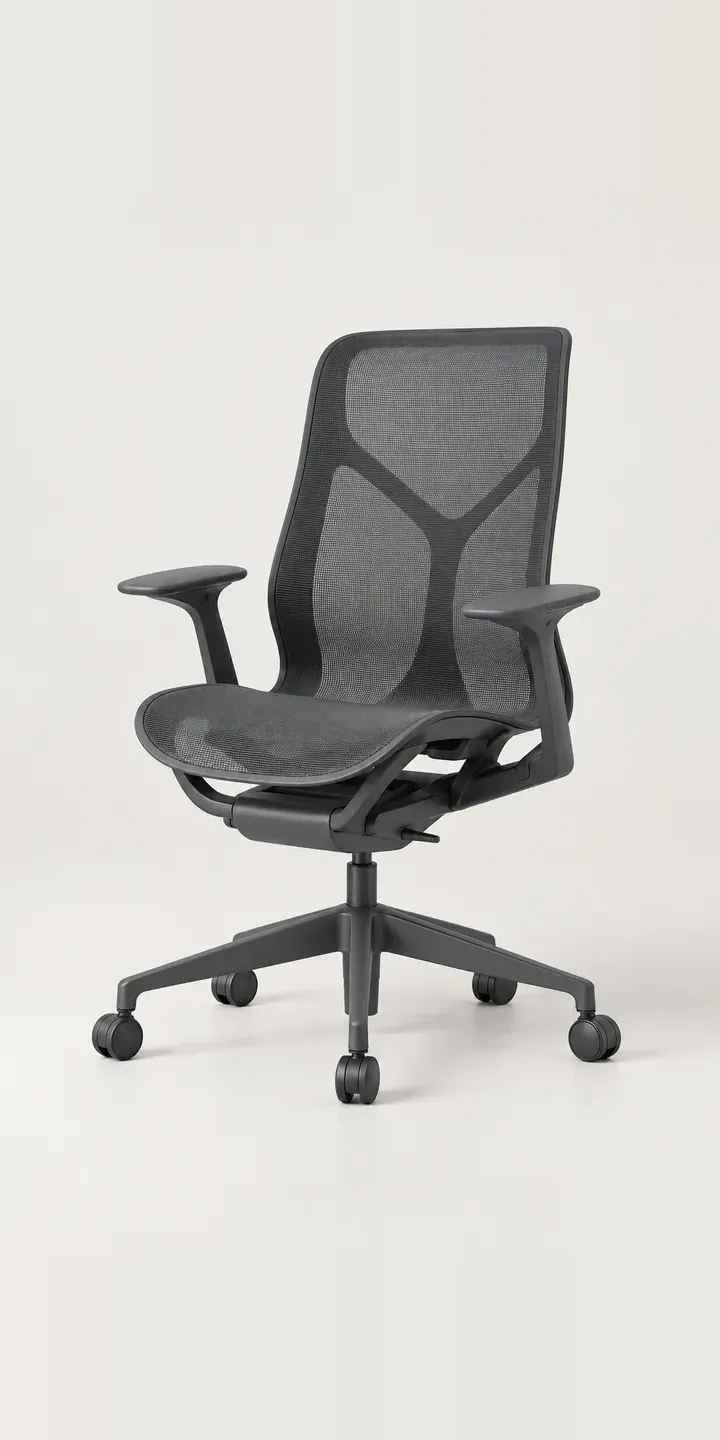
Below is a working configurator for an illustrative task chair with a woven suspension back. Choose a colour and a back height, and the build summary updates ready for a quote request.
A task chair is sat in all day, so the decision is mostly about the body. Buyers compare seat depth adjustment, lumbar support, armrest movement and the tilt mechanism, and many check whether a chair meets the relevant office seating standard. Back height belongs in the same conversation. A low back suits short tasks and meeting rooms, while a high back supports people who recline while they think. Colour usually comes last, often chosen to fit a brand or a floor plan.
Home office Configurator demo
Task Chair
- Product
- Task Chair
- Colour
- Graphite
- Back
- Low
Illustrative product. The design and images are generated examples, not a real model for sale.
What you can configure
Graphite, studio white, mineral and deep blue swap the main image; sage and terracotta are left out of this demo. Back height is a separate choice of low, mid or high. It goes into the summary without redrawing the chair, and a production version would add a render per height. On a suspension chair the colour runs through the woven back as well as the frame, so it reads differently against a bright wall than under office lighting.
- Colour: Graphite, Studio White, Mineral, Deep Blue
- Back: Low, Mid, High
Why a configurator suits office chairs
Office seating is usually specified rather than browsed. A workplace designer picks one chair for the open-plan floor, perhaps a high-back version for focus rooms, and a colour that works with the carpet and the brand. Six colours and three back heights make 18 variants before anyone mentions arms, castors or a headrest.
Dealers spend a lot of time producing visuals for those specifications. A configurator lets the designer or client build the chair themselves, see it in the right colour and export the spec with codes. The dealer gets a clean brief, and the manufacturer sees which combinations are being requested across its dealer network.
For home office buyers the reasoning is simpler. They cannot sit in the chair before buying, so they want every angle in the colour they are choosing. Accurate images and clear dimensions for each back height reduce returns from a chair that arrives taller or bluer than expected, and office chairs are bulky to collect.
How a production version would be built
A production task chair configurator usually starts from a 3D model, because options multiply fast once arms, castors and mechanisms join colour and back height. From the model I would render a fixed set of angles for each combination, or move to a 3D product configurator if the range is large. The manufacturer supplies the option structure, component codes and the components that cannot be combined. Output can feed a dealer quote, a CRM, or a Shopify basket for direct sales, and the same data can drive a seating configurator across the wider range.
Build sheet for this range
- Colours in the full range: 6 (4 shown in this demo)
- Back choices: 3
- Combinations to support: 6 × 3 = 18
- Images for one photograph per combination at 3 angles: 54
- Images if back heights can be shown as separate layers, at 3 angles: 27
- Data each of the 18 combinations needs: a SKU or variant ID, price, stock or lead time, and any dimensions or specification that change
Questions about office chair configurators
Can the configurator handle arms, castors and mechanisms as well as colour?
Yes. Each component becomes an option with its own layer or render, plus rules for what fits together. A fixed-arm version might not take a seat slider, for example. Those rules live in the product data, so the configurator only offers valid builds and every specification it produces can actually be made.
Can dealers produce specification sheets from a configured chair?
They can. A finished configuration can generate a PDF or shareable link with the image, component codes and dimensions. Dealers attach that to tenders and proposals instead of building a sheet by hand. If the client changes colour later, the dealer reconfigures and resends rather than starting from scratch.
How do we show the difference between low, mid and high backs clearly?
Side views do most of the work. A front view hides back height, while a profile shows where the backrest stops against the shoulders. I would render each height from the same side angle with a simple height dimension, so buyers can compare all three without opening three product pages.
Will the woven suspension colours match what customers receive?
They will be close if the images are calibrated against real samples. Woven backs are tricky because light passes through the weave, so colour shifts with whatever sits behind the chair. Showing every colour against the same neutral backdrop, and checking each against the physical mesh, gives buyers a fair comparison.
More home office configurator demos
All desk and home office configurator demos
A configurator for your office chairs
This demo uses an illustrative product. If you sell office chairs, I can build the same experience around your own range, photography and ordering process, connected to Shopify, WooCommerce or a quote workflow. I reply to enquiries within two UK working days.