A compact module with a recessed finger pull along the door edge, this illustrative mini cabinet is configured by colour and mounting. Hang it on the wall, stand it on legs or set it on a plinth.
Mounting changes what this cabinet is. Wall-hung by the front door, it is a shelf with a door for keys and post. On legs, it becomes a bedside table. On a plinth, it is a low cabinet that can be lined up with others. Small modules are also bought in multiples and arranged into grids, so the buyer is often designing a composition across a wall rather than buying one cabinet.
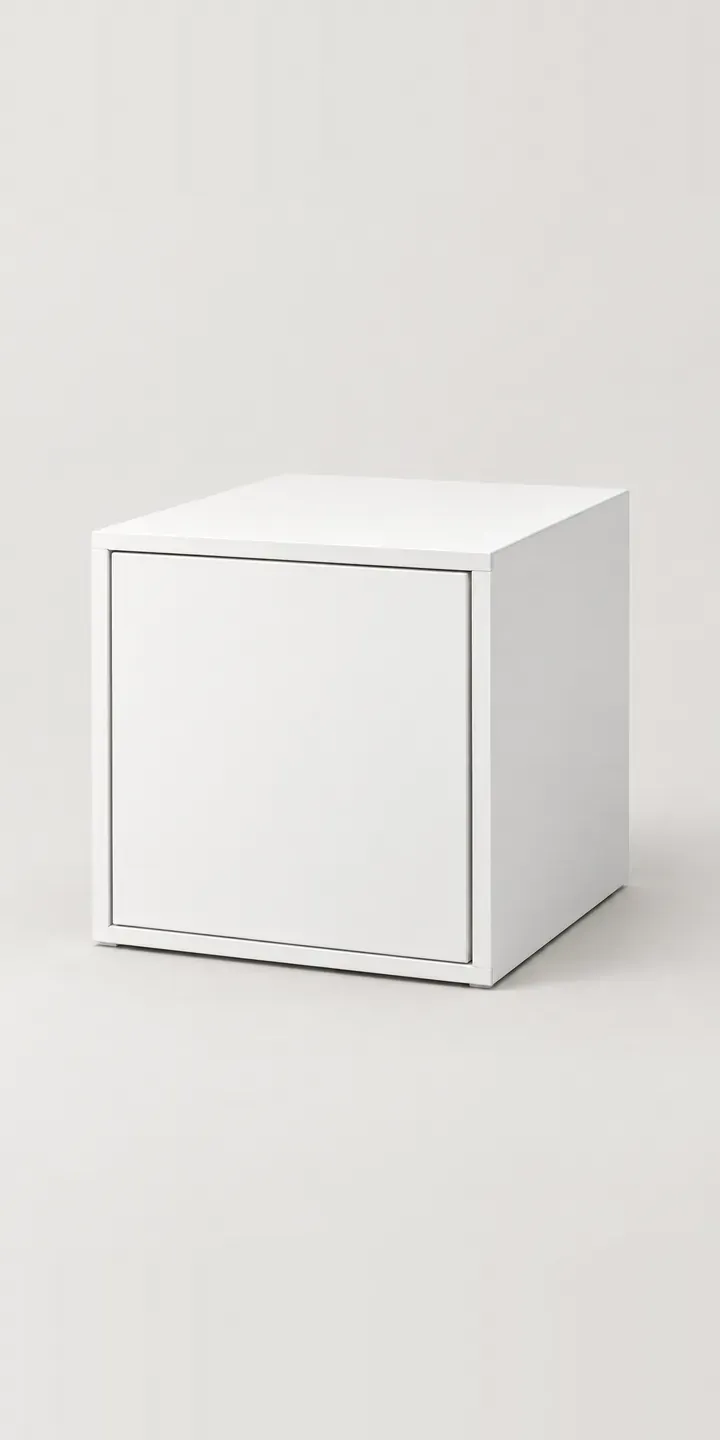
Furniture Configurator demo
Mini Cabinet
- Product
- Mini Cabinet
- Colour
- White
- Mounting
- Wall
Illustrative product. The design and images are generated examples, not a real model for sale.
What you can configure
The cabinet switches between white, dark grey, oak effect and sage, which are four of six colours. Pale blue and brick red are the others. Wall, legs or plinth is noted in the summary but not yet drawn. A production version would show each, since mounting changes the cabinet's height from the floor and how much wall shows around it.
- Colour: White, Dark Grey, Oak Effect, Sage
- Mounting: Wall, Legs, Plinth
Why a configurator suits cabinets
Mounting options multiply the range in a way that is easy to underestimate. Six colours on three mountings is eighteen products, and buyers composing a wall may want several colours together. A mixed grid of sage, brick red and pale blue cabinets is exactly what sells this kind of product. It is also exactly what a static product page cannot show.
Wall mounting brings practical questions. Is the wall masonry or plasterboard? What load can the cabinet hold? Which fixings are included? These questions often reach customer service before the order, or after a difficult installation. A configurator can show fixing guidance for the wall option only, so buyers choosing legs or a plinth are not confused by it.
For retailers, the composition is the larger order. A buyer who designs a grid of six cabinets places one order for six, plus the mounting hardware, rather than buying one to try. Saving the composition as a link also lets them share it with a partner before committing, and come back to it later.
How a production version would be built
A modular cabinet suits a canvas-style build. Each cabinet is rendered once per colour from a straight-on view, and the buyer places modules on a simple wall grid to plan a composition. Legs and plinths are separate layers under the cabinet, so changing the mounting needs no new render of the body. The retailer supplies colours, module dimensions, mounting hardware, wall-fixing guidance and load information. The composition reaches the basket as individual items with their mountings. Buyers can also keep it as a shareable configuration link to revisit later.
Build sheet for this range
- Colours in the full range: 6 (4 shown in this demo)
- Mounting choices: 3
- Combinations to support: 6 × 3 = 18
- Images for one photograph per combination at 3 angles: 54
- Images if mount options can be shown as separate layers, at 3 angles: 27
- Data each of the 18 combinations needs: a SKU or variant ID, price, stock or lead time, and any dimensions or specification that change
Questions about cabinet configurators
Can buyers arrange several cabinets into a wall composition?
Yes. A production build can offer a wall grid where buyers place cabinets, choose a colour for each and see the composition to scale. The configurator then lists every module and its mounting hardware for the basket. A straight-on view keeps the layout simple to read on a phone.
Can the configurator show fixing guidance for wall-mounted cabinets?
Yes. When the wall option is chosen, the configurator can show the fixings supplied, the wall types they suit and any load limits from your product data. That information can also go into the order confirmation. Buyers choosing legs or a plinth simply do not see it, so the page stays clear for them.
Do legs and plinths need separate photography?
Not if the build uses layers. The cabinet body is rendered once per colour, and the legs and plinth sit on separate layers beneath it. A new leg finish or plinth height is then one new layer that works with every colour. Rendering from a single 3D model keeps the alignment exact.
How quickly do you respond to enquiries about a cabinet configurator?
Within two UK working days. Send your range, the number of colours and mountings, and the platform your shop runs on. I can then tell you which approach suits it and what affects the budget. There is no fixed price, because the work depends on asset preparation and integration.
More furniture configurator demos
All furniture configurator demos
A configurator for your cabinets
This demo uses an illustrative product. If you sell cabinets, I can build the same experience around your own range, photography and ordering process, connected to Shopify, WooCommerce or a quote workflow. I reply to enquiries within two UK working days.