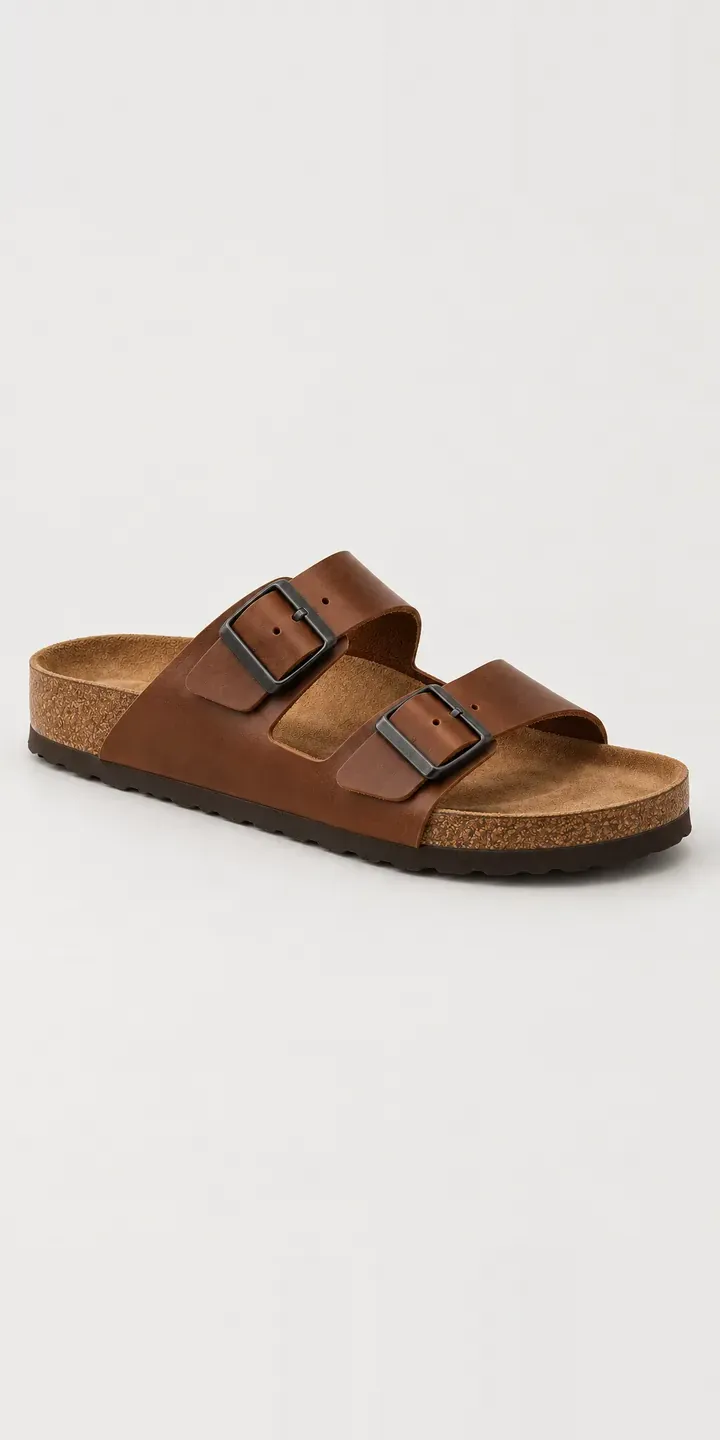
This configurator presents an illustrative two-strap sandal with a contoured cork footbed and buckled straps. Customers choose a leather colour and a width fitting, and the selection is held in a summary ready to send.
Most sandal buyers have been caught out by fit before. A raised-arch footbed only works if the foot sits where the arch was shaped to support it. A strap that cannot close tightly enough lets the foot slide forward. So width is not a minor detail here. It decides whether the sandal is comfortable by day three. Colour comes second: dark tan for summer days, black for evenings and city wear.
Footwear Configurator demo
Two-Strap Sandal
- Product
- Two-Strap Sandal
- Colour
- Dark Tan
- Width
- Narrow
Illustrative product. The design and images are generated examples, not a real model for sale.
What you can configure
The swatches cover dark tan, black, off white and taupe; cognac and navy would complete the range of six. Each photograph keeps the metal buckle on the outer strap and the cork footbed visible, so you can judge how each leather sits against the cork. Narrow or regular is logged with the order, though the photograph stays put. That is realistic, as width fittings rarely show on camera.
- Colour: Dark Tan, Black, Off White, Taupe
- Width: Narrow, Regular
Why a configurator suits sandals
Width doubles every variant. Six colours in two fittings across a full size run makes a large SKU table. Most online sandal listings bury the width choice in a dropdown that customers overlook. The result is a familiar returns pattern: the right colour, the wrong fitting. A configurator puts width beside colour as a first-class decision, with guidance on how to choose.
The selling season is short. Sandals sell hard for a few months, and every return in that window is a pair that may not resell at full price. Clear fitting advice and accurate leather colour on the product page protect sell-through when it counts. They also reduce the emails asking whether regular will suit a high instep.
Brands selling through independents gain something else. A stockist ordering for the season can set out colour and width splits before placing a wholesale order. That makes the width ratio a deliberate choice rather than a default, so fewer shops end the summer with unsold narrow pairs.
How a production version would be built
For a sandal, I would photograph each leather once from a consistent three-quarter angle, with a top-down view showing the footbed shape. Width needs no extra images, but it does need content: a short fitting guide, perhaps a foot-tracing tool, and clear notes on what changes between fittings. Colour names, width definitions, size runs and stock come from the brand. Colour, width and size then combine into one variant for the basket. A made-to-measure configurator can go further, taking foot measurements and suggesting a fitting.
Build sheet for this range
- Colours in the full range: 6 (4 shown in this demo)
- Width choices: 2
- Combinations to support: 6 × 2 = 12
- Images for one photograph per combination at 3 angles: 36
- Images if widths can be shown as separate layers, at 3 angles: 24
- Data each of the 12 combinations needs: a SKU or variant ID, price, stock or lead time, and any dimensions or specification that change
Questions about sandal configurators
How do we help customers choose between narrow and regular?
Put the guidance next to the choice, not on a separate page. A short prompt can ask about foot shape, instep height or how other shoes fit, then suggest a width. You can also show the measurement difference between fittings if you hold it. The aim is to make width feel as considered as colour.
Will off white leather look right next to the darker colours?
It can, but pale leathers need care. They clip easily under bright light and can turn blue or yellow if white balance drifts. I shoot pale and dark colours under the same setup and then check each against the physical leather. A close-up of the strap surface helps buyers see the grain as well as the tone.
Can stockists see which widths sell best before they order?
If the configurator runs on your own retail site, the selection data shows how often each width is chosen with each colour. You can share that with stockists as part of a seasonal order guide. It is a better starting point than splitting every colour evenly between fittings.
What would it take to add a wide fitting later?
Very little on the configurator side. Width is a list of values in the product data, so a wide fitting means adding its sizes, stock and guidance. No new photography is needed unless the strap or footbed visibly changes. The summary and quote request pick up the new option automatically.
More footwear configurator demos
All footwear configurator demos
A configurator for your sandals
This demo uses an illustrative product. If you sell sandals, I can build the same experience around your own range, photography and ordering process, connected to Shopify, WooCommerce or a quote workflow. I reply to enquiries within two UK working days.