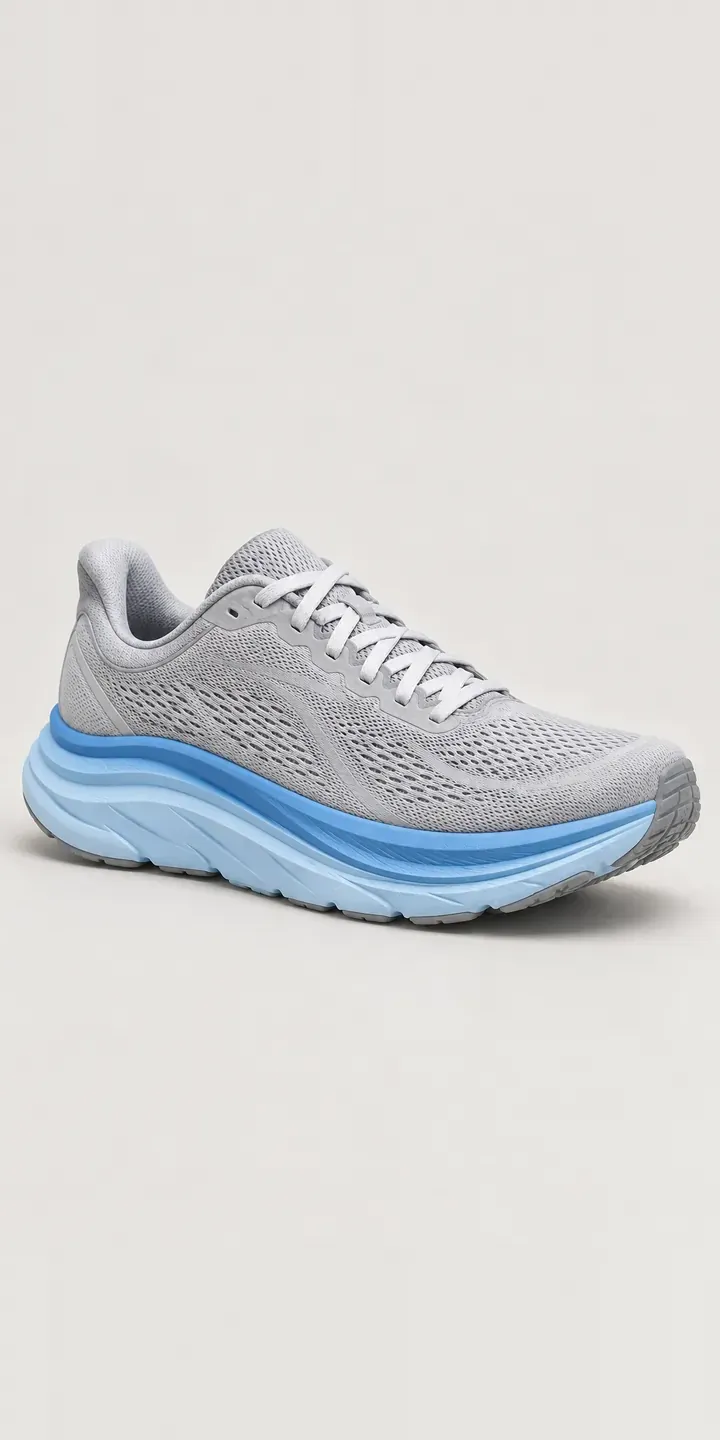
This page features an illustrative cushioned road shoe with a configurator for colour and width. The finished choice is ready to send as a quote request.
Runners choose shoes in a set order. Fit and feel come first: cushioning, midsole shape, heel hold and width. Colour comes last, often as a small reward once the technical choice is made. That order matters for a configurator. A runner who needs a wide fit has narrowed the range before looking at colour. They should not see colourways that are not made in their width.
Footwear Configurator demo
Cushioned Road Shoe
- Product
- Cushioned Road Shoe
- Colour
- Grey Blue
- Width
- Regular
Illustrative product. The design and images are generated examples, not a real model for sale.
What you can configure
Grey blue, black, coral and sea green are live, and butter and deep navy complete the range. Each swatch swaps the photograph. The rocker curve of the midsole at the toe and the structured heel counter behind the mesh can be checked in every colour. Width is the option here, Regular or Wide, and it is added to the summary. In a production build, width would also filter the colours on offer.
- Colour: Grey Blue, Black, Coral, Sea Green
- Width: Regular, Wide
Why a configurator suits running shoes
Wide fits are often made in fewer colourways than the standard width. On a typical product page, a runner picks coral, chooses wide and finds it does not exist. It is an easy place to lose a sale. Asking for width first, then showing only the colours made in it, removes that dead end entirely.
Specialist running shops have another reason. Their value lies in fitting advice, often backed by gait analysis in store. Online, a configurator can reflect some of that by asking about typical distance and surface, then pointing towards suitable widths and models. It should guide rather than diagnose, and the shop sets the logic behind every suggestion. Runners who want more can book a fitting from the same screen.
Runners replace shoes regularly, often with the same model. A returning customer who knows their size and width wants the quickest route to a new pair. Saving their last configuration turns a repeat purchase into a couple of clicks. It also keeps them away from the discount sites.
How a production version would be built
A production version would use one side photograph per colour, plus optional sole and heel views. The rocker and heel counter are what runners inspect. Width needs no images of its own, but it does need availability rules: which colours exist in wide, and in which sizes. The shop supplies those rules, SKUs by size and width, and stock. Orders pass to Shopify variants or WooCommerce. Shops with an EPOS can sync stock, so a runner sees what is on the shelf before booking a fitting.
Build sheet for this range
- Colours in the full range: 6 (4 shown in this demo)
- Width choices: 2
- Combinations to support: 6 × 2 = 12
- Images for one photograph per combination at 3 angles: 36
- Images if widths can be shown as separate layers, at 3 angles: 24
- Data each of the 12 combinations needs: a SKU or variant ID, price, stock or lead time, and any dimensions or specification that change
Questions about running shoe configurators
Can wide-fit colours appear only when the runner selects wide?
Yes. Width can come first, and the colour swatches then show only what is made in that width. Alternatively, colour can come first with unavailable widths greyed out. Which works better depends on your customers. For a shop with many wide-fit runners, width first avoids disappointment.
Should the configurator include a shoe-finder questionnaire?
It can, but I would keep it short and honest. A few questions on distance, surface and preferred feel can point to two or three suitable models. It should never claim to replace a fitting. Many shops use the result to book an in-store fitting, which keeps the expert advice where it belongs.
Can returning runners reorder the same shoe quickly?
A signed-in customer can start from their last configuration, with model, width and size already set and only the colour to choose. For shops with a loyalty scheme, that history can live in the CRM. It is one of the simplest ways to make repeat purchases easier.
Can the configurator show cushioning, drop and weight?
Yes, as product data beside the image. Stack height, drop, weight and intended use can sit in a spec panel that updates by model. The figures come from your product data, so they match the brand's own specification. For runners comparing two models, a side-by-side spec view often helps more than a second photo.
More footwear configurator demos
All footwear configurator demos
A configurator for your running shoes
This demo uses an illustrative product. If you sell running shoes, I can build the same experience around your own range, photography and ordering process, connected to Shopify, WooCommerce or a quote workflow. I reply to enquiries within two UK working days.