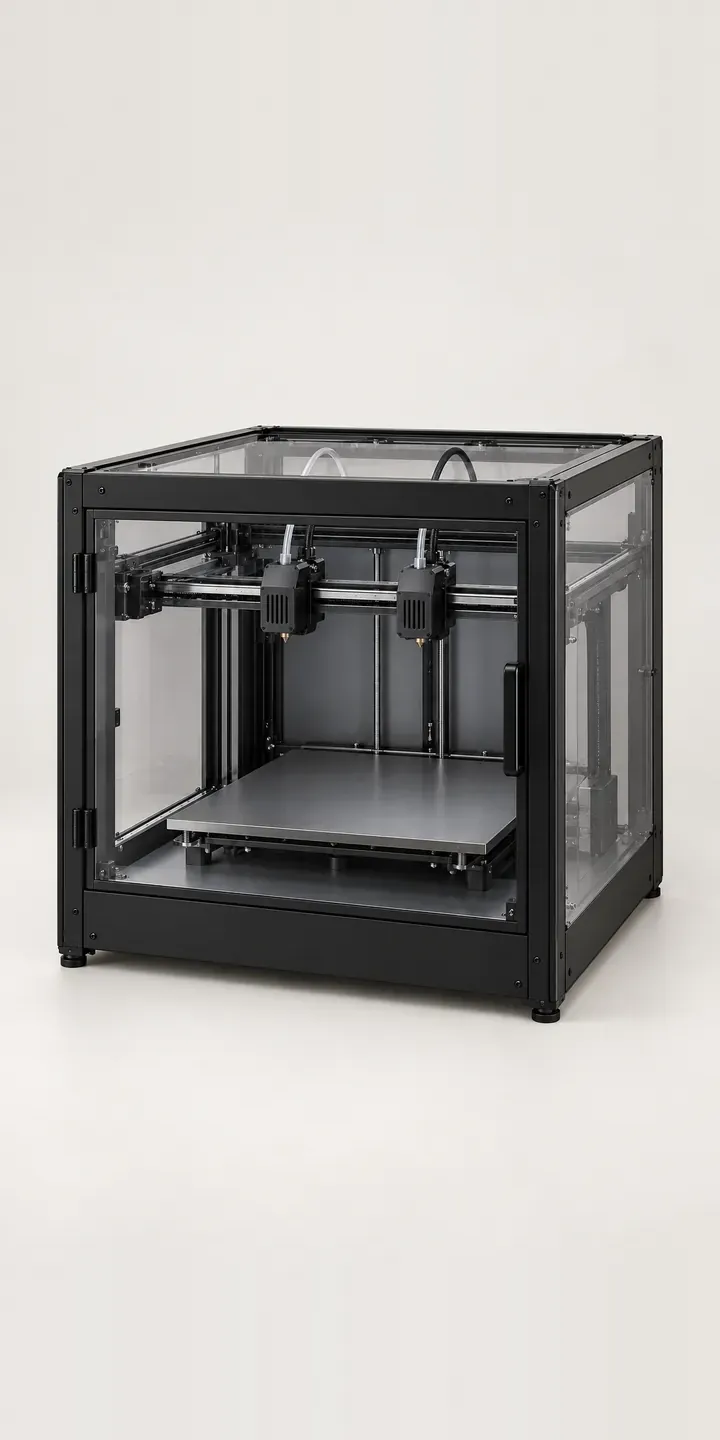
Here you can configure an illustrative twin-nozzle 3D printer. Pick the frame colour, choose a 0.4 mm or 0.8 mm nozzle set, and send the result as a quote request.
Two nozzles side by side solve a specific problem: printing a part with soluble supports, or in two materials, without swapping filament halfway through. Buyers already know they want that. What they are weighing is nozzle diameter. A 0.4 mm set gives finer layers and crisper detail. A 0.8 mm set lays down far more plastic per pass, which suits large functional parts where print time matters more than surface finish.
Tools and workshop Configurator demo
Twin-Nozzle Printer
- Product
- Twin-Nozzle Printer
- Colour
- Black
- Nozzles
- 0.4 mm
Illustrative product. The design and images are generated examples, not a real model for sale.
What you can configure
The demo shows black, white, silver and graphite, four of the six frame colours. Nozzle size is a separate choice that appears in the summary. At full-product scale a nozzle is a few millimetres across, so swapping the main image would not show the difference. A production build would add a labelled close-up of the twin nozzles alongside the main view.
- Colour: Black, White, Silver, Graphite
- Nozzles: 0.4 mm, 0.8 mm
Why a configurator suits 3D printers
Twin-nozzle printers sell heavily into universities, schools and product design studios, and those buyers rarely use a basket. They need a quote with part numbers that procurement can match to a purchase order. When the spec arrives as free text, someone has to phone back to confirm which nozzle set and which colour was meant.
A configurator removes that step. Six frame colours with two nozzle sets is twelve orderable versions, each with its own code. The buyer picks one, and the reseller receives the code rather than a description. Mixed batches work too. Four graphite machines with fine nozzles and two black ones with coarse become separate lines on one request.
Frame colour matters more than it might seem. In a design studio the printer often sits where clients can see it, and a white or graphite machine suits that room. In a teaching lab, black hides the inevitable marks. Showing each finish properly answers that question before it becomes an email.
How a production version would be built
Because the printer body is identical in every colour, one image per finish covers the main view: six photographs or renders from a fixed camera position. The nozzle choice is better handled as a detail image swapped beside the main view than as a layer. The retailer provides product codes, finish names, any education or trade pricing tiers, and whether nozzle sets are sold separately as spares. Orders then go to a Shopify basket for retail buyers and a quote for institutions.
Build sheet for this range
- Colours in the full range: 6 (4 shown in this demo)
- Nozzles choices: 2
- Combinations to support: 6 × 2 = 12
- Images for one photograph per combination at 3 angles: 36
- Images if nozzle sets can be shown as separate layers, at 3 angles: 24
- Data each of the 12 combinations needs: a SKU or variant ID, price, stock or lead time, and any dimensions or specification that change
Questions about 3D printer configurators
Can education buyers request a quote for several configured printers at once?
Yes. Each configured printer becomes a line on the same request, with its own code, colour and nozzle set. The buyer can add a quantity per line and a purchase order reference. The request then reaches you as one structured document rather than a chain of emails.
Should nozzle size be an option on the machine or sold as a separate spare?
Usually both. Offer the nozzle set as a choice at purchase so the machine ships ready, then list spare sets as add-ons. Buyers who print both fine and coarse parts often want each size from day one. The configurator can suggest the second set without forcing it.
How do we show what the 0.8 mm nozzle actually changes?
A specification table does part of it. A pair of sample photographs, the same printed part at each diameter, does more. The configurator can show that comparison when the nozzle option is selected, so buyers see the difference in layer lines and wall finish instead of reading about it.
Can trade and education prices sit alongside retail prices?
Yes, through customer groups on Shopify or WooCommerce, or through the quote itself. Logged-in trade or education accounts see their own pricing, while public visitors see retail prices or a request-a-quote button. The configuration logic stays the same for both audiences.
More tool and workshop configurator demos
3-in-1 Fabricator
Aluminium Saw Rail
Battery Rail Saw
Cordless Combi Driver
Desktop Laser Cutter
Digital Test Meter
All tool and workshop equipment configurator demos
A configurator for your 3D printers
This demo uses an illustrative product. If you sell 3D printers, I can build the same experience around your own range, photography and ordering process, connected to Shopify, WooCommerce or a quote workflow. I reply to enquiries within two UK working days.