The demo here is an illustrative digital multicooker with a steam release valve in the lid and a glossy control panel. Change the finish or the capacity and the summary keeps track of the build.
With a multicooker, capacity is the real decision and colour follows. A student in a shared flat wants something small enough to store in a cupboard, while a family batch-cooking stews for the freezer needs the large pot. Buyers also weigh the inner pot coating, how many cooking modes they will actually use and how easily the lid and sealing ring clean. Size sets both the price and the footprint on the worktop.
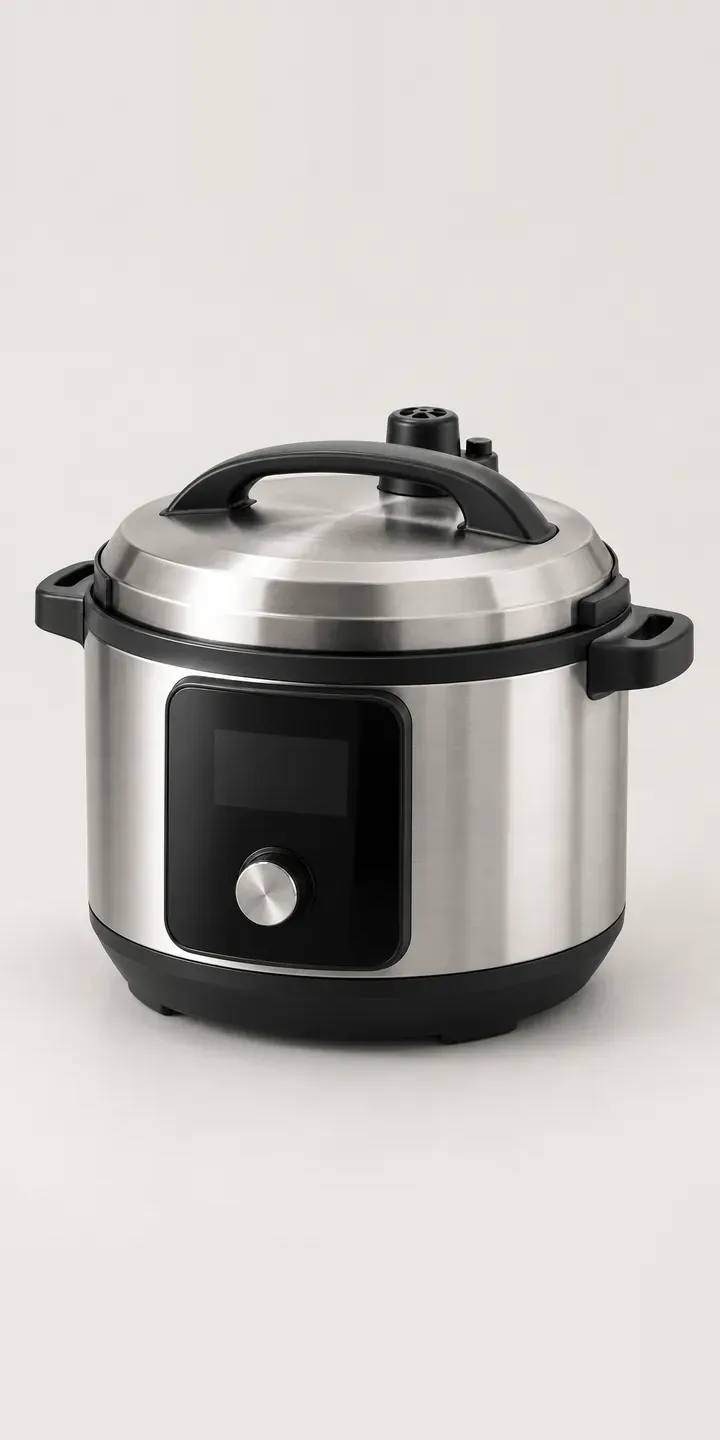
Kitchen Configurator demo
Digital Multicooker
- Product
- Digital Multicooker
- Colour
- Brushed Steel
- Capacity
- 3 L
Illustrative product. The design and images are generated examples, not a real model for sale.
What you can configure
Capacity matters more on a multicooker than on most appliances. Pressure cooking needs a minimum fill, so an oversized pot is awkward for small portions and an undersized one cannot be stretched. The demo offers 3, 6 or 8 litres, recorded in the summary while the picture stays at one size. Brushed steel, matte black, ivory and sage change the image; charcoal and terracotta would be added for production.
- Colour: Brushed Steel, Matte Black, Ivory, Sage
- Capacity: 3 L, 6 L, 8 L
Why a configurator suits multicookers
Three capacities in six finishes means 18 versions of the same appliance. Retailers rarely photograph them all, so the 3 L often borrows the 6 L photo and buyers misjudge the size. When the box arrives and the cooker dwarfs a student kitchenette, it goes back.
A configurator fixes that with a consistent image set and a plain size comparison. Each capacity can show its external dimensions, the number of portions it suits and how it sits beside a familiar object. That is the information a buyer would get from lifting the box in a shop, delivered on the product page instead. Portion guidance especially helps first-time buyers who have never owned a pressure cooker and cannot picture what three litres holds.
Multicookers also suit accessory selling. Spare sealing rings, steamer baskets and extra inner pots are cheap to add and useful to the buyer, but each depends on the capacity chosen. A configurator only offers the accessories that fit, removing a common source of wrong orders and customer service emails.
How a production version would be built
Because the three capacities are physically different sizes, I would produce a separate image of each capacity in each finish, ideally rendered from one 3D model so the scale between them stays true. The brand provides the product data a configurator needs: variant codes, external dimensions, recommended portions and accessory compatibility by capacity. That data drives the images and the rules. On WooCommerce or Shopify the configured cooker and any accessories land in the basket as ordinary lines, so fulfilment works exactly as it does today.
Build sheet for this range
- Colours in the full range: 6 (4 shown in this demo)
- Capacity choices: 3
- Combinations to support: 6 × 3 = 18
- Images for one photograph per combination at 3 angles: 54
- Images if capacities can be shown as separate layers, at 3 angles: 27
- Data each of the 18 combinations needs: a SKU or variant ID, price, stock or lead time, and any dimensions or specification that change
Questions about multicooker configurators
How do we stop customers choosing the wrong multicooker capacity?
Make the size comparison part of the choice. Each capacity option can show external dimensions, a portions guide and a side-by-side outline against a kettle or dinner plate. Buyers then pick by household rather than by price. If the 3 L and 8 L look the same size on screen, the configurator is not doing its job.
Can the configurator show the inner pot and lid as well as the outside?
Yes. A second view with the lid open can show the inner pot, the sealing ring and the steam valve. Those are the parts buyers ask about most, because they clean them every day. If inner pots come in different coatings, that can become its own option with a separate image.
Can accessories be filtered by the capacity the customer picks?
They can. Each accessory is tagged with the capacities it fits, and the configurator only shows the matching ones. A steamer basket for the 8 L pot simply does not appear for someone building the 3 L model. That keeps the basket accurate and saves your team from processing exchanges.
Do we need new photography for every colour and size?
Not necessarily. If the factory can supply a 3D model or CAD file, every finish and capacity can be rendered from it at the same angle and scale. Photography works too, but all 18 versions then need an identical camera setup. I usually recommend whichever route you can repeat when the range changes.
More kitchen configurator demos
Fireclay Apron Sink
Heated Food Processor
High-Power Liquidiser
Inset Steel Sink
Kitchen Spray Tap
Pebble Ice Machine
All kitchen product configurator demos
A configurator for your multicookers
This demo uses an illustrative product. If you sell multicookers, I can build the same experience around your own range, photography and ordering process, connected to Shopify, WooCommerce or a quote workflow. I reply to enquiries within two UK working days.