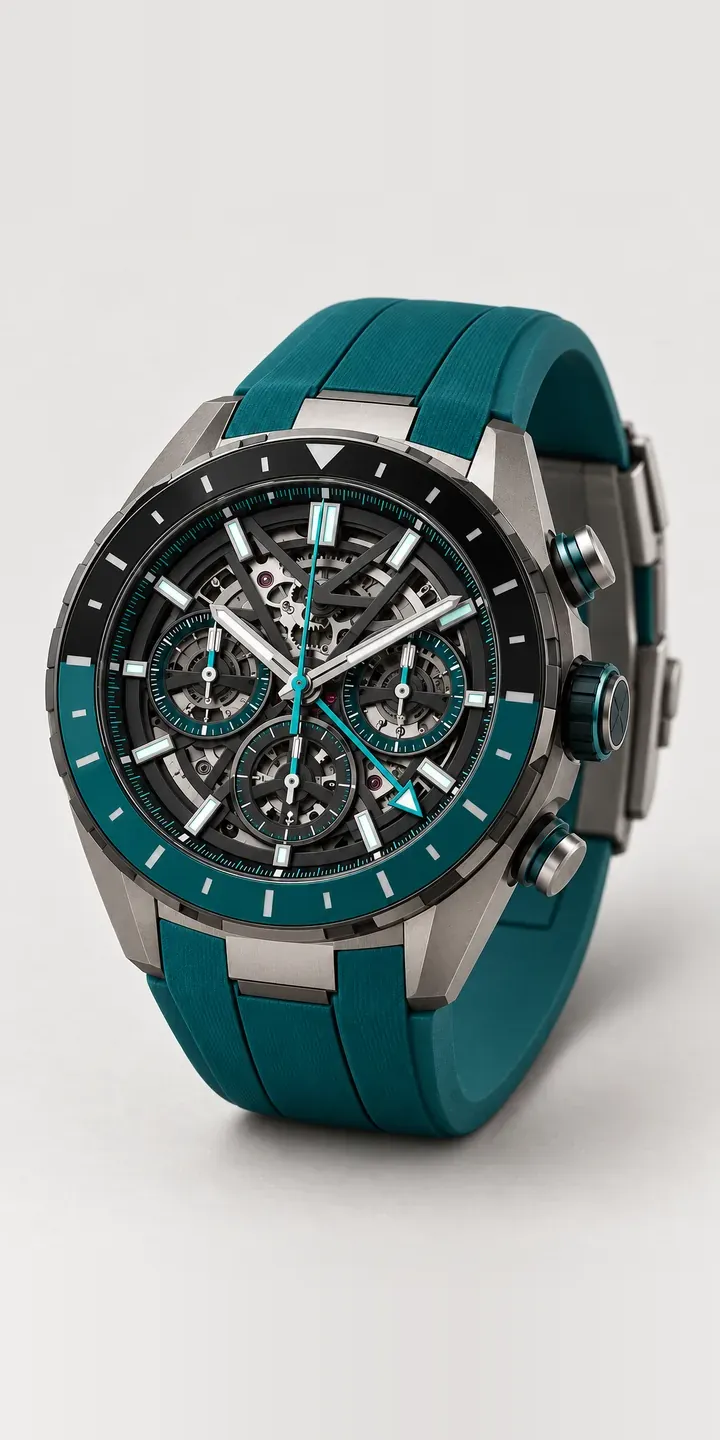
This illustrative GMT chronograph has an openworked dial that reveals the movement and a two-tone ceramic bezel with a 24-hour scale. Accent colour and strap, rubber or titanium, are yours to set before the build goes to an enquiry.
With a skeleton watch, the buyer is paying to see the mechanism. Colour is used sparingly, on accents, so the real question is how much it competes with the movement. Black lets the architecture lead. Teal and orange add a motorsport energy, and blue sits closer to a travel watch, which a GMT complication arguably is.
Watches Configurator demo
Skeleton Chronograph
- Product
- Skeleton Chronograph
- Colour
- Teal
- Strap
- Rubber
Illustrative product. The design and images are generated examples, not a real model for sale.
What you can configure
Teal, black, orange and blue accents are available to compare, out of six that also include red and grey. Rubber and titanium are listed and carried into the summary, though the photograph does not follow the strap choice in this demo. On an open dial every coloured element sits in front of moving parts. Each swatch is therefore a complete image, not a tint over one photograph.
- Colour: Teal, Black, Orange, Blue
- Strap: Rubber, Titanium
Why a configurator suits chronographs
Watches at this level are considered for months and often bought through a conversation rather than a checkout. Buyers want to know which combinations exist, which are limited, and when they can see one in person. A configurator is the place they return to while deciding, and the enquiry it produces arrives with the decision already well formed.
Twelve combinations of a skeleton GMT are expensive to stock and to shoot. Openworked dials demand macro photography with careful depth of field, and every accent colour needs the same treatment. Brands often show one or two pieces in depth and the rest as thumbnails. A buyer comparing teal with orange needs the opposite.
Titanium against rubber also shapes how the watch wears. Titanium is light for a metal bracelet and suits travel, while rubber suits the track day or the gym. Showing both with every accent lets a buyer judge the whole watch, not just the head. It also makes a post-delivery exchange over a strap that felt wrong less likely.
How a production version would be built
This is one of the few watches where I would consider 3D early. An openworked dial looks different at every angle, and buyers want to tilt it to see depth through the movement. A 3D configurator built from the brand's CAD data allows that, with accent colours handled as material changes. A strong image-based version is still a sensible first stage. In both cases the brand supplies CAD or renders, accent and strap names, references and availability, and enquiries feed into its CRM.
Build sheet for this range
- Colours in the full range: 6 (4 shown in this demo)
- Strap choices: 2
- Combinations to support: 6 × 2 = 12
- Images for one photograph per combination at 3 angles: 36
- Images if straps can be shown as separate layers, at 3 angles: 24
- Data each of the 12 combinations needs: a SKU or variant ID, price, stock or lead time, and any dimensions or specification that change
Questions about chronograph configurators
Is 3D worth it for a skeleton watch, or are images enough?
Images are enough for colour choice. 3D earns its place when depth is the selling point, as with an open dial. Customers can rotate the watch and look through it. It needs good CAD data and costs more to build, so many brands start with images and add 3D for flagship pieces.
How do you photograph an openworked dial so the whole movement stays sharp?
Focus stacking: several exposures at different focus depths, merged into one sharp image. A skeleton dial has layers at different heights, and a single exposure always leaves some of them soft. Rendering from CAD avoids the problem altogether, but stacking is the right method when photographing real samples.
Can the configurator explain the GMT and chronograph functions?
Yes. Small hotspots on the image can label the 24-hour bezel, the pushers and the subdials, each with a sentence on what it does. Buyers new to GMT watches often want that explanation, and keeping it on the product image avoids a long block of text beneath the configurator.
Can the configurator take enquiries instead of payments?
Yes. This demo already ends in a quote request. The form carries the configured build, chosen strap and the customer's details, and can go to email or a CRM. Online purchase can be added for references you sell direct. Questions about a build like this are answered within two UK working days.
More watch configurator demos
A configurator for your chronographs
This demo uses an illustrative product. If you sell chronographs, I can build the same experience around your own range, photography and ordering process, connected to Shopify, WooCommerce or a quote workflow. I reply to enquiries within two UK working days.