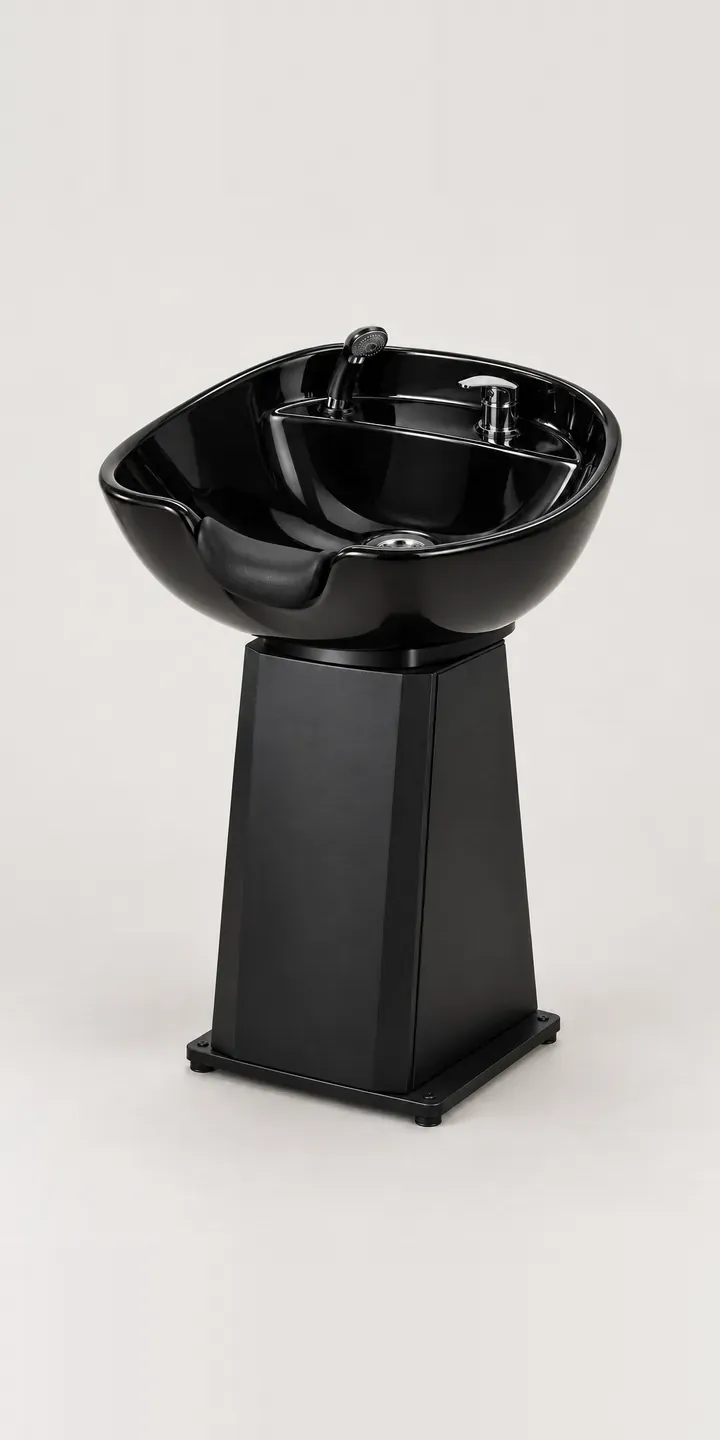
Here is a working configurator for an illustrative salon backwash basin. Pick a bowl colour and a mount, and the summary sets out the unit for a fit-out quote.
The wash area is where clients spend their most relaxed minutes in a salon, and where poor choices are hardest to undo. Once basins are plumbed in, changing them means lifting floors and reworking waste pipes. Owners therefore weigh neck comfort, bowl depth, how the unit pairs with a chair and how the plumbing will be hidden, usually before colour is even discussed.
Salon and barbering Configurator demo
Backwash Basin
- Product
- Backwash Basin
- Colour
- Black
- Mount
- Pedestal
Illustrative product. The design and images are generated examples, not a real model for sale.
What you can configure
Black, white, stone and ivory bowls are shown, with navy and blush also in the range. The mount is pedestal or cabinet. A pedestal is lighter visually and suits open, airy wash areas. A cabinet hides pipework and adds storage for towels and product. The summary records the mount, while the product image stays the same whichever one is chosen.
- Colour: Black, White, Stone, Ivory
- Mount: Pedestal, Cabinet
Why a configurator suits salon basins
Backwash units are rarely bought singly. A wash area might hold three or four in a row, sometimes in two colours, alongside matching chairs. Twelve bowl and mount pairings become far more once upholstery and arrangement are added, and no supplier can sensibly photograph every pairing in every colour.
That is why many fit-outs still depend on showroom visits and printed swatches. A configurator lets the owner, or their designer, compose a wash area remotely: bowl colour, mount and chair, viewed together. Decisions that used to take two visits and a box of samples can be settled in one conversation, with the configured list sent straight to the supplier.
The mount choice carries installation consequences that belong on the order. A pedestal needs plumbing routed one way, a cabinet another, and the fitter needs to know which before arriving. Capturing mount, waste position and tap type during configuration means the supplier hands the installer a complete job sheet rather than discovering the gaps on site.
How a production version would be built
For a single basin, twelve photographs or renders cover every colour and mount. The stronger build is a wash area view, with basins, chairs and back panels composited in layers. If buyers need to arrange a row of units and set the spacing, 3D fits better. The supplier provides SKUs, plumbing requirements per mount, compatible chairs and lead times. Orders go to a quote, ideally logged in the supplier's CRM so the fit-out team can follow up. The salon furniture design technology page explains how I approach this sector.
Build sheet for this range
- Colours in the full range: 6 (4 shown in this demo)
- Mount choices: 2
- Combinations to support: 6 × 2 = 12
- Images for one photograph per combination at 3 angles: 36
- Images if mounts can be shown as separate layers, at 3 angles: 24
- Data each of the 12 combinations needs: a SKU or variant ID, price, stock or lead time, and any dimensions or specification that change
Questions about salon basin configurators
Can the configurator show a full row of basins with chairs?
Yes, and for backwash units that is often the point. With chairs and basins shot or rendered at matching angles, the configurator can place them side by side and switch colours across the row. A 3D version goes further, letting the buyer set the number of stations and the gap between them.
Can it capture plumbing details for the installer?
Yes. Mount type, waste position, tap or mixer choice and water supply can each be a step, with options limited to what works together. The quote then carries an installation summary, so the fitter knows what to expect before they arrive on site.
How do we show the difference between stone and ivory accurately?
Close neutrals are the hardest colours to separate on screen. I shoot or render them under identical light and offer a side-by-side comparison, so the buyer judges the difference rather than each colour alone. Offering physical samples through the same configurator closes the remaining gap.
Do salon suppliers usually choose 2D or 3D for basins?
Image-based is a sound start for a supplier with a handful of basins, and quick to build. Where buyers want to plan an entire wash area, 3D earns its cost. Praxis Digital 3D, the browser-based configuration platform I built, was used by more than 20 UK businesses, so I can advise on both routes.
More salon and barbering configurator demos
Barber Trimmer
Barrel Air Shaper
Hydraulic Barber Chair
Rotating Air Curler
Salon Hair Hood
Salon Hairdryer
All salon and barbering equipment configurator demos
A configurator for your salon basins
This demo uses an illustrative product. If you sell salon basins, I can build the same experience around your own range, photography and ordering process, connected to Shopify, WooCommerce or a quote workflow. I reply to enquiries within two UK working days.