Between 2021 and 2025, I developed the Praxis Digital 3D product configurator for businesses that needed to make configurable products easier to understand online. It was used by more than 20 businesses across the UK, working in different industries.
REM was one of those businesses. Its furniture configurators provide the examples explored on this page: three recognisable interfaces, a substantial product library and the ability to change finishes on different parts of an object. They offer a detailed view into the work, while representing one application of a broader platform.
This is a postmortem of five years spent developing and operating the Praxis Digital platform, examined through one substantial client deployment. The aim is to understand what the work demonstrates about real-world product configuration: the product system, the delivery decisions and the lessons available from the platform’s own operational records.
Explore four current portfolio demonstrations
These demonstrations use original products to explore how a configurator can adapt to different categories and buying decisions. They are interactive portfolio concepts, separate from the historical REM deployments documented in this case study.
| Demonstration | Interaction to explore |
|---|---|
| Gather · Seating | Browse a furniture collection, then open the upholstery choices. |
| Index · Storage | Use a product library beside a live specification table. |
| Outline · Tables | Move through product, finish and summary steps. |
| Afterlight · Lighting | Explore a scene-led viewer with separate finish and exposure controls. |
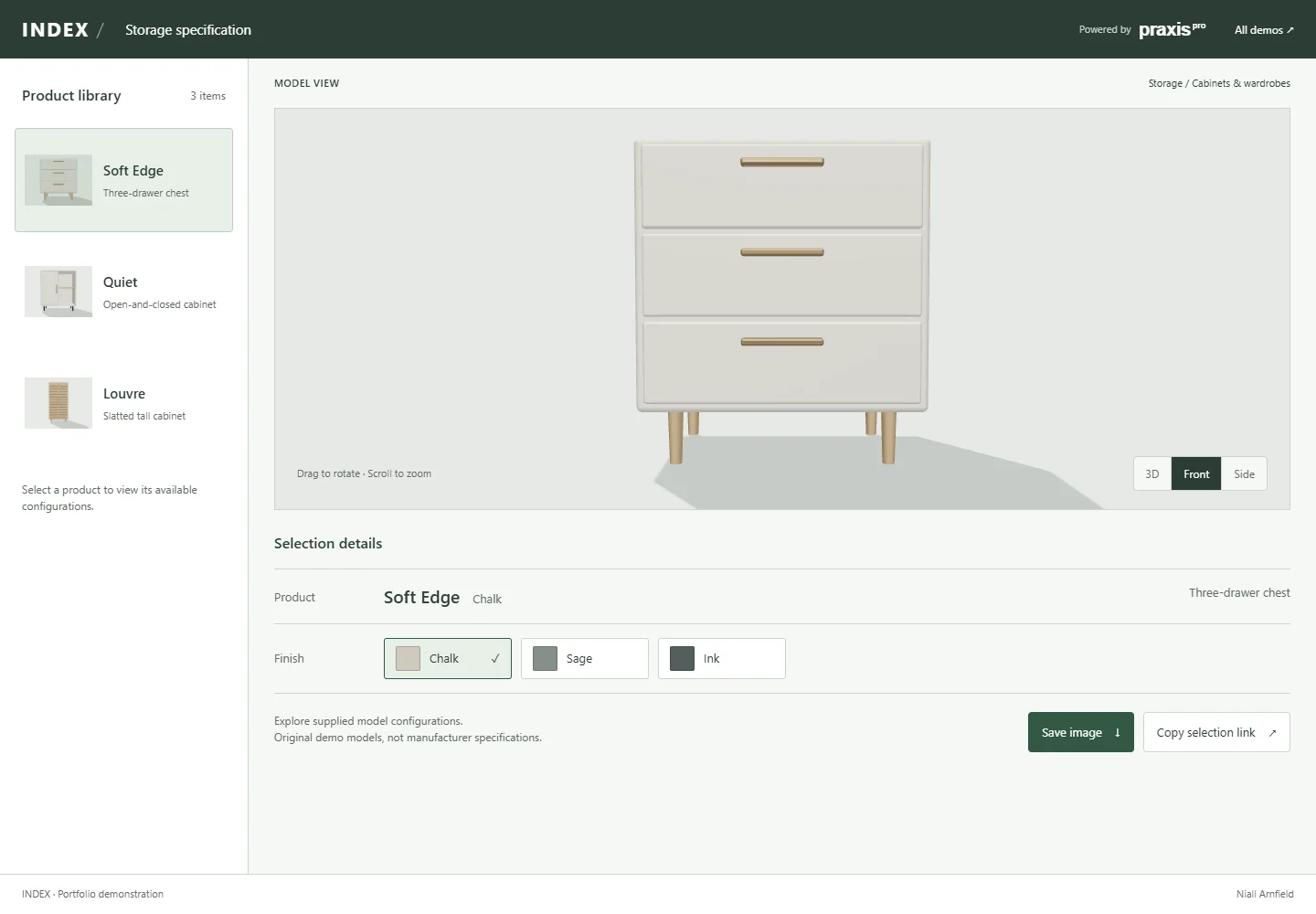
Each demo starts with a static preview and opens the interactive viewer when you choose Explore in 3D. You can change supported options and copy a selection link. These demonstrations do not submit an order or represent additional client deployments.
A platform used beyond one business
The central project was the configurator itself: a way of bringing product information, interactive 3D and understandable controls together inside a customer-facing experience. A client’s name, colour palette and catalogue were visible parts of an implementation, but they were not the full extent of the work. The underlying challenge was making a configurable product make sense to somebody encountering it through a screen.
Over its five-year period, the platform was used by more than 20 UK businesses in different industries. That breadth matters because a configurator cannot rely entirely on the assumptions of one catalogue. Products have different proportions, different material boundaries and different ways of being selected. An interface that is comfortable for a simple upholstered object can become awkward when a product has several independently configurable surfaces.
My role was to bring the design and development of that experience together. The work connected the visible interface with the product models, material choices and browser-based scene. It required attention to the relationship between those parts: what a person could select, what changed on the product, and whether the result remained understandable as they moved through the options.
This article looks closely at the REM Standard and REM Earth implementations. They demonstrate how the platform accommodated different product ranges and visual identities within one business. Across the wider client base, the same central task remained: translating a configurable catalogue into an experience that customers could understand and use.
Making product choices visible
A product photograph answers an important question: what does this item look like in this particular configuration? A configurable product introduces another question: what would it look like with the choices I am considering? Adding more images can help, but it also creates a growing library of combinations for the customer to mentally compare. The relationship between an option and the product is often left implicit.
The configurator makes that relationship more immediate. The customer chooses a material and sees it on the relevant part of the model. They can rotate the product to understand its form, keeping the current combination in view. Instead of asking a person to imagine how a small swatch might translate onto a larger surface, the interface places the two in the same visual conversation.
That does not turn a screen into a physical sample. Colour, reflectivity, texture and scale are still affected by the model, rendering, display and viewing conditions. The useful ambition is to support understanding and comparison. A visualiser can help somebody narrow a choice or formulate a better question without claiming to reproduce every property of a finished physical product.
This distinction also shapes the design. The product needs enough space to be inspected, while the controls must explain what can change. A large rendering with hidden options is incomplete; a dense options panel with a tiny object is equally unhelpful. The visual hierarchy has to connect choosing with seeing, rather than treating the interface and the model as unrelated halves of the page.
Explore three product configurators
The demonstrations below run real product models and material selections. Choose an interface, open the demo, then change a finish or rotate the product. The white customiser also provides a product selector, making it possible to move beyond the opening example. On a smaller screen, opening the demo in its own page gives the product and controls more room.
Cindy Stool · named fabric choices and a neutral grey stage.
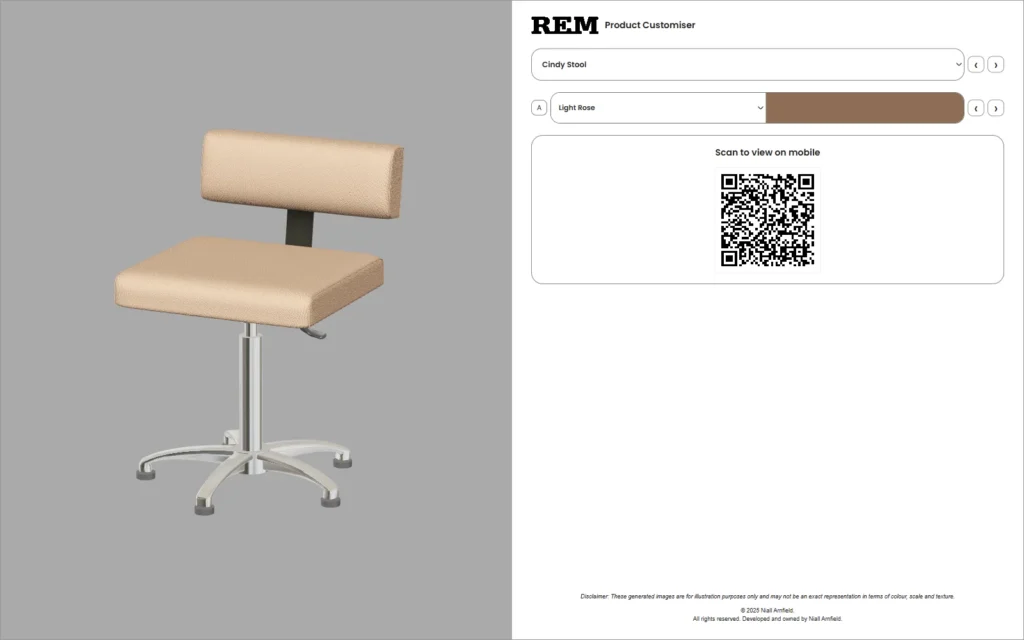
Choose to load the 3D scene when you are ready.
These demonstrations bring three Praxis Digital deployments into the portfolio. Each uses the product models, materials and interactions behind the client experience. The white and charcoal versions use the Standard 2025 library; REM Earth uses its own Earth 2025 library. Keeping those catalogues distinct preserves the product choices and finish vocabulary of each range.
Camera behaviour is specific to the product. Hello Desk, for example, fixes its viewing distance while allowing rotation and finish selection. A consistent distance keeps the object comfortably framed and makes comparisons easier. The objective is a useful view of the product: interaction should help a customer inspect it without making them continually recover a lost or awkward camera position.
The interface starts with the product
The first responsibility of the interface is orientation. A visitor should be able to identify the current product, find the available choices and understand which surface those choices affect. That sounds straightforward, but the product image alone cannot communicate the complete control model. The naming, grouping, selected states and relationship between panels all contribute to that understanding.
In the REM examples, the product title anchors the experience. Material regions are identified separately, and a selected finish remains visible after the user has made a choice. This matters because a configurator is a sequence of decisions. Without a persistent indication of the current state, the person has to remember what they selected while trying to evaluate the next option.
The controls also distinguish choosing a region from choosing its finish. An A or B selector changes the target of the next decision; a swatch changes the material applied to that target. Giving those actions different positions and visible selected states reduces ambiguity. The experience is not simply a set of coloured circles beside a model: those circles need an intelligible relationship to the object.
There is a useful restraint in keeping the product stage relatively quiet. The rendered object supplies much of the visual interest. Interface decoration has to earn its place by helping someone locate, compare or confirm an option. Fine rules, simple typography and deliberate spacing can do more for that task than adding another layer of visual effects around an already complex subject.
Three interfaces, different emphases
The classic charcoal configurator
The earlier interface gives most of the composition to the product. A narrow charcoal panel holds the identity, product name, regional selectors and a compact field of circular swatches. Green rings indicate the active choice. The room backdrop places the object in a recognisable setting, making this version feel closer to viewing furniture in a space than inspecting an isolated catalogue cut-out.
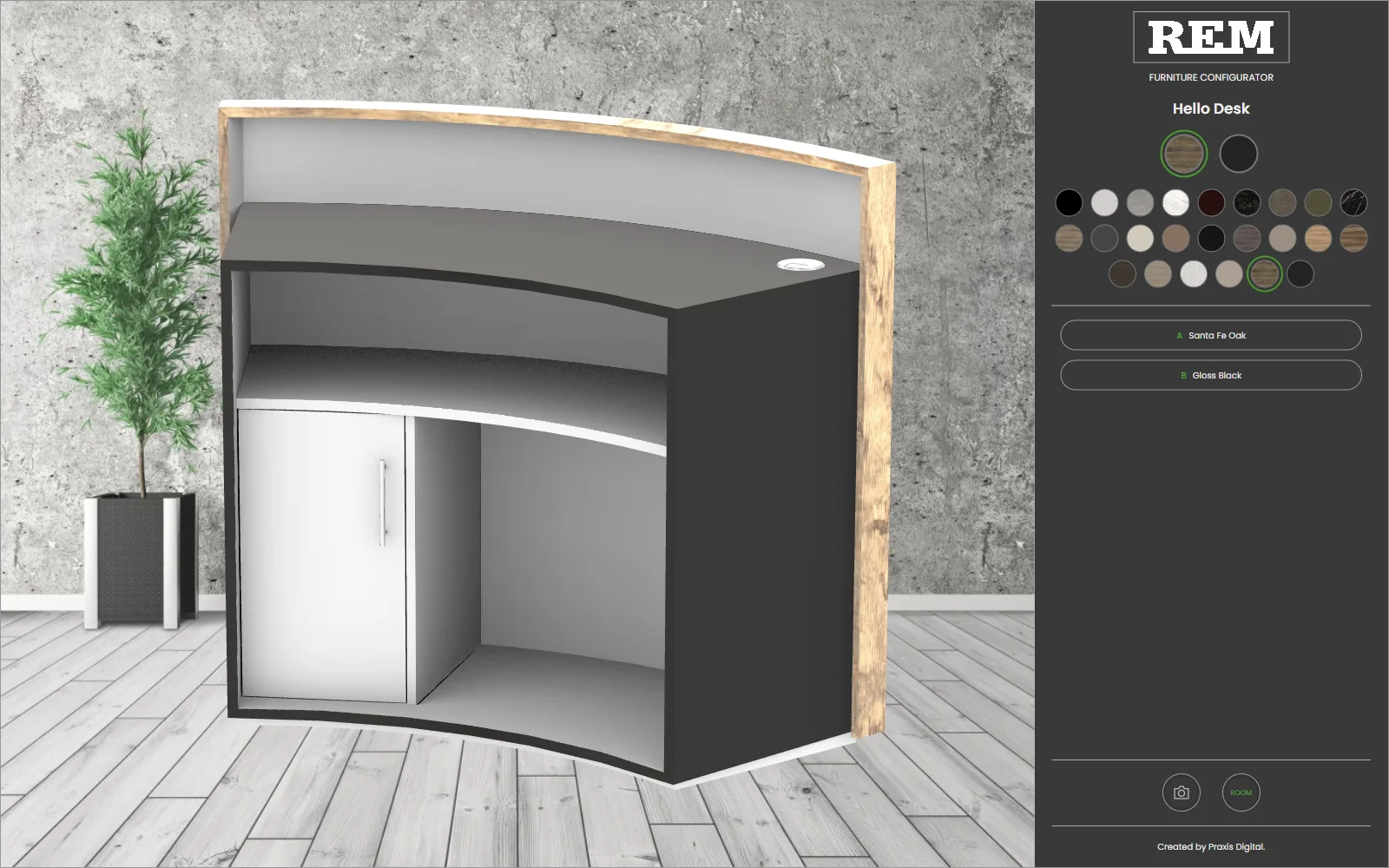
That treatment has a clear trade-off. A room provides context, but it also introduces texture and contrast that can compete with the product. The darker controls need a disciplined hierarchy so that the active option remains legible among many small swatches. The material summaries below the palette are therefore useful: they translate a visual choice back into a name and a region.
The white 2025 customiser
The later white interface changes the balance. Product selection, named material controls and a large QR panel are arranged beside a neutral grey stage. A finish is presented as a name with a preview, rather than relying exclusively on a palette of circles. Previous and next controls make adjacent choices available without requiring the user to reopen a selector for every comparison.
The grey background supports a more isolated view of the product. The white control area reads as part of the surrounding product-page interface, while the outline treatment groups options without filling the panel with heavy blocks. This is a practical design language: the hierarchy comes from position, proportion and grouping, with the model retaining the main visual emphasis.
The separate REM Earth visualiser
REM Earth uses a sage control panel and a white product stage, with the controls on the left. The Earth identity, product title and “Swatch Choices” heading establish a different presentation while retaining the recognisable sequence of selecting a region and then a finish. The material palette belongs to that product experience, giving the range an identity that customers can recognise as they explore different pieces.
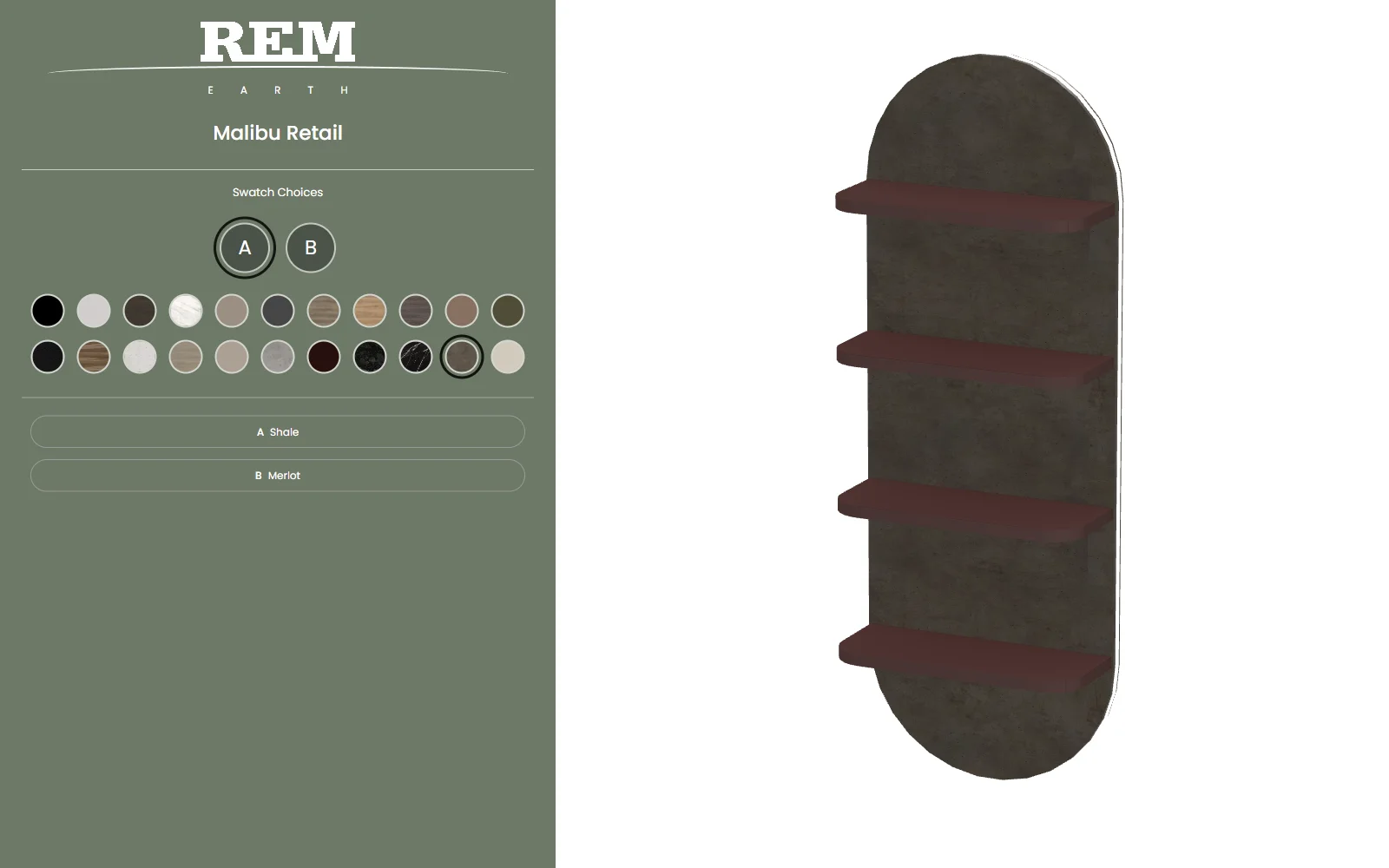
Taken together, the three interfaces demonstrate how a consistent interaction problem can support different visual treatments. They are not presented as a controlled usability experiment or proof that one version improved conversion. Their value in this retrospective is more specific: they let us examine what each composition prioritises, how it communicates choices and how the product remains central to the design.
One object, several material decisions
The Malibu Retail example makes regional configuration particularly clear. Its backing and shelves can receive different finishes. A single “product colour” control would hide that distinction, while an undifferentiated list of every possible combination would make the choices harder to navigate. Separating the object into meaningful material regions provides a more direct representation of the available decision.
In the Earth interface, selecting A or B establishes which region the next swatch will affect. The selected state then appears in the controls and on the model. A customer can change the backing while retaining the shelf finish, or reverse that process. Keeping those choices independent helps the person explore a combination without repeatedly rebuilding the entire configuration.
Shale / Merlot
White Laminate / Bamboo
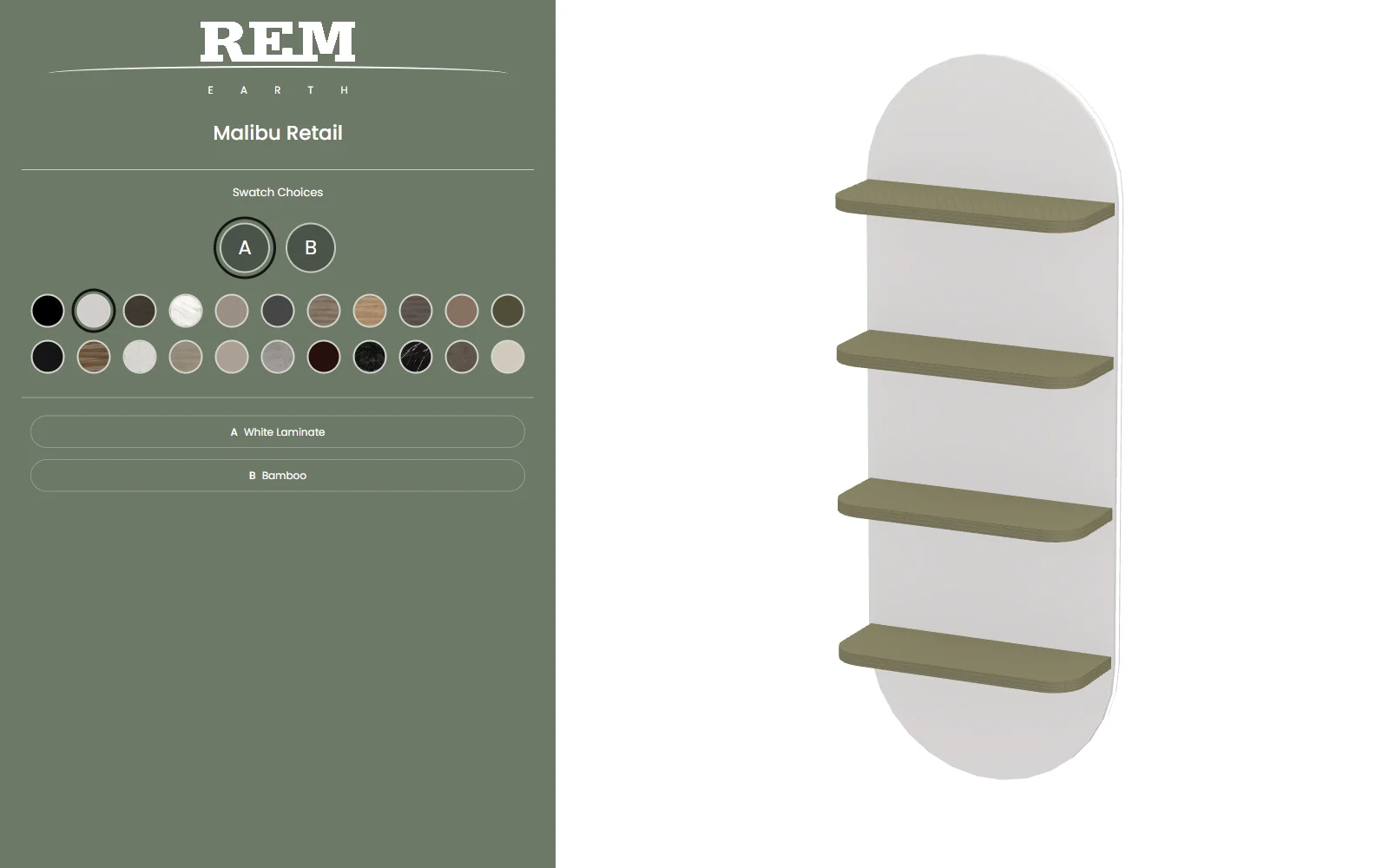
Keeping the product and viewing angle consistent makes a finish comparison much easier to read. The silhouette, proportions and lighting remain familiar, so the material choice accounts for the visible difference. This is valuable when a customer is comparing combinations that are close in colour but different in character. A consistent view helps them concentrate on the relationship between the surfaces rather than repeatedly reorienting themselves around the object.
Defining material regions is also a design decision. Each region should correspond to a part of the product that the customer can recognise: a backing panel, a shelf, an upholstered seat or a structural component. The control names and selected states then provide a map of that object. When the mapping is clear, a customer can explore individual finishes while keeping the complete combination in mind.
Building visual credibility into the materials
A material has to do more than supply a colour. Its surface detail, reflectivity and response to light help a viewer recognise the difference between upholstery, a laminated panel and a metal component. Those cues become especially important when several materials sit beside each other. If they all respond identically, changing a finish can feel like tinting a picture rather than exploring a physical product.
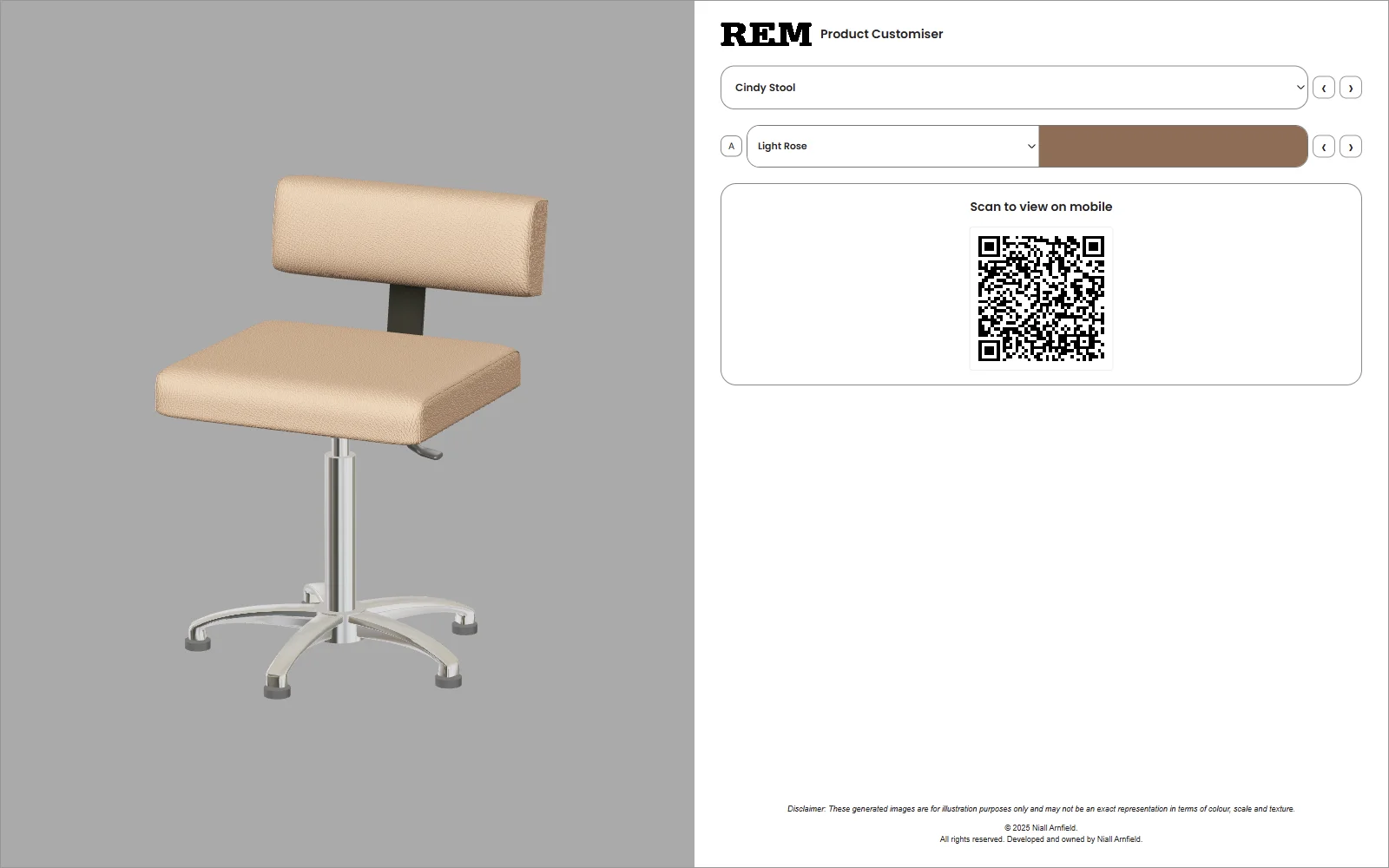
The models and material resources work together to describe those relationships. Cindy Stool combines an upholstered seat and back with metal supporting components. Its surface detail and highlights remain attached to the object as the view changes. That continuity is part of the value of a real-time scene: the selected appearance is available from more than one fixed photograph.
Light Rose upholstery
Pebble upholstery
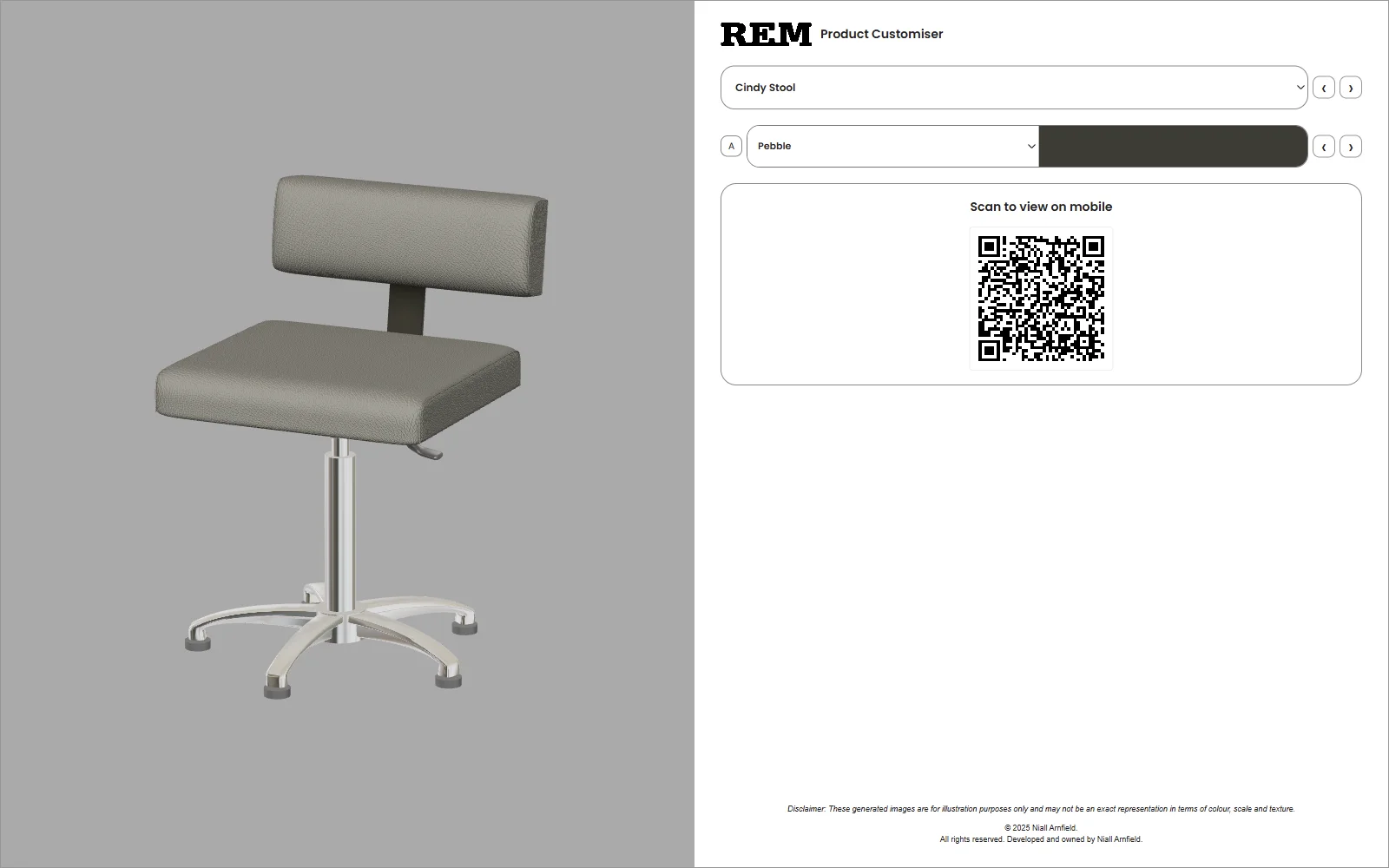
The comparison is also a reminder that a swatch and a rendered product serve different purposes. The swatch helps a user recognise and select a finish. The model helps them understand its distribution and relationship to the rest of the object. Neither should silently replace a physical sample when exact colour or tactile qualities determine a purchasing decision. The interface includes an illustration disclaimer for that reason.
Lighting and background need to support the same goal. An isolated stage makes a silhouette easier to read; a contextual background helps a viewer place the object in a setting. Strong highlights may describe a curved surface but can obscure a finish if taken too far. Visual craft is the balance between those signals, not simply turning every material into the shiniest possible version of itself.
The camera and selected materials also need to be deliberate. A useful close view explains a surface or a join; a wider view explains the whole product. Keeping the object at a consistent angle during a comparison lets the material change do the talking. The figures on this page use that approach so the effect of each choice can be examined directly.
A library that accommodates different products
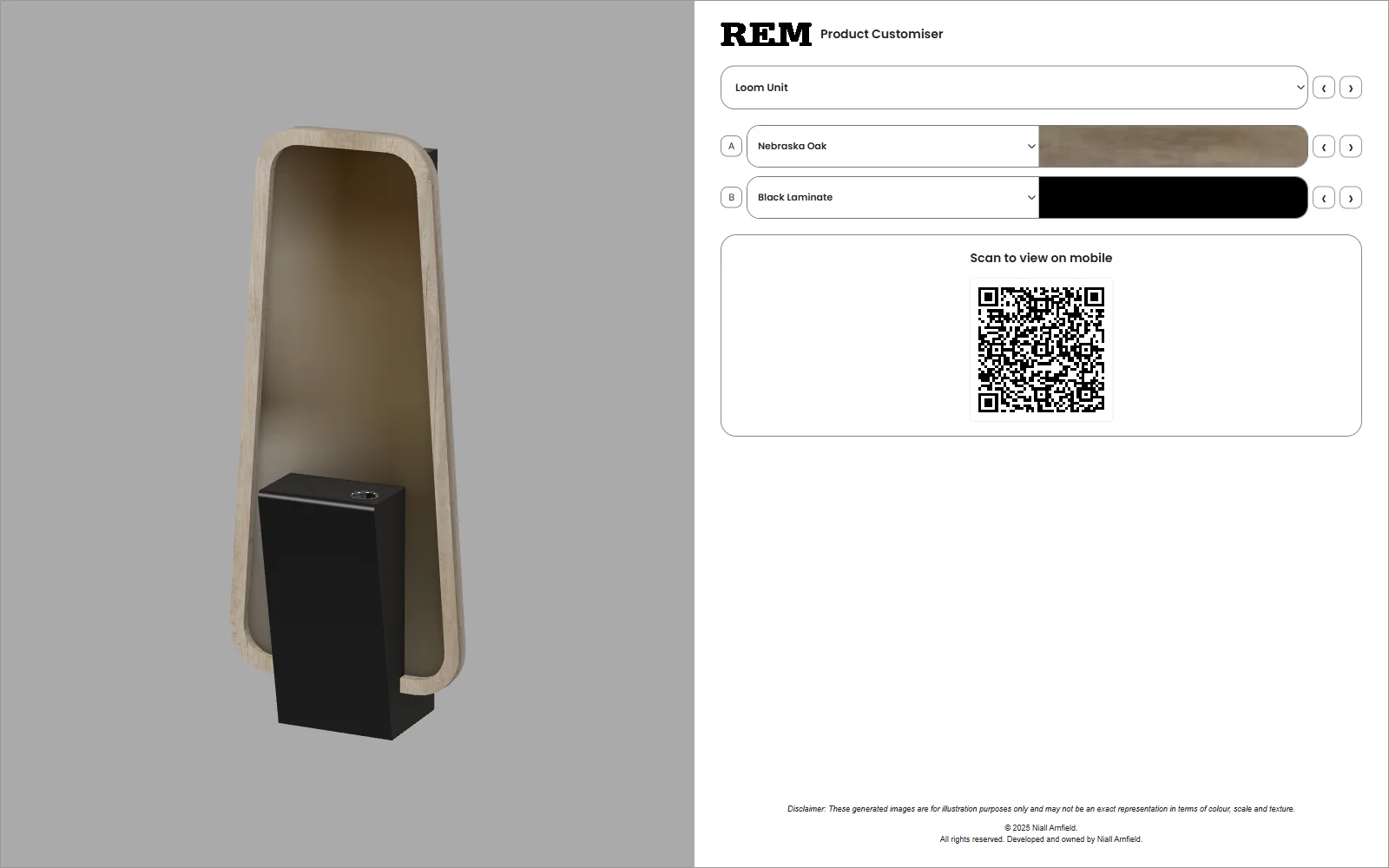
A configurator becomes more demanding when it has to handle a catalogue rather than a single demonstration object. A stool, reception desk, display unit and wash unit present different silhouettes and different material boundaries. Their useful viewing angles are not necessarily identical. The interface has to remain recognisable while the object occupying its main visual area changes substantially.
Loom Unit · Standard library
Poppy Baltic · Earth library
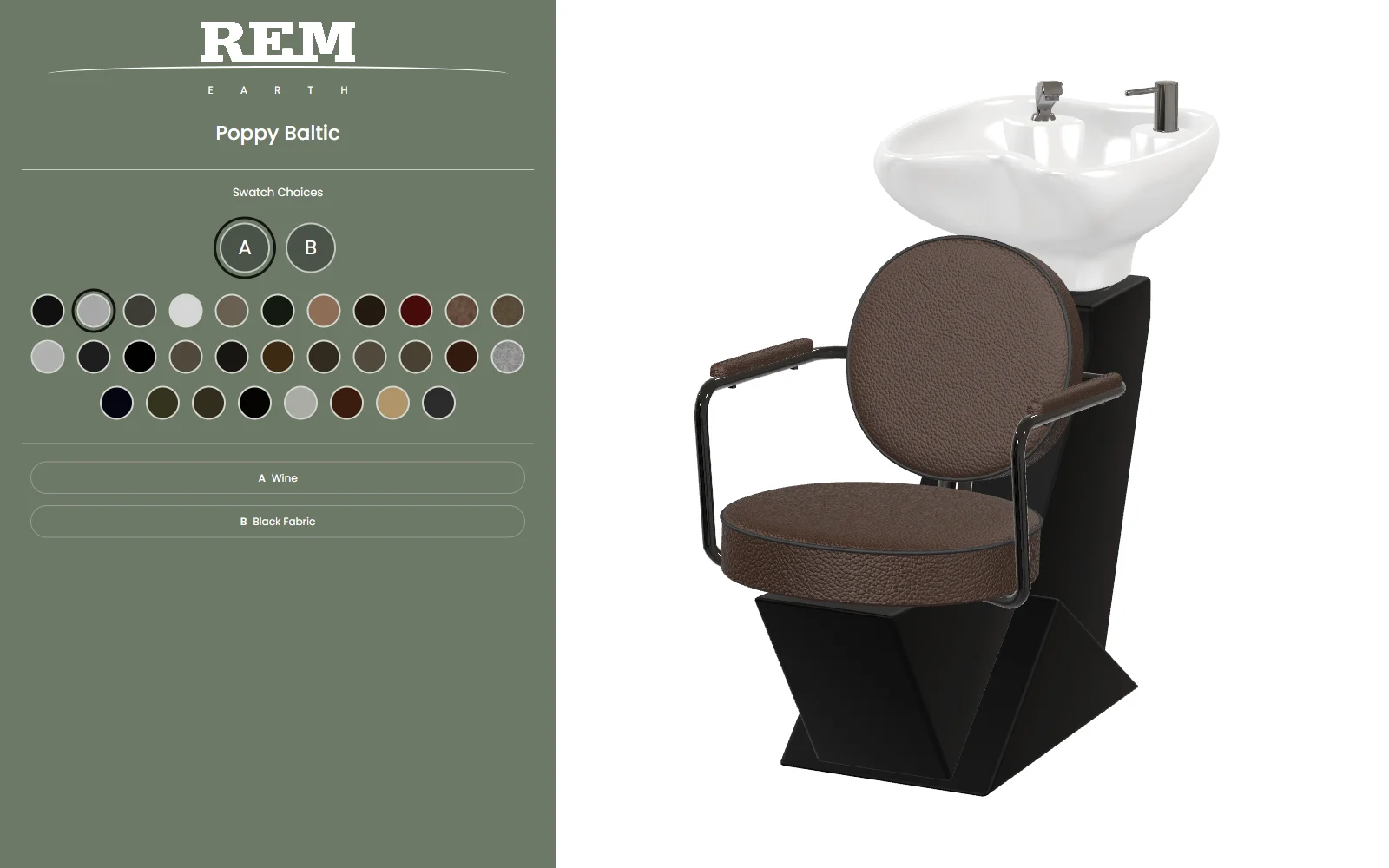
The Standard 2025 library contains 134 product templates, with a further 18 in the separate Earth library. A template describes a configurable product within the system, including its model and supported material regions. These two REM libraries illustrate the scale of a single client’s catalogue; the wider Praxis Digital platform also served other businesses with their own products and requirements.
This is where the relationship between product structure and interface design becomes concrete. The product determines which regions can be changed; those regions determine which controls are needed; the control state determines which finish appears on the relevant model surface. When those relationships are clear, the interface can remain familiar across several kinds of object without pretending that the objects themselves are interchangeable.
These examples also show why a catalogue needs curation. Not every product makes an equally effective opening demonstration. A simple upholstered piece explains a single material choice quickly. A desk or shelving unit better explains the relationship between separate regions. Choosing examples by what they teach makes the experience clearer than opening with the largest or most technically complicated model available.
For a wider platform serving different UK businesses, this distinction between a shared approach and a specific application matters. Reuse is valuable where the underlying task stays the same. Product terminology, visual identity, available finishes and the surrounding customer journey still need to reflect the business using it. The REM examples make those design relationships visible without standing in for every industry the platform served.
Part of the buying journey
In the REM deployments, the configurators sat inside product pages. The visitor could encounter ordinary product information and images before reaching the interactive visualiser. That context is important: the configurator supported an existing customer journey rather than needing to explain the whole business, catalogue and purchase process by itself.
Product page
Identity, photographs and commercial context.
Configuration
Inspect the product and compare supported finishes.
Business next step
The appropriate sales, enquiry or purchase process.
There is a clear division of responsibility in that arrangement. The product page introduces the item and its commercial context. The configurator supports visual exploration of the available choices. The next step belongs to the business’s sales process. The surrounding design needs to make that next action easy to find, while allowing the customer to return to photographs, specifications or finish information when they need reassurance.
That division makes the configurator useful without forcing it to become the entire website. It has a focused job: help someone explore a product and establish a preferred appearance. Product details, samples and the commercial conversation remain available around it. The demonstrations here isolate the configuration experience so readers can try the visual work directly; they do not submit an order or enquiry.
The QR panel in the white interface addresses another practical consideration: continuing on another screen. The current demo generates a link from the chosen product and material state, rather than sending every visitor back to the default object. The interface can therefore communicate a specific combination. The link’s usefulness depends on the destination being accessible on the receiving device, just as any shared web address does.
Developing a platform over five years
A five-year product has to accommodate change. New products arrive, material ranges develop and the presentation needs of individual businesses evolve. My work connected the modelling, material preparation, interface design, development and ongoing refinement. The yearly presentations show how that responsibility expanded from establishing a configurable scene to supporting a product used across websites and catalogues.
A repeatable service, from design to maintenance
The 2022 Praxis Digital presentation described four stages: demo and design, content creation, release, and maintenance. That sequence is a useful explanation of the work behind the interface. The initial demonstration establishes how a product should be explored. Content creation makes the models, materials and surrounding presentation ready for that purpose. Release places the experience into a customer journey, while maintenance keeps it relevant as the catalogue changes.
The work behind an interactive product
- 01 / DEFINEDemo and design
Establish the product, available choices and how a customer should explore them.
- 02 / CREATEContent production
Prepare the models, material appearance and interface around those choices.
- 03 / RELEASEWebsite integration
Place the configurator within the business’s existing product journey.
- 04 / REFINEOngoing maintenance
Accommodate product updates, presentation needs and experience improvements.
Model production, mobile access and performance
The 2023 review recorded the development of the newer PlayCanvas implementation following the earlier research project, including redrawing product models and introducing QR-based access. It also documented work on code performance and model compression. These were connected concerns: adding products and richer materials increases what an experience can show, while the customer still needs a scene that is practical to open and operate in a browser.
The same presentation considered changes to the interface: image capture, opening the configurator in a separate page, and reducing reliance on an interior environment. That last point makes the visual trade-off explicit. A room can help somebody imagine furniture in context, but it also adds content to load and compete with the object. A neutral stage gives the product more visual independence and reduces the demands of presenting an entire setting.
Those presentation items document the questions being evaluated at the time. They should not all be read as features shipped to every client. The interfaces on this page provide concrete examples of the resulting variety: the classic contextual treatment, the later white customiser and the separate Earth visual identity. Each balances the object, its controls and the available space differently.
Looking beyond the first deployment
The later 2024/25 planning presentation gave more attention to distribution, product-range coverage and access through retailer websites. That development in the reporting is significant. The conversation had moved beyond whether a browser could display an attractive configurable object. It was also about where the experience appeared and how it supported a catalogue across a wider commercial network.
The service developed through successive rounds of product work, interface changes and operational support. The selected platform observations below add evidence of use to that development history, while keeping roadmap proposals separate from what the records actually show.
The earlier Manchester Metropolitan University Knowledge Transfer Partnership produced a separate 2D product configurator research project, with 3D assets used in its production process. Praxis Digital’s later browser-based 3D work is the subject of this article. The subsequent rebrand is another stage again. Each deserves its own account, with its own examples and evidence.
What the Praxis Digital platform recorded
The observations here come from operational records collected by the Praxis Digital platform while serving this particular deployment. REM Standard and REM Earth identify the product experiences being observed. The figures are a view into one application of the platform, not a measure of the whole Praxis client base or a report on REM’s sales performance.
The useful question is what those records add to the five-year development story. A working demonstration can show that an interaction is possible. An operating deployment shows what has to hold together over time: catalogue coverage, loading, material choices, distribution and ongoing support. The platform records let us examine some of that real-world use alongside the interfaces and products themselves.
Sustained access beyond a launch demonstration
In the available 2025 reporting window, the Standard and Earth configurator documents received more than 48,000 requests. This is a rounded summary of records covering 13 January to 23 October, with partial months at each end. It describes requests for the configurator pages, including repeat access, rather than verified people, completed configurations or purchases.
The useful observation is sustained access across several months, with variation over the period. That supports the account of a platform operating through real websites. It does not establish a conversion uplift, and it would be misleading to turn the total into a customer count. The later reduction in recorded activity is part of the deployment’s history; the traffic series alone cannot explain its cause.
Distribution was part of the product
The platform’s referring-site records show that retailer and distributor websites contributed a volume of attributed requests broadly comparable to the manufacturer’s own websites. That is a useful finding for a configurable product sold through a wider network: the experience needed to work where customers were already encountering the catalogue.
This changes the design brief. Clear product naming, an understandable starting view and a stable embedded layout matter outside the manufacturer’s homepage. The configurator has to make sense in somebody else’s buying journey, with no assumption that the visitor knows the platform behind it. A retailer using the deployment is not automatically a separate paying Praxis client, and the records should not be used to imply that.
The interface had to travel with the customer
Mobile operating systems formed a substantial part of the host request mix alongside desktop systems. The records do not identify individual customers or prove what each person did, but they reinforce a practical requirement visible throughout the development work: product inspection and finish selection have to remain usable across screen sizes and input methods.
That makes model preparation, compression, camera framing and the arrangement of controls part of the same problem. A richer scene has limited value if it is awkward to open or use in the setting where the customer finds it. The deployment gave those decisions a real operating context, rather than leaving them as preferences demonstrated on a designer’s machine.
Scope of the observations. These are selected summaries of Praxis Digital platform records for this deployment, not a complete five-year analytics series. Document requests exclude supporting assets but can include repeat or automated access. Referring-site and operating-system observations describe host requests, not verified people. They do not measure sales, conversion uplift, finish preferences or completed configurations. The underlying datasets are not published with this retrospective.
The commercial context and the decision to stop
The deployment developed within a changing business. Product work and platform improvements continued over its life, while changes in the client’s commercial circumstances affected the setting in which the service operated. A technical account would be incomplete if it treated that setting as constant.
The client was R.E.M. (UK) Limited. Companies House records that it entered administration on 4 June 2025. Following that administration, and considering the changed commercial circumstances, I chose not to work with the company that took over REM’s operations. My services for this deployment ended in 2025.
That was a decision about continuing a commercial relationship. The company that took over was not the original client, and this retrospective concerns the platform work delivered during that original relationship. It does not assess the successor company’s current operations.
The end of that relationship provides a point from which to look back at the deployment as a whole: what was built, how it evolved, where it was used and which lessons remain useful. It also separates a technical outcome from a commercial one. An operational configurator cannot, on its own, determine the future of the business using it; equally, a change in that business does not erase the engineering, product development or observed use that preceded it.
Praxis Digital’s wider 2021–2025 platform history includes other businesses and industries. This deployment offers a detailed view into that broader work because the product libraries, interfaces and platform observations can be considered together. The value of the case study lies in that combination, rather than in publishing a larger table of numbers.
What the five-year project demonstrates
The strongest lesson is that the product model and the interface model need to agree. If a surface can be changed independently, the controls need to represent that independence. If a choice is fixed, the interface should not suggest otherwise. Much of the clarity comes from getting that relationship right before adding visual polish around it.
A second lesson is that different visual treatments can support a recognisable interaction. The charcoal, white and sage interfaces do not need to look identical to communicate product selection, regional choices and a current finish. Their hierarchy and selected states carry the continuity. That gives room for client identity while keeping the core task understandable.
A third lesson concerns the role of visual realism. Real-time rendering is valuable when it makes a product easier to inspect and a choice easier to understand. Surface detail, material response and a considered camera can all contribute. Their value depends on the decision being supported, rather than on how many rendering effects are present or how dramatic a still image looks.
The project’s reach provides context for those lessons. More than 20 businesses across the UK used the platform in different industries during its 2021–2025 period. That reach reflects a product used in real business settings, with different catalogues, audiences and presentation needs. Designing for that variety meant attending to the shared interaction without losing the detail of each business’s products.
REM is a useful detailed example because its product ranges let the work be examined closely. The interfaces, product families and material choices give the reader something concrete to inspect. The broader achievement was developing a configurator approach that was used beyond that one business, while continuing to deal with the specific products and presentation needs of individual implementations.
Starting with the right product questions
For a new configurator project, the most useful opening conversation is about the product and its customer. What can actually change? Which choices need to be understood together? What should the person be able to inspect before taking the next step? Those questions establish the purpose of the interface and the evidence its visual presentation needs to provide.
The Praxis Digital work shows the importance of treating the model, materials, controls and surrounding page as parts of one experience. A well-presented object attracts attention; an understandable configuration process helps that attention turn into a considered choice. The craft lies in making those responsibilities work together for the particular business and the people choosing its products.
Explore my product configurator design and development service →
About the examples. The demonstrations and screenshots show REM implementations of Praxis Digital 3D. REM was one of more than 20 businesses across the UK that used the platform in different industries between 2021 and 2025.