Opal glass, blown into a globe and cupped by a metal housing, is the basis of this illustrative light. Choose the housing finish and whether it mounts on a wall or overhead.
A globe light like this is usually repeated: along a corridor, down a staircase or across a row of mirrors. Buyers are choosing one fitting but judging the line of them, so finish consistency and spacing matter more than the single piece. The mount option is a planning decision. The same globe on a wall or a ceiling changes how a corridor is lit and how the housing is seen from below.
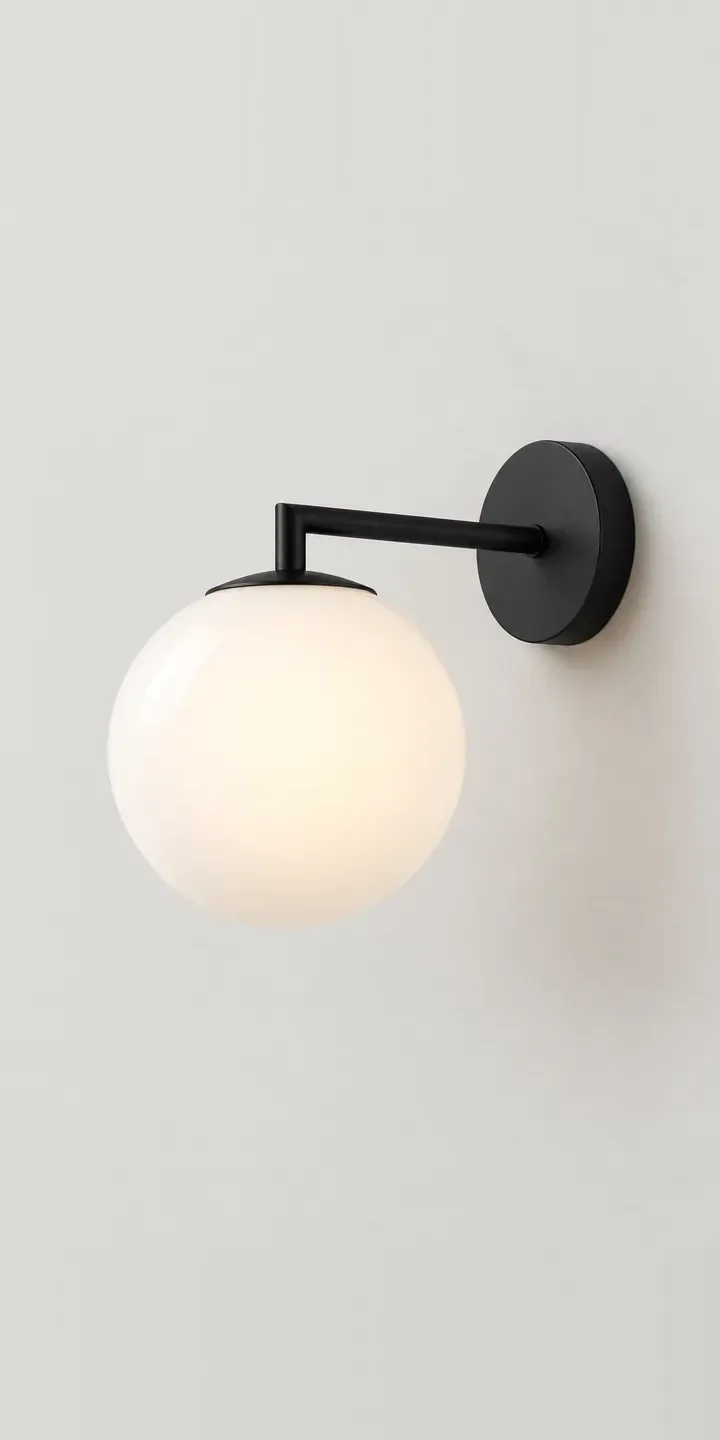
Lighting Configurator demo
Globe Wall Light
- Product
- Globe Wall Light
- Colour
- Matte Black
- Mount
- Wall
Illustrative product. The design and images are generated examples, not a real model for sale.
What you can configure
Matte black, brass, brushed steel and white housings are shown; bronze and dark green complete the six. The glass is unchanged across images, so only the housing differs. Mounting, wall or overhead, is chosen alongside and listed in the summary. The picture stays in its wall-mounted view here. In production an overhead view would be added, because buyers need to see the housing from beneath.
- Colour: Matte Black, Brass, Brushed Steel, White
- Mount: Wall, Overhead
Why a configurator suits wall lights
Corridor and staircase lighting is ordered in quantity, often by contractors and hotel operators working from a plan. Six housings with two mounts is twelve codes, and a scheme might use two of them in different areas. A configurator that collects finish, mount and quantity per area produces a clean schedule that matches the drawing.
Wall and ceiling versions are easily confused in an order, because they look similar in a list. When the mount is a structured option with its own code, the warehouse picks the right fitting and the electrician receives what the plan shows. That avoids the costly part of a mistake, which is a wasted visit on site rather than the fitting itself.
Glossy opal glass also needs presenting with care. It reflects its surroundings when unlit and glows evenly when on, and buyers judge both. A lit view in the chosen housing, alongside the unlit studio image, tells a specifier what the finished corridor will feel like. For a contract supplier, that is often what earns a place on the shortlist.
How a production version would be built
Rendering suits a contract product like this. One 3D model produces each housing finish in both mount positions, plus a lit view of the glass and a simple elevation with the fitting repeated at set spacing. The supplier provides housing finishes, mount codes, glass dimensions, any IP rating it publishes and data sheets. Those details drive the specification output, which can be downloaded or sent with a quote. For larger ranges, 3D product visualisation also supplies marketing images from the same models.
Build sheet for this range
- Colours in the full range: 6 (4 shown in this demo)
- Mount choices: 2
- Combinations to support: 6 × 2 = 12
- Images for one photograph per combination at 3 angles: 36
- Images if mounts can be shown as separate layers, at 3 angles: 24
- Data each of the 12 combinations needs: a SKU or variant ID, price, stock or lead time, and any dimensions or specification that change
Questions about wall light configurators
Can the configurator show a row of lights along a corridor?
Yes. An elevation with the chosen fitting repeated at set spacing shows rhythm and scale in one view, and the spacing can be adjustable if buyers want to test it. It is built from the same images as the single fitting, so it adds little cost to the build.
Can it tell contractors whether a fitting suits a bathroom?
It can display the IP rating you publish for each version and explain where in a bathroom it may be used. If only some housings are suitable, the configurator can filter the options by location in the room. It should not replace the electrician's judgement, but it stops the obvious mistakes.
How do we keep wall and ceiling versions from being mixed up?
Give each mount its own code and image, and show the mount clearly in the summary and the quote. When the configurator writes the full code automatically, the order arrives with the right version every time. Showing the back plate or canopy for each also helps.
Can the configurator output a specification sheet for a tender?
Yes. The configuration can generate a PDF with the product code, finish, mount, quantity, dimensions and your data sheet attached. Contractors can use it directly in tender submissions, and it means your product is specified exactly rather than as an approximate equivalent.
More lighting configurator demos
All lighting configurator demos
A configurator for your wall lights
This demo uses an illustrative product. If you sell wall lights, I can build the same experience around your own range, photography and ordering process, connected to Shopify, WooCommerce or a quote workflow. I reply to enquiries within two UK working days.