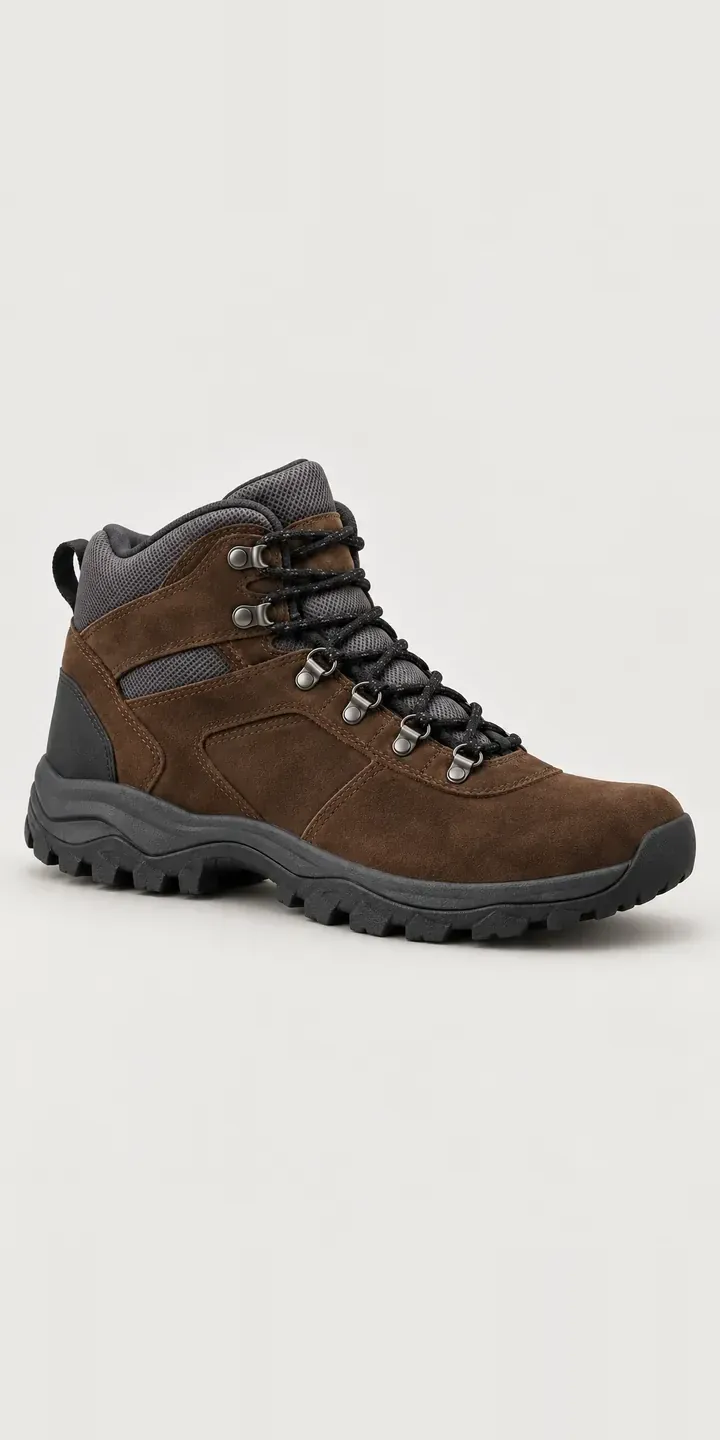
An illustrative trail walking boot, with a deep-lugged outsole and a rubberised toe cap, set up as a configurator. Choose a suede colour and a standard or broad fitting, then send the result as a quote request.
Anyone who has walked a long day in the wrong boot knows where the priorities sit. Fit comes first, then support and grip, then weight. Colour is a late decision, though not a trivial one. Some walkers want a boot that hides peat and mud, others want one that looks right in town. Outdoor retailers built their reputations on boot fitting, so an online page has to respect that rather than pretend fit is a dropdown.
Footwear Configurator demo
Trail Walking Boot
- Product
- Trail Walking Boot
- Colour
- Dark Brown
- Width
- Standard
Illustrative product. The design and images are generated examples, not a real model for sale.
What you can configure
Dark brown, tan, black and slate grey are the demo colours, from six in total. Walkers judge durability by the deep rubber lugs and the toe cap wrapping over the suede, and both are in shot. Width, standard or broad, appears in the summary without changing the picture. In a full build, width would come with fitting guidance and a route to an in-store fitting.
- Colour: Dark Brown, Tan, Black, Slate Grey
- Width: Standard, Broad
Why a configurator suits boots
Broad-fitting walkers are often underserved. Many boots come in a single width, and customers who need more room either size up, which causes heel lift, or give up. A configurator that shows width as a clear, early choice tells those customers the range fits them. It also cuts the calls asking whether a boot comes in a wider fit.
Walking boots also suit a mixed online and in-store model. A customer can configure colour and width at home, check stock at the nearest branch and reserve a pair to try with their own socks. The fitting still happens in the shop, where staff can check length, volume and heel hold, but the customer arrives with a decision half made.
For a brand selling through outdoor specialists, the configurator can end in a stockist finder. The customer picks a colour and width, then sees which nearby shops hold that exact combination. That keeps independent retailers in the sale rather than competing with them online.
How a production version would be built
A walking boot fits an image-based build well, with a side view, a three-quarter view and a sole view per colour. Width usually needs no extra photography, as the difference rarely shows in a product shot. What matters more is the data: colour names, width definitions, size runs and stock by location. For multichannel retailers, the configurator reads branch stock and offers reserve-to-try. For brands, it ends in a dealer locator or a quote. Either way, colour, width and size travel as structured data.
Build sheet for this range
- Colours in the full range: 6 (4 shown in this demo)
- Width choices: 2
- Combinations to support: 6 × 2 = 12
- Images for one photograph per combination at 3 angles: 36
- Images if widths can be shown as separate layers, at 3 angles: 24
- Data each of the 12 combinations needs: a SKU or variant ID, price, stock or lead time, and any dimensions or specification that change
Questions about boot configurators
Can a configurator replace an in-store boot fitting?
No, and it should not try. It can narrow the choice to a colour, width and likely size, and it can explain how your fitting service works. Then it hands over to the shop. For walking boots, a fitting checks things a screen cannot, such as heel hold on a slope or toe room on a descent.
Can customers reserve a configured pair at their nearest store?
Yes, if your stock system shows branch levels. The configurator checks which stores hold that colour, width and size, and the customer reserves a pair to try. The reservation can reach the branch by email or through your retail system. Staff then know who is coming and which boot to have ready.
How do we show sole and toe cap detail properly?
Add fixed secondary views for every colour: a sole shot showing the lug pattern and a close-up of the toe cap. Walkers compare these between boots, so they belong in the configurator rather than a separate gallery. Keeping the same angles for each colour makes comparison easy and keeps the photography brief simple.
Can a boot brand send configured enquiries to its stockists?
It can. The customer configures the boot, enters a postcode and sees stockists nearby. If a stockist lists that exact colour and width, the enquiry goes straight to them. Otherwise it comes to you to arrange supply. This keeps your dealer network central rather than undercut by direct sales.
More footwear configurator demos
All footwear configurator demos
A configurator for your boots
This demo uses an illustrative product. If you sell boots, I can build the same experience around your own range, photography and ordering process, connected to Shopify, WooCommerce or a quote workflow. I reply to enquiries within two UK working days.