Case, strap and size — with a fallback if needed. Explore the product options, see how a configuration affects the demonstration price, and share the result.
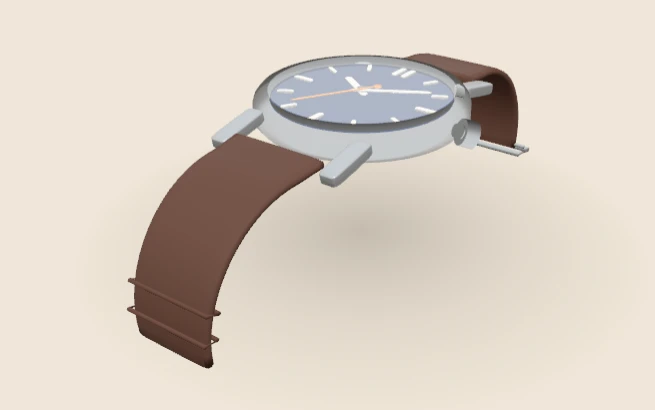
The interactive viewer loads when you choose Explore in 3D.
This is a demonstration product, not a client catalogue or an offer for sale. Explore product configurator development for your own range.
- Case metalSteel, Gold or Black DLC
- StrapLeather, Steel mesh or Rubber
- Case size38, 40 or 42 mm
- EngineThree.js WebGPURenderer
How this demo works
This watch configurator demonstration brings case metal, strap and case size into one product state. This page describes a fallback route for unsupported rendering. The visible renderer label in the browser used for this walkthrough was WebGPU with Three.js WebGPURenderer.
This is a simplified fictional product and catalogue. The walkthrough records interface behaviour; it is not a watch offer, graphics benchmark or proof of support on every device.
Three groups with different effects
Choose Explore in 3D above. The initial options are Steel case, Leather strap and 40 mm size. Case choices also include Gold and Black DLC; strap choices include Steel mesh and Rubber; sizes are 38, 40 and 42 mm.
The controls sit beside the preview with a readable summary and demonstration amount. Keeping the size label explicit matters because a visual camera view alone is not a reliable way to communicate the selected dimension.
A recorded state change
| Selection checked | Displayed demonstration price | Observed feedback |
|---|---|---|
| Steel / Leather / 40 mm | £890.00 | Combination available |
| Gold / Leather / 42 mm | £1,165.00 | Gold and 42 mm remain explicit in the accepted summary |
| Gold / Rubber / 40 mm | Not offered | “Gold cases are not offered with the rubber strap in this range.” |
The values were observed on 13 October 2026. They describe the fictional demo’s state and are not real commercial prices or evidence that WebGPU improves conversion.
Keep backend choice separate from product state
A renderer determines how the scene is drawn. It should not change the meaning of the selected product. A fallback implementation needs to preserve the option labels, accepted configuration and commercial hand-off even if the rendering route differs.
This walkthrough observed the WebGPU-labelled route only. An actual fallback test needs a device or controlled environment where that route is unavailable, followed by a review of the alternative behaviour. A page’s fallback description is not evidence that every unsupported case has been tested.
Review a small product at useful distances
A watch invites close inspection, so source assets and texture budgets need to match the intended views. In a production model, inspect the case silhouette, strap attachment, dial details and recognisable finishes. The demo model has a lugged case, a dial with applied markers, hands, a glass and curved straps. It is still a demonstration model, not a finished catalogue asset.
Check each offered size with appropriate camera framing and each material under a consistent environment. Reflections can make a metal appear much lighter or darker. The material lab gives a controlled example of roughness and metalness changes.
What to look for when you try it
Start close. Turn the watch and look at the dial, the hands and the markers. A watch is small, so buyers look hard at the detail. The view should stay sharp and the parts should line up.
Next, change the case. Steel, gold and black should each catch the light in a different way as you turn the watch. Then change the strap and check that both ends change together.
Now try the rule. Pick a gold case, then the rubber strap. The demo tells you that gold is not offered with rubber in this range. Check what the summary shows next: a good configurator never lets a blocked pair through to the quote.
Last, switch between 38, 40 and 42 mm. The size label in the summary matters more than the picture here. On screen, a 2 mm change is hard to see, so the words must say it clearly.
What I checked on the WebGL route
On 15 October 2026 I loaded this demo with WebGPU switched off in the page, so the browser had to use the WebGL route. The engine label changed to “WebGL · Three.js”. The 3D canvas drew at 696 × 520 pixels, all three option groups were present, and the console showed no errors or warnings.
That test proves the fallback starts and keeps the same choices. It does not prove the picture looks the same on every device, because I did not compare the pixels. The watch model itself is a 183 KB GLB file, shared by both routes.
An acceptance register for both routes
Record browser, device, renderer label, selected state, visible result and any failure. Add each strap, minimum and maximum sizes, keyboard use, a slow or failed asset request, a restored share link and a real unsupported-renderer case.
Test the quote or cart integration separately from the image. The demo exposes Request a quote and Copy share link controls, but this walkthrough does not claim a completed customer order or verified link restoration. Price and compatibility need validation in the commercial process.
Try the gold and rubber rule in the demo above, compare the other engine journeys, or document a real scope with the project brief. Discuss implementation through configurator development.