Basin, upholstery and a plumbing rule. Explore the product options, see how a configuration affects the demonstration price, and share the result.
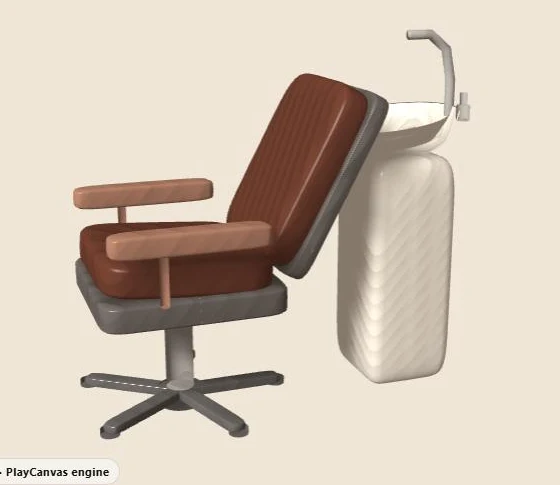
The interactive viewer loads when you choose Explore in 3D.
This is a demonstration product, not a client catalogue or an offer for sale. Explore product configurator development for your own range.
- BasinRound ceramic, Rectangular or Vessel bowl
- UpholsteryAniline leather, Salon velvet or Clinical vinyl
- BaseStar pump or Square plinth
- EnginePlayCanvas on WebGL
How this demo works
This PlayCanvas demo lets you choose a basin, the upholstery and the base for a salon wash unit. A summary shows what you picked. It also has one product rule: the vessel basin needs the square plinth. That rule is what makes it more than a colour picker.
The product is made up for the demo. It is not a client’s catalogue or a real installation spec, and the rule below is not advice for real salon equipment.
Open the viewer and look at the choices
Choose Explore in 3D above to load the preview. The label shows it runs on the PlayCanvas engine using WebGL. It starts with the round ceramic basin, aniline leather upholstery and the star pump base.
The other basins are rectangular and a vessel bowl. The other upholstery is salon velvet or clinical vinyl. The other base is the square plinth. So one group swaps a part, one changes a surface and one changes what holds the unit up.
A rule you can try yourself
| State checked | Observed feedback | Displayed demonstration price |
|---|---|---|
| Round ceramic / Aniline leather / Star pump | Combination available | £1,240.00 |
| Vessel bowl / Aniline leather / Star pump | “A vessel basin needs the square plinth so the waste can run internally.” | £1,380.00 |
| Vessel bowl / Aniline leather / Square plinth | Combination available | £1,475.00 |
In the middle row, the demo keeps your basin and your base, and tells you why they clash. Choosing the square plinth clears the message. I recorded these results on 13 October 2026. The prices are demo values, not offers or supplier quotes.
Explain a rule where it affects a choice
A message that just says “invalid configuration” does not help anyone. This demo names the parts involved and the reason. In a real range, the product owner should approve that wording, and the customer needs a clear way to a choice that works.
When a choice clashes, the interface can keep it and explain, refuse it, or offer a swap. Pick one approach on purpose. The final order or quote step must still check the result. A price on screen does not mean every combination can be made.
Hand over 3D files that know their parts
A wash unit has surfaces that need different treatment. Decide which parts of the model belong to the basin, the upholstery and the base, and which materials each option changes. Changing the upholstery should never change the basin by mistake because two materials share a vague name.
After each part change, check where the pieces meet and how the camera frames them. Compare finishes with approved samples under the same light. The material lab shows why surfaces and lighting need checking together.
What loads, and when
The page itself loads no 3D at all. You see a still image of the wash unit first. Only when you choose “Explore in 3D” does the viewer start.
At that point the browser fetches two large files. The PlayCanvas engine and app code is about 1.4 MB before compression. The wash unit model is a single 294 KB GLB file. It holds the chair, the basin, the base and every part the options switch between.
Because one model holds every part, changing the basin or the base does not fetch anything new. The app shows, hides or recolours parts that are already loaded. That keeps each change quick once the first load is done.
For a real range, the engine cost stays roughly the same, but the models add up. So it is worth agreeing a size budget for each product before modelling starts. The performance budget guide has a worksheet for this, and the glTF optimisation guide shows how to bring a heavy model down to size.
Write tests around the rule
Test the default, the vessel-and-star clash, the fixed vessel-and-plinth state, and a saved setup reopened after a rule changes. Record the summary on screen and the data sent to the quote step. Add checks for keyboard use, loading and errors.
This walkthrough checks what the demo shows and the prices it displays. It does not prove a live supplier order, real plumbing or a quote that was sent.
Try the rule in the demo above, explore the other demos, or start a real spec with the project brief. To discuss your own range, see configurator development.