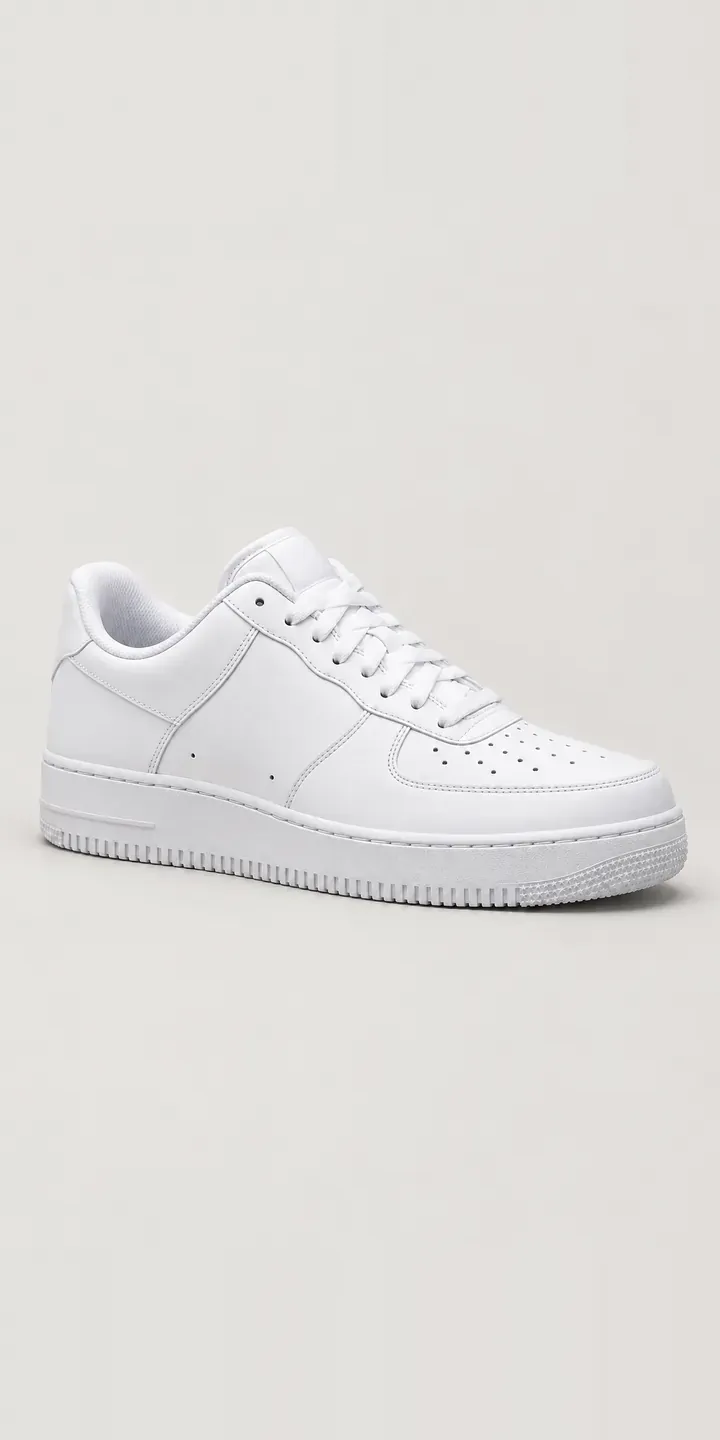
The illustrative leather court trainer on this page comes with a configurator for colour and UK size. Your selection collects in a summary and leads to a quote request, the same route a made-to-order or personalised pair would take.
Minimal leather trainers are judged on what is left once decoration is removed: leather quality, stitching, sole edge and proportion. Tonal colourways make those details the whole story. All white is the default buy and all black the practical one. Navy and tan are for people who already own white trainers and want a second pair that still feels understated.
Footwear Configurator demo
Leather Court Trainer
- Product
- Leather Court Trainer
- Colour
- All White
- Size
- UK 6
Illustrative product. The design and images are generated examples, not a real model for sale.
What you can configure
All white, all black, navy and tan are the tones to compare, with light grey and forest completing six. On a tonal shoe, only the small details compete with the leather. Look for the perforated toe box and the stitched rubber cupsole edge in each image. Both stay in identical positions. The size you pick, UK 6, UK 8 or UK 10, is recorded but leaves the image unchanged.
- Colour: All White, All Black, Navy, Tan
- Size: UK 6, UK 8, UK 10
Why a configurator suits trainers
White leather is notoriously hard to photograph. Overexpose it and the stitching and perforations disappear. Underexpose it and the shoe looks grey. Buyers of minimal trainers zoom in on exactly those details, so a poor white image undermines the product at its strongest point.
Carefully exposed, consistent images show each tone with the detail intact. Because the rest of the shoe stays identical, a buyer switching from all white to tan sees only the leather change. That makes the colour decision easy to trust, which matters on a shoe with so little else to look at.
Minimal trainers also suit personalisation. A short monogram on the heel or tongue adds value without changing the stock shoe, provided the brand or retailer can apply it after purchase. The configurator can preview the initials on the chosen colour and pass the text to the workshop with the order. A plain trainer then becomes something closer to a gift, and the personalised pair is far less likely to come back.
How a production version would be built
Each tone would be photographed under controlled light, with white exposed for detail and black lit to show grain. Side, three-quarter and toe views cover what buyers inspect. A monogram would be a text layer with a fixed font, size and position, previewed on each colour. The retailer supplies tone names, SKUs by UK size, stock and personalisation rules such as character limits. Pairs held in stock map to ordinary Shopify or WooCommerce variants. Personalisation travels with the order as line properties, so it reaches whoever applies it.
Build sheet for this range
- Colours in the full range: 6 (4 shown in this demo)
- Size choices: 3
- Combinations to support: 6 × 3 = 18
- Images for one photograph per combination at 3 angles: 54
- Images if sizes can be shown as separate layers, at 3 angles: 27
- Data each of the 18 combinations needs: a SKU or variant ID, price, stock or lead time, and any dimensions or specification that change
Questions about trainer configurators
How do you photograph an all-white leather trainer without losing detail?
Exposure is set for the white, not the background, and the light is soft enough to keep shadow in the perforations and stitching. I check the edit against the physical shoe on a calibrated screen and on a phone. The aim is a white that reads as white while the toe perforations stay crisp.
Can customers add a monogram and see it before ordering?
Yes. The initials appear as a text layer in a fixed position, in the chosen foil or emboss colour. The configurator limits characters and blocks unsupported symbols. This demo has no monogram option, but adding one to an image-based build is straightforward if your workshop can apply it.
Can tonal and contrast versions sit in the same configurator?
They can. Tonal colourways like all white sit alongside contrast ones, such as a white upper with a navy heel tab, if you make them. Each fixed colourway is its own image set. If contrast parts become free choices, the build switches to layered images, with each part recoloured independently.
Is a configurator worth it for a single minimal trainer?
It can be, if the shoe sells in several tones and you want personalisation or trade ordering. For one style in two colours, a well-built product page may be enough. My product configurator service starts by working out which of those situations you are in, before any build is quoted.
More footwear configurator demos
All footwear configurator demos
A configurator for your trainers
This demo uses an illustrative product. If you sell trainers, I can build the same experience around your own range, photography and ordering process, connected to Shopify, WooCommerce or a quote workflow. I reply to enquiries within two UK working days.