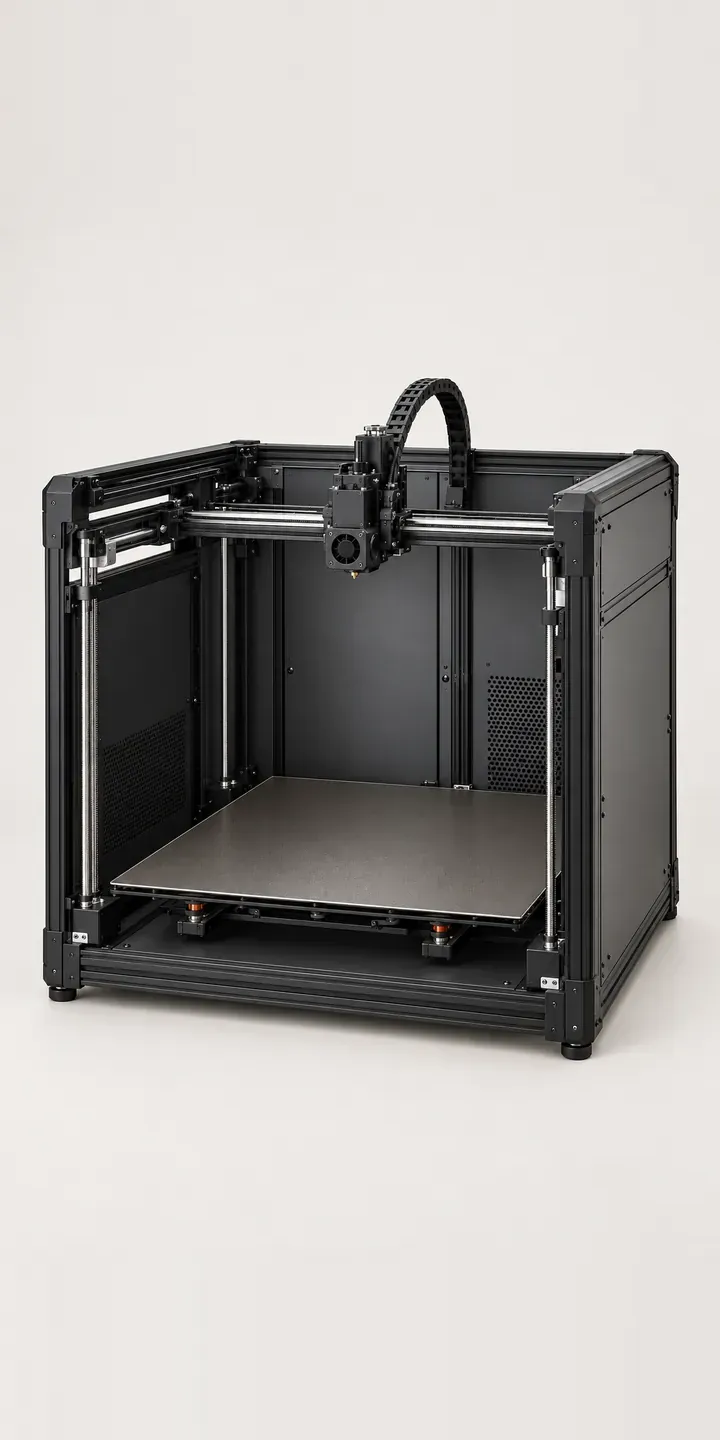
An illustrative large-bed 3D printer is the subject of this demo. Choose a frame finish, set the number of toolheads, and the summary lists the machine you would ask a reseller to price.
People buying a large-format machine are usually replacing outsourced parts, or a smaller printer that keeps running out of build volume. The real decision is the toolhead count. One head keeps things simple. Two allow soluble supports or a second material. Five suit a lab that switches filaments all day and cannot afford to stop for a manual change.
Tools and workshop Configurator demo
Large-Bed 3D Printer
- Product
- Large-Bed 3D Printer
- Colour
- Dark Grey
- Toolheads
- 1 Head
Illustrative product. The design and images are generated examples, not a real model for sale.
What you can configure
Four of the six frame finishes are in the demo: dark grey, black, silver and white. The toolhead selector offers one, two or five heads and feeds straight into the summary. In this demo the picture stays the same when you change heads. A production build would show the carriage with the right number of heads docked, because that is what an experienced buyer checks first.
- Colour: Dark Grey, Black, Silver, White
- Toolheads: 1 Head, 2 Heads, 5 Heads
Why a configurator suits 3D printers
Toolhead count changes the price, the lead time and the sales conversation. A single-head machine is often a straightforward online order. A five-head machine prompts questions about the tool changer, calibration and which materials have been tested, and that buyer expects to speak to someone who knows.
Six frame finishes across three toolhead options is eighteen variants. Few resellers photograph more than one or two, so the rest live in a dropdown with no picture. A configurator puts finish and head count in front of the buyer together. It then passes a structured spec to the sales team instead of a vague contact form.
For education and engineering customers, the quote is the purchase route anyway. Purchasing departments need a written specification to raise an order, and the configurator produces exactly that. It also leaves the reseller with a record of the builds people price up but never order. That record is useful when deciding what to hold in stock.
How a production version would be built
For a printer, I would photograph or render the frame once per finish, then render the toolhead carriage as a separate layer for each head count. The carriage sits in the same position every time, so eighteen combinations need nine images. The reseller supplies part numbers, finish names, which finishes are made to order, and accessories such as enclosures or spare build sheets. The result can feed a quote request or a WooCommerce basket, depending on how each machine is sold.
Build sheet for this range
- Colours in the full range: 6 (4 shown in this demo)
- Toolheads choices: 3
- Combinations to support: 6 × 3 = 18
- Images for one photograph per combination at 3 angles: 54
- Images if toolhead kits can be shown as separate layers, at 3 angles: 27
- Data each of the 18 combinations needs: a SKU or variant ID, price, stock or lead time, and any dimensions or specification that change
Questions about 3D printer configurators
Can the configurator show the docked toolheads change as the buyer picks one, two or five?
That is what layering is for. The carriage and tool dock are rendered as a layer above the frame, one version per head count. Switching heads swaps that layer while the frame finish stays put. Rendering from CAD works well here because the parts are rigid, so every layer lines up exactly without a reshoot.
Can buyers choose a textured or smooth build sheet as part of the spec?
Yes. Build sheets, spare nozzles and filament bundles can sit as add-on options with their own part numbers and prices. Some resellers show them as a second step once the machine is set, so the main choice stays clear. Anything that changes the look, such as an enclosure, gets its own image layer.
How do we stop someone ordering a combination we do not make?
Each combination is checked against your product data. If the five-head version only ships in black and dark grey, the other finishes can be disabled once five heads is selected, with a short note explaining why. The rule lives in a spreadsheet or your shop data, so it can change without new code.
Will it work with our existing quote process?
Usually. The configured spec can arrive as an email, a quote request in WooCommerce or Shopify, or a record in your CRM. I connect configurators to quote forms and CRM or ERP systems regularly. Tell me where quotes go now and I will suggest the least disruptive route. I reply within two UK working days.
More tool and workshop configurator demos
Orbital Sanding Tool
Precision Rail Saw
Screwdriver Kit
Stacking Toolbox
Twin-Nozzle Printer
3-in-1 Fabricator
All tool and workshop equipment configurator demos
A configurator for your 3D printers
This demo uses an illustrative product. If you sell 3D printers, I can build the same experience around your own range, photography and ordering process, connected to Shopify, WooCommerce or a quote workflow. I reply to enquiries within two UK working days.